VATA Private Radar for Arena Breakout (Web Radar)

Working
Top seller
VATA VATA
Last update 11.07.2026 This date shows when the software was last updated. An old date doesn't mean the software stopped working! Most likely the developer just had nothing new to add. If you have any doubts, you can always check the current status with our support team.
Add another cheat from this game too — to compare them.
VATA Browser Radar
Steam
Official
Windows support: 10: all builds; 11: all builds
Menu language: Russian, English
Spoofer:No
USB drive:Yes
BIOS:No

User information


  • A second device is required: to run the radar you need a separate device with a browser (phone, tablet, laptop). Nothing gets drawn on top of the game on your main monitor.

  • The "Radar Sharing" option (access for a friend):

    • After buying the main subscription for yourself, you can pay a small extra fee for access to the sharing feature (Share Link).

    • Your friend does not need to buy the full version or download anything. They just open your link, enter the key and see the map.

    • Condition: your friend only sees the radar while you are playing (you, the owner of the main subscription).

  • Versions: pick Lite or Full at checkout. The difference is whether loot and corpses are shown.

VIDEO
SCREENSHOTS
Description

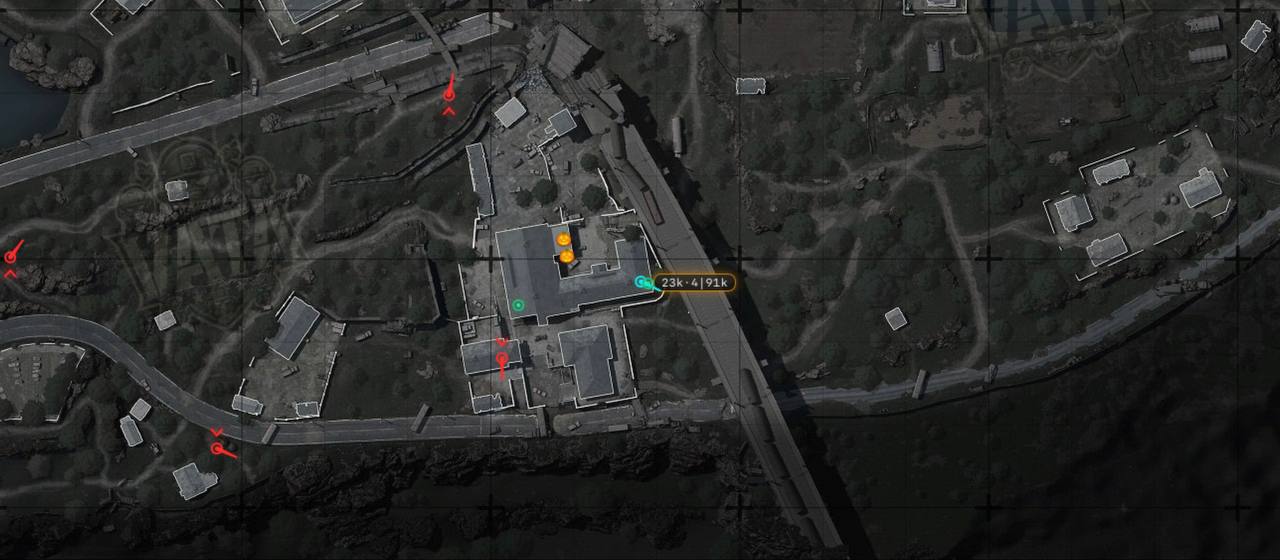
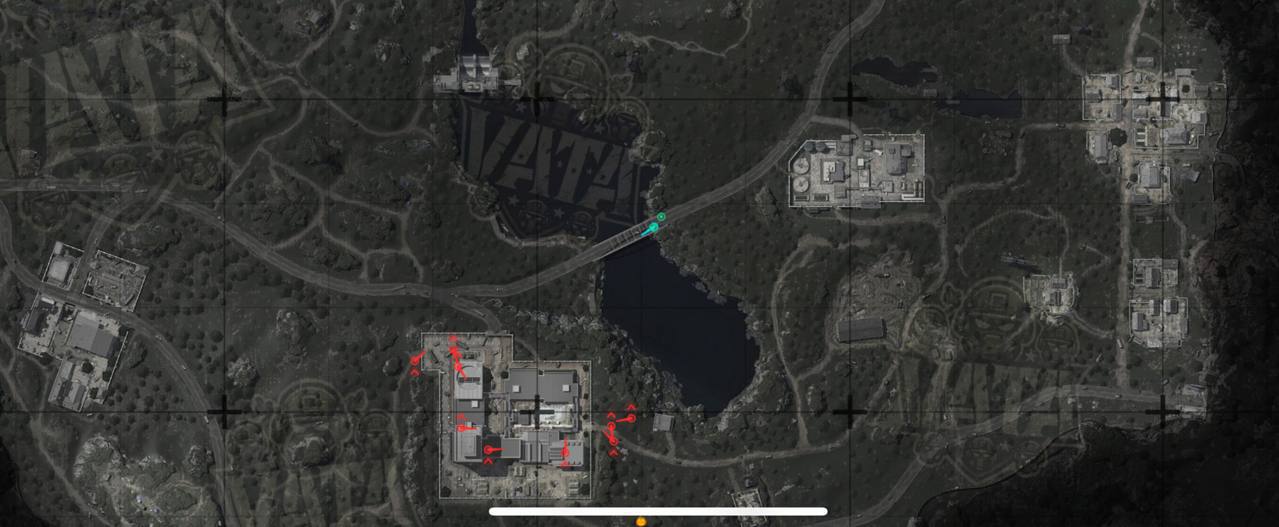
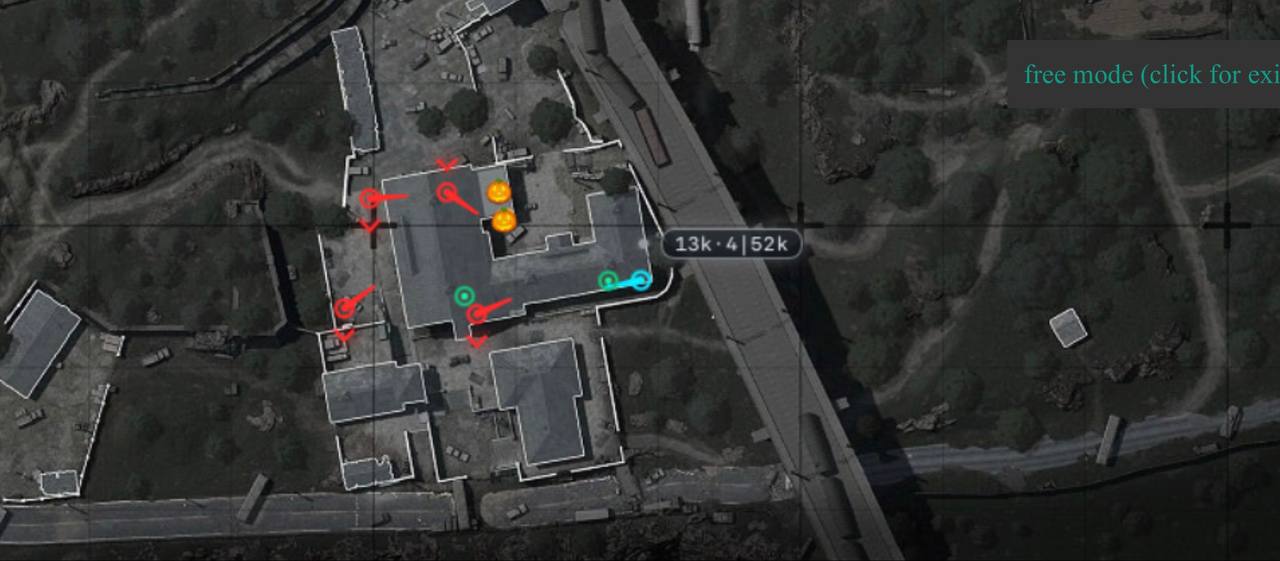
VATA Radar is a unique solution for Arena Breakout that takes your safety to a new level. Unlike regular cheats, it draws nothing on top of the game on your main monitor. All the information shows up on the screen of your phone, tablet or a second laptop as a handy 2D map. That makes the radar practically invisible to anti-cheats and streaming services.

The product comes in two versions, and you pick which one you want before buying. The Lite version focuses only on combat info (enemies, teammates, floor level), which is perfect for PvP. The Full version adds loot and corpse display, turning the radar into the ultimate farming tool. VATA Radar is the choice of players who value their account above everything else.

Product features

Radar Features

Enemies ESP

shows the exact position of enemies on the map

Teammates

shows your allies' positions so you can coordinate

Floor Check

shows which floor an enemy is on (above/below)

Loot ESP

shows valuable loot and items (available in the Full version)

Corpses

shows player corpses for fast looting (available in the Full version)

Cross-Platform

works on any device: phone, tablet, laptop

View Direction

shows which way a player is looking

Known issues & fixes

Real questions from our support, with the fixes that worked. Based on user requests for this product.

The activation website won't open or keeps loading forever — what should I do?

Try connecting through a VPN set to Russia and refresh the page — the site is sometimes unreachable without one. If that doesn't help, check your browser's security settings and wait a few minutes, since the service can be temporarily overloaded.

If the page still won't load after that, contact support.

I paid but still haven't received my access or key — how long should I wait and what should I do?

Delivery goes through a review step after payment and can take up to 24 hours, though it's usually faster. The main support chat can't issue keys directly, so there's no way to speed it up before that window passes.

If a full day has passed and you still have nothing, message the seller or support with your order number and payment confirmation, and they'll sort it out manually.

The Run Software button is inactive , entered the key and clicked OK but nothing happens

After entering the key you must confirm your request in the Telegram bot @vata_approval_bot: open the bot, send your login, and wait for the developer to approve it. The Run Software button only becomes active after approval.

If the bot has already approved you but the button is still inactive , sync your PC clock and try a VPN.

Can I view the VATA radar on my phone, iPhone, or a second monitor?

Yes — the VATA radar runs in a browser, so you can display it wherever's convenient: a second monitor, a phone, or a tablet. It doesn't matter which device you open it on.

It also works on iPhone — just open the link in your device's browser.

After removing the USB drive, the loader does not start or nothing happens

Check that your PC clock is synchronized: Settings → Time and Language → Sync now. An incorrect system time is a common cause of launch failures.

Also try enabling a VPN. Make sure the loader and client are in the same folder on the USB drive and are launched from the main PC where Arena Breakout Infinite is installed.

After reinstalling Windows the loader asks to register again and I cannot log into my old account

After reinstalling the OS, open the Rebind tab in the loader and re-link your device. If that does not help , contact support with the email address used during initial registration and an operator will forward the request to the developer.

Do not register a new account , multi-accounting is prohibited and may result in a ban.

There is no Inject button in the loader , how do I use the radar?

VATA is a browser-based radar, not a traditional injectable cheat, so there is no Inject button. The loader runs on the main PC with Arena Breakout Infinite, and the radar interface is opened on a second device (laptop, phone, or second PC) in a browser using the link from the instructions.

Use the login and password you set during registration.

My PC blue-screens or reboots when I launch the game with the software running — how do I fix it?
  • Temporarily disable your third-party antivirus or add the program's folder to its exclusions — security software often blocks the launch.
  • Close overlays and background programs that may conflict with the loader.
  • If that doesn't help, try rolling back the latest Windows update and contact support — they'll tell you which system security settings to check and can provide a compatibility-check utility if needed.
Can I use my key on multiple devices or move it to a new computer?

A key is bound to a single device (HWID) under a one-device-per-key rule. Activating it on a second computer or a different account counts as a violation of the developer's rules and can get the key blocked.

You can't transfer your remaining paid time to a new device yourself. If you've switched computers or need a license for another device, contact support.

Why do I need a USB flash drive for the VATA radar in Arena Breakout?

The USB flash drive is required for the injection process — without it you won't be able to activate or launch the VATA radar. Copy the loader and client files onto it and run the radar from the flash drive itself, not from your hard drive.

You can use either a physical USB stick or a virtual one, but virtual drives sometimes behave unstably — if you run into issues, try a physical flash drive instead.

The VATA radar map website won't load or keeps spinning

This is usually caused by the map site being blocked in your region. Turn on a VPN (Russia region) and try loading the page again.

  • If that doesn't help, wait 5–10 minutes and try again — the site is sometimes temporarily unavailable.
  • Try switching VPN servers or clearing your browser cache.

If the problem persists longer than that, contact support — there may be maintenance work happening on the developer's side.

The radar screen is completely white, no data is shown

Make sure you are inside an active match in Arena Breakout Infinite before opening the radar interface on your second device , the radar only displays data during a live game session.

If the screen is still white: reboot the second device and clear browser cookies, then reload the radar page.

The cheat will not launch , I suspect antivirus, how do I check?

Download the Sordum utility (available from technical support; archive password: sordum), run it and click Search. Wait for the scan to complete.

If nothing is found but the loader still will not start , antivirus is running in the background. Find and completely remove all security software, including Kaspersky and any hidden protection components.

A new key is issued after subscription renewal , do I need to re-download the loader?

No, you do not need to re-download the loader. Simply enter the new key into the already installed loader and activate it.

I made a mistake in the Telegram bot form and now need a new personal link , where do I get it?

A new personal link for re-submitting the application can only be issued by the seller. Write to the seller via the «Chat with seller» section on the oplata.info platform, describe the situation, and request a new link. A reply usually arrives within a few hours.

The software stopped working after a game update — is it broken?

Usually not — after a major game update, the developer needs time to release a compatible build, so access or the instructions page can be briefly unavailable.

The best move is to wait it out; reinstalling or re-activating your key won't speed things up.

My access application was rejected as an 'unqualified user' — what should I do?

This is usually caused by an inaccurate or incomplete form when applying for access. Ask the seller for a new personal link and fill out the form again, carefully providing all requested details (where you purchased, proof of payment, etc.).

After resubmitting, the application is typically reviewed within a few days.

Can anti-cheat ban me for using the VATA radar?

No seller can give a 100% guarantee — there's always some risk when using third-party software. That said, there haven't been widespread ban reports for the VATA radar, and it hasn't been flagged by anti-cheat so far.

To lower the risk, follow the installation instructions closely and avoid drawing attention to the fact that you're using it in-game.

I can't attach a photo to the VATA radar activation form

This is usually caused by your browser's security settings blocking the file upload. Try turning on a VPN and attempting again.

If that doesn't help, check your browser's protection settings (ad/tracker blockers, built-in privacy protection) and temporarily disable them, then try attaching the image again.

The loader shows a startup error mentioning a third-party anti-cheat (vanguard, faceit, vbox) even though protections seem disabled

This error usually points to a conflict with system security modules or another game's anti-cheat still running. Make sure the program is added to your antivirus exclusions, close overlays and anti-cheats from other games, fully restart your PC, and try again.

If the error persists, contact support — they can pinpoint the exact cause for your case.

All issues & general troubleshooting
TARIFFS
$8.97
BUY Shared link What happens after payment?
Got a question? Ask before you pay

We'll help you choose and sort out any launch issue. Ask us anything before buying, we're always on your side.

Support 10:00–22:00, sometimes we reply at night too
Ask a question
Update history
  • 11.07.2026 Working
    Received an update
  • 09.07.2026 Working
    Received an update
  • 26.05.2026 Working
    Updated, time unfrozen

Available tariffs

Reviews about VATA Browser Radar
207 sales on Digiseller No text reviews yet — be the first to leave one.

Your review

Reviews are published after moderation.

Join our gaming community chat

Discuss current cheats from developers and how to use them effectively in popular online games. Share tactics, exchange useful info and find like-minded players in our community.

1 900+Members
24/7Online
Join our gaming community chat

Technical support

Run into a technical issue? Our team of experts will help. We handle all requests in a live queue, so please be understanding if it sometimes takes a little wait. We guarantee that no request goes unanswered.

Availabilityfrom 10:00 to 23:00
Fast responseIn queue order
Get help
Technical support
PROCHEAT

PROCHEAT news channel

Follow product status changes, update history and important announcements.

Subscribe

Total safety with the Web Radar

The biggest fear of anyone using a private cheat is an account ban. VATA Radar solves that completely. Since the radar runs in a browser on a separate device, it never hooks into the game process and leaves no traces on your main PC.

The game's anti-cheat simply does not see any outside activity, because you are basically just looking at a web page on your phone. That makes VATA Radar one of the safest ("undetected") solutions on the market for playing on a main account with expensive inventory.

Tactical superiority

In Arena Breakout, positioning decides the fight. With the VATA radar you get eyes in the back of your head. You see enemies moving in real time across the whole map. The Floor Check feature tells you whether an enemy is on your level, in the basement or on the roof.

This lets you set up perfect ambushes, slip past dangerous squads, or pin enemies in a pincer with your team. You control the map, which means you control the game.

Two versions for any job

The VATA developer gives you flexible options. If you only need the radar for firefights, go with the Lite version. It shows enemies and allies, which is enough to win in PvP. It is the cheaper pick for fighters.

If your goal is maximum profit and fast farming, take the Full version. Showing Loot and Corpses lets you vacuum the location, grabbing only the most valuable gear and not wasting time checking empty rooms. The choice is yours, so you pay only for what you need.

Easy to use on any device

VATA Radar does not need powerful hardware. All you need is any device with a browser and internet access: a phone (iOS/Android), a tablet, an old laptop or a second monitor.

You just open the link, enter the key and get the battle map in front of you. It is very convenient: you can prop the phone on a stand next to your monitor and use it like a car navigator. No FPS drops on your main computer.

Perfect for squads and solo

The radar is useful for solo players and team players alike. Solo, you avoid unnecessary fights and survive. In a squad you become the perfect coordinator (IGL). Seeing Teammates and enemies on one map, you can call the attack: "Two on the right, one flanking from the left!".

Your teammates will not even realize you are using software. You will just look like a player with great game sense and map reading. VATA Radar is your hidden ace up the sleeve.

Team play: one map for two

A unique feature of VATA Radar is the ability to share radar access. If you play in a party with a friend, you do not have to buy two keys. The "for a friend" subscription option lets you generate a special web link.

Your partner just opens that link in a browser on their phone or second monitor and sees everything you see: enemy positions, loot and ambushes. They do not need to install any software, since everything works through the cloud. It is the perfect solution for well-coordinated duos, letting both players have full battlefield information without extra cost or risk.

Latest updates

11.07.2026 14:56
Working
Received an update
09.07.2026 16:30
Working
Received an update
26.05.2026 07:31
Working
Updated, time unfrozen
10.05.2026 13:20
Working
Updated, time unfrozen
08.05.2026 09:33
Working
Updated, time unfrozen
Open full history
from $8.97 Choose a plan
Ask a question


