Last update 27.08.2026
This date shows when the software was last updated. An old date doesn't mean the software stopped working! Most likely the developer just had nothing new to add. If you have any doubts, you can always check the current status with our support team.
Add another cheat from this game too — to compare them.
Steam
Windows support:
10: all builds; 11: all builds
Menu language:Russian, English
Spoofer:Yes
USB drive:Yes
BIOS:No
VIDEO
SCREENSHOTS
Description
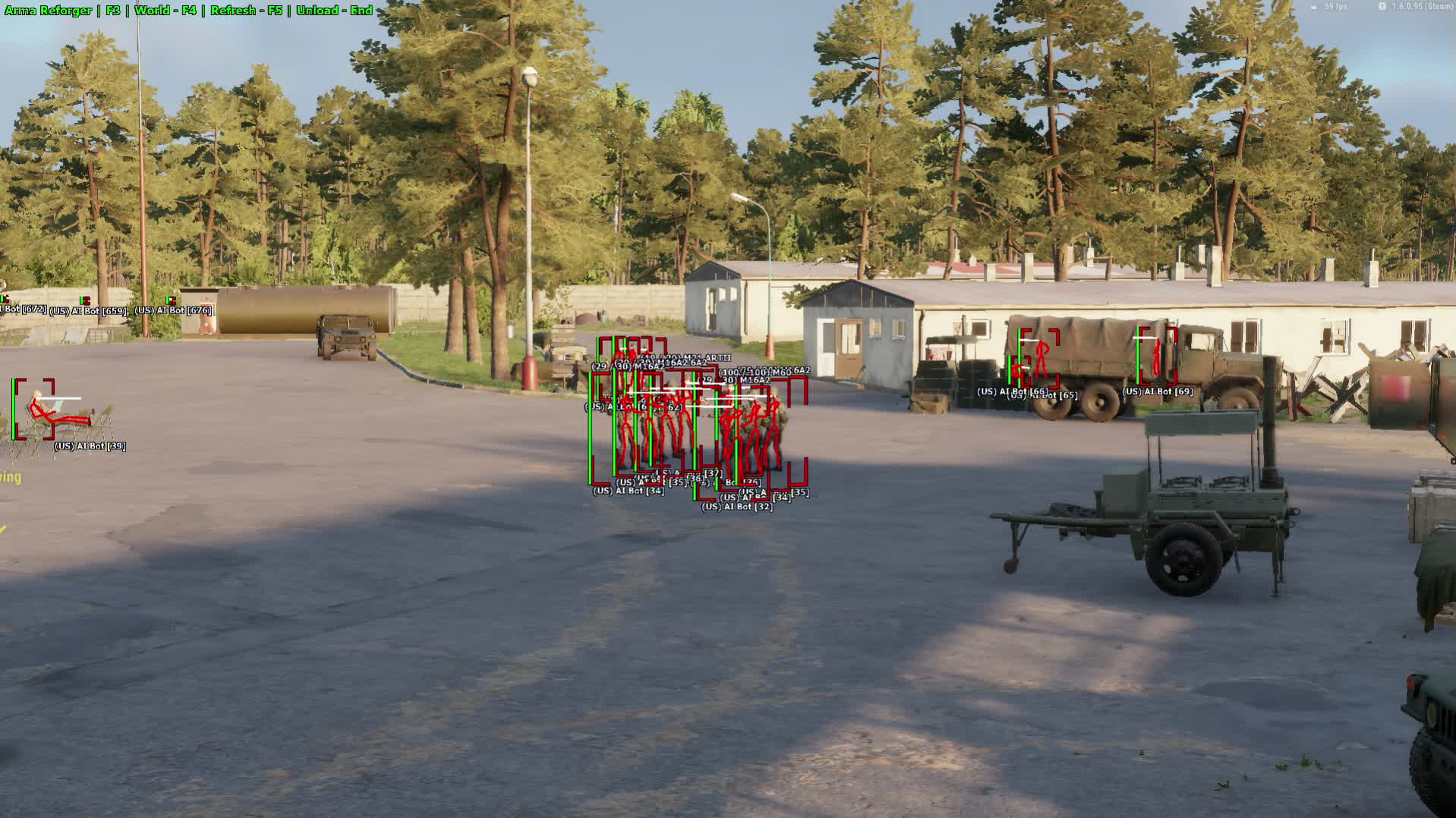
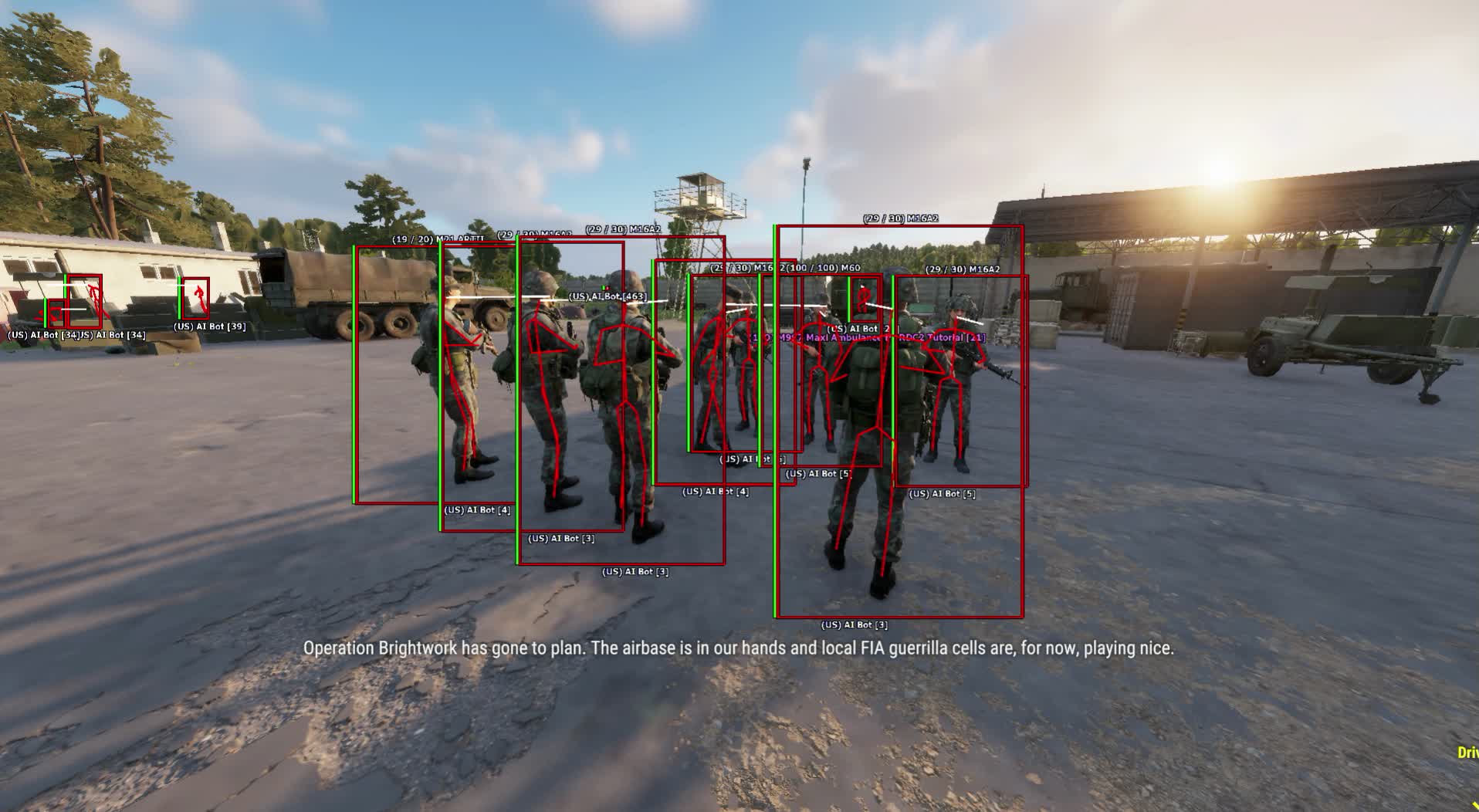
Arma Reforger is a hardcore simulator where staying hidden and knowing the terrain decide everything. Tired of dying to an enemy you never even saw? The Soft Hub cheat turns the chaos of the battlefield into a controlled tactical map where you're the lead strategist. See everything, know everything, and control every fight. A combat simulator just isn't fun without cheats - you're constantly on edge, getting killed by enemies you can't spot, and the game loses its appeal fast. With our private cheat for Arma Reforger you'll feel a lot safer, and as a bonus you get to enjoy yourself, because mowing down enemies is way more fun. The set of visual features lets you see enemies through obstacles, know how many meters away the enemy is, how much health he has, and more. You can read the full list of Arma Reforger cheat features below - we didn't add aimbot here, since the ESP in the scope can drift a bit due to FOV in scopes. The main strength of our cheats is security: you'll be reliably protected from anti-cheat bans. Deal with the admins yourself, though, if you start shooting through tree canopies or into the grass and rack up reports - we don't know what the admins will do, they might call in a check.
Product features
Aimbot
Enable
Activates the aimbot.
Prediction
Automatic calculation of target movement for leading your shots, accounting for ballistics.
Bone Selection
Set the body part (head, body, neck) to target.
Priority
Target selection logic: closest to crosshair or by health.
FOV Radius
Set the zone (circle) within which the aimbot will lock onto enemies.
Smooth
Adjust aim smoothing for more legit-looking play.
Max Distance
Limit the aimbot's working range in meters.
Draw FOV
Visual display of the aimbot's working radius.
Target Marker
A marker over the target the aimbot is currently locked onto.
Keybinds
Assign activation keys.
Skip Knocked
Ignore downed (knocked) players.
Player ESP (Combat Recon)
Skeleton & Box
Visual contact. Skeletons and boxes show enemies through dense vegetation and walls.
Weapon & Faction
Identification. Shows the faction (USSR/USA) and the weapon in the enemy's hands.
Model Direction
Attention vector. The look-direction line shows where the enemy is aiming.
Distance & Health
Target status. Distance for ranging your shots and a health bar.
World ESP (Logistics & Threats)
Vehicles & Corpses
Transport and resources. Find vehicles for moving your squad and loot from corpses.
Dropped Weapon
Trophies. Highlights weapons dropped on the ground.
Mortar & Tripod
Artillery. Detect enemy mortars and mounted machine guns.
Clothing
Gear. Find uniforms, rigs and helmets on the map.
Mine & Explosive
Sapper. Highlights mines and explosives on roads for safe convoy passage.
ARMST (Mod)
Mod support. Visualization of mod-specific items and objects from the ARMST mod.
Radar (Tactical Tablet)
Custom Radar
Customizable 2D radar for controlling your surroundings without visual contact.
Misc (Survival & Weapons)
No Recoil & Sway
Accuracy. Fully removes weapon recoil and sway (weapon wobble) when firing.
Unlock Third Person
View. Enables third-person view on servers where it's locked (Hardcore).
Local Bullets
Info. Magazine ammo counter on screen (handy in hardcore mode).
Infinite Stamina
(RISK) Infinite stamina for forced marches.
Local Health
Health and stamina indicators for your character.
Crosshair
Custom crosshair for shooting from the hip.
Development history
14.07.2025
Major Update: New ESP, Fixes, and Restored Features
We're excited to present a major update that significantly expands ESP capabilities, fixes bugs, and brings back fan-favorite features based on your feedback.
✅ NEW: Stationary Weapon ESP
Highlighting has been added for stationary machine guns, mortars, and other turrets. In the menu this option is called Turret.
🔧 FIXED
Fixed a bug where the weapon type was being displayed in the weapon name (both in-hand and on the ground).
Fixed an issue where dropped weapon ESP could incorrectly highlight decals and explosion sites.
🔄 RESTORED
Enemy Corpses display is available again.
The Clothes display feature has been restored.
11.07.2025
Update: Vid from tretego litsa snova in igre!
Otlichnye news, komandiry! My vernuli odnu iz samyh vostrebovannyh funktsiy for rasshireniya vashih takticheskih vozmozhnostey.
VOZVRASchENO
Razblokirovka vida from tretego litsa (Unlock Thirdperson)
Snova pereklyuchaytes mezhdu vidami, chtoby poluchit full obzor polya boya, kontrolirovat okruzhenie and prinimat bolee vzveshennye takticheskie resheniya.
Obnovite product, chtoby poluchit access k funktsii!
10.07.2025
Scheduled Update and Bug Fixes
The product has been updated to improve stability and functionality.
✔️ Feature restored
The Include Teammates display feature is available again.
🔧 Fix
Fixed the display of Vehicle Health on modded (mod) servers.
⏸️ Temporary disable
The Draw Corpses feature is temporarily unavailable while maintenance work is carried out.
Thanks for your patience and support!
09.07.2025
System Update: Vehicle Module
Vehicle combat protocols have been updated. Gain a tactical advantage with new battlefield data.
✅ [NEW] Vehicle Health
You can now see the health bar of any vehicle on the battlefield. Assess the threat and know exactly when to land the finishing blow.
⚙️ [NEW] Hide Allied Vehicles
An option has been added to disable ESP for allied vehicles. Clean up your interface and focus only on enemies.
Update now and gain full situational awareness!
05.07.2025
Optimization and Quality-of-Life Improvements
We've performed technical maintenance to improve product stability and ease of use.
✅ Performance boost
Significantly improved performance on high-population servers under heavy load. Gameplay will now feel even smoother.
🎯 Aimbot refinement
The aimbot now automatically skips unconscious targets. No more accidentally switching to irrelevant enemies.
⌨️ Hotkey update
IMPORTANT: Core hotkeys have been changed (the old "F + number" system is no longer used). The hotkey for World ESP functions has also been fixed.
We recommend updating for the best possible gameplay experience!
02.07.2025
Scheduled Product Improvements
We're happy to announce important enhancements to our Arma Reforger cheat.
✨ ADDED:
A new No Recoil & No Sway module has been integrated. Implemented as a single toggle for maximum stability and performance.
✔️ RESTORED:
The Dropped Weapon (world ESP) feature is back and working.
Thanks for staying with us!
02.07.2025
MAJOR UPDATE: AIMBOT IS LIVE!
New aim, enhanced intel, and a fan-favorite feature returns. The Arma Reforger product just got a whole lot stronger.
🎯 [NEW] Full AIMBOT with Prediction
A fully customizable aimbot has been added that accounts for target speed and trajectory for perfect lead shots. Dominate at any range!
🧠 [NEW] Unconscious Enemy Marker
Now you'll always know whether a downed enemy is still a threat or already incapacitated and safe to loot.
✔️ [RESTORED] Player Name Display
You asked, we delivered. The player nickname display feature is back in action and working flawlessly!
Update now and feel total control!
20.06.2025
Important Technical Update
Please review the current product changes.
⏸️ Temporarily unavailable features:
Player Name
Include Teammates
Change View Type
Dropped Weapon
Clothing
We are working to restore this functionality as soon as possible.
💡 Fixing possible issues:
If you're experiencing a "floating" or jittery ESP, please enable V-Sync in your game settings and cap your frame rate (FPS) to 60.
Known issues & fixes
Real questions from our support, with the fixes that worked. Based on user requests for this product.
Why did the software stop working right after a game update?
After every game update the software goes into a temporary "frozen" state until the developer adapts it to the new game version — this is normal and there is nothing you need to do.
While the status is "frozen", your remaining subscription time is paused, and the downtime is usually compensated. An update typically takes from a few hours up to a day.
When I enter my activation key it says the subscription is frozen — what does that mean?
It means the program is temporarily paused after a recent game update — it is not a problem with your key. Wait until the update is finished, then activate the key again.
Do not enter the key many times in a row: repeated attempts can trigger an automatic lock on the key that only support can remove. You can check the current status on the product page or with support.
How do I check whether my Windows version is supported, and what if my build isn't?
Press Win+R, type winver, and compare your version and build number with the supported list on the product page. If your build is newer than the listed maximum, the program will not run — support for new builds is added only after their official release, and Insider (beta) builds are usually not supported.
In that case, roll back or reinstall a supported official build. Use full editions of Windows 10/11 from an official source — stripped-down or modified builds often cause launch errors.
Cheat not injecting into Arma Reforger, overlay menu doesn't appear
The most common cause is Windows Core Isolation or Secure Boot being active. Follow these steps:
Disable Core Isolation in Windows Security → Device Security.
Disable Secure Boot in your BIOS/UEFI settings.
Download the Sordum (available from technical support) archive (password: sordum), launch dControl, and click Disable , confirm the icon turns red. This removes leftover Defender components.
Launch the game in windowed mode, then press the menu hotkey (default F3).
If the issue persists, reboot your PC and try again.
Loader hangs during loading or shows MPRC / DPRC error «previous load attempt was unsuccessful»
These errors indicate a previous load did not complete cleanly, or conflicting anticheat software is present on the system.
Uninstall Vanguard (Valorant Anti-Cheat) and FaceIt AC if they are installed.
Download the Sordum utility (available from technical support; archive password: sordum), run it, click «Search», and wait for it to finish.
Perform a full PC restart and make sure Windows Defender is disabled.
Launch the loader as Administrator.
ESP in the Arma Reforger cheat shows no players, vehicles, or bots — what should I check?
If the cheat menu opens but ESP/WH shows nothing at all, check these in order:
increase the max scan range in the dev settings;
restart the cheat and the game — sometimes the overlay doesn't pick up right after loading;
make sure you're running a licensed copy of the game, not a pirated build — features may not work correctly on those.
If none of this helps, contact support — there may be a temporary issue after a game update.
Do I have to run the loader from a USB drive, and what kind of drive do I need?
Yes, running the loader from a USB drive is a required part of the protection setup — it lowers the chance of the program being flagged by anti-cheat. A regular flash drive works fine, nothing special is needed.
Once the game has launched successfully, you can remove the drive — the program will keep working. If you don't have a physical drive, it can be emulated with a virtual one: contact support and they will walk you through it.
Kaspersky or another antivirus is blocking the launcher — how to fix?
Third-party antivirus software (especially Kaspersky and Norton) conflicts with the launcher. You need to fully uninstall the antivirus — disabling it is not enough.
Uninstall Kaspersky / Norton via "Programs and Features" or the vendor's dedicated removal tool.
Restart your PC after uninstalling.
Make sure no antivirus components remain in the installed programs list.
Windows Defender is sufficient — disable real-time protection temporarily if prompted.
Can I move my key to another computer, and how do I reset the hardware (HWID) lock?
The key is bound to a single computer by its hardware, so it won't activate on a new machine on its own, and it can't be used on several computers at once.
To switch computers, contact support with your software login — the hardware lock will be reset manually, and you can then activate the key on the new machine.
My computer freezes or blue-screens while the software is running — what should I do?
First, update Windows to the latest supported build via Windows Update and restart your computer. Disabling the page file (virtual memory) in the system performance settings also helps.
Wait 10–15 minutes after turning the computer on before launching, so the system finishes its background initialization. If the problem persists, contact support and attach a video of the freeze — it speeds up diagnosis.
Launcher file won't download or is blocked by the browser
Some browsers have built-in protection that blocks downloading and running loader executable files.
Open browser settings and disable the built-in protection feature (e.g. Protect / Safe Browsing).
If the file still won't download from the main server, install the MEGA extension and download via it.
Note: each user gets an individual launcher file — it cannot be shared with others.
Loader shows an error on startup — do I need a VPN, and what to check in BIOS?
If the loader throws an error on startup, first try connecting a VPN — the VPN is only required during the download and activation stage; once the loader is running you can disconnect it.
If VPN does not help, check the following in BIOS and Windows settings:
Secure Boot must be disabled in BIOS.
Core Isolation (Memory Integrity) must be disabled. Find it in Windows Security → Device Security → Core Isolation.
After changing these settings, reboot and try launching the loader again.
Cheat won't launch at all, compatibility error with Windows
Certain Windows builds are incompatible with the loader. A clean Windows reinstall is recommended , any up-to-date clean build will work. After reinstalling, make sure to disable Windows Defender and Core Isolation before the first launch.
Windows Defender flags the loader as a Trojan , is this normal?
Yes, this is a false positive. The loader is protected with obfuscation and VMProtect , standard anti-reverse-engineering measures that antivirus software often flags as suspicious. The file is safe. Before launching, disable real-time protection in Windows Defender and add the cheat folder to exclusions.
Does key time run out while the cheat is being updated or under maintenance?
No. Your key's subscription time does not tick while the cheat is undergoing an update or maintenance. The subscription resumes exactly where it left off.
The loader shows an error about the page file at startup — what should I do?
The error means an active page file (virtual memory) is blocking the loader. Disable it in the Windows performance settings: in the virtual memory options, uncheck automatic size management and set "No paging file" for every drive.
Save the changes, restart your computer, and launch the loader again.
I paid but it still says there is no payment — what should I do?
Sometimes the payment system needs a little time to confirm the transfer. Wait a few minutes — once the bank or payment provider sends confirmation, the payment status will update automatically.
If it is still not confirmed after 15–20 minutes, contact support and attach your payment receipt.
Why does the crosshair jerk downward when shooting in Arma Reforger?
This jerk is usually tied to the aim settings in the cheat menu. Try these one by one:
lower the smoothing value in the settings;
enable prediction for smoother aiming;
test without an optical scope — the effect is more noticeable there because of the zoomed-in view.
If the jerk persists after that, describe the issue to support — it may need extra tuning for a specific weapon.
The game crashes, freezes, or the screen goes black while the software is running — what should I check?
A common cause is a conflict with third-party overlays — Steam, Discord, screen-recording tools, audio overlays, and similar utilities.
Disable all such overlays and unnecessary background programs before launching and try again.
At startup I get an error saying the anti-cheat driver is already loaded in the system — what should I do?
This happens when the game was launched before the loader. Fully close the game (use Task Manager if needed), start the loader, wait until it finishes loading completely, and only then open the game.
The cheat menu shakes or jitters on top of the game — how do I fix it?
This is usually caused by the game running in exclusive fullscreen mode. Switch the game to windowed or borderless windowed mode in its graphics settings — this normally stops the overlay from jittering.
If the issue persists after switching modes, take a screenshot and contact support.
I forgot my account password for the software — how do I recover access?
You can't reset the password yourself through the website. Contact support and provide your purchase details so the operator can confirm the account is yours.
After verification, the operator will manually reset the password and send you a new one.
This product has 15 reviews across 2290 sales, only about 0.66%. Most satisfied buyers never write a review, the ones who do are usually those who ran into a question. So do not judge the product by the number or the tone of reviews alone, weigh them against how many people actually bought it.
4.9/ 5
★★★★★15 reviews · 2290 sales on Digiseller
How the rating is calculated
Most satisfied buyers never leave a review — people write mainly when something went wrong, so text reviews skew negative. The score is smoothed over every sale, not just the written reviews.
rating = (G + S + 10·0.9) / (N + S + 10) × 5
G — sum of review positivity (5★ = 1, 1★ = 0)
N — number of text reviews = 15
S = (sales − N) × 0.15 — silent satisfied buyers
15 reviews against 2290 sales — only 0.66% of buyers wrote anything.
Customer
Recommends
Verified purchase · Digiseller05.04.2026
Купил товар, все хорошо
Customer
Not recommended
Verified purchase · Digiseller04.04.2026
Получил бан
ProCheat reply
К сожалению так бывает никто от этого не застрахован
Customer
Recommends
Verified purchase · Digiseller31.03.2026
супер пойду тестить
Customer
Not recommended
Verified purchase · Digiseller05.12.2025
Чит работает.
Банов нет, но проблема в том, что чит кривой. Он либо зависнет, либо криво загрузится и пол чита не работает. 1 раз поиграл. Перезашел, и уже 2й час пытаюсь запуститься без бага
Customer
Not recommended
Verified purchase · Digiseller27.10.2025
Поддержки 0, сидят видимо неадекваты, общение на уровне друга, не работал софт, так и не помогли, пишут одно и тоже
Ответ на комментарий: Вам описали проблему по всем пунктам, от поддержки поступило только что надо включить впн, сказал что не помогает, снова пишут попробовать впн)
Вы ничего и не написали толком, что мне читать?? Предоставьте скрин к своим словам, а не пустую отписку размазанную под любой тип отзыва
ProCheat reply
Человек не воспринимает информацию о рекомендациях, не хочет слышать и читать то что ему пишут
Customer
Not recommended
Verified purchase · Digiseller21.10.2025
Ни открывает ссылку с момента покупки.
ProCheat reply
Могу снять видео как все открывается. Обращайтесь к провайдеру или используйте vpn
Customer
Recommends
Verified purchase · Digiseller23.09.2025
Прежде чем купить надо знать одно , без впн чит не работает , если вы не купили впн то не покупайте чит , пустая трата времени и денег .
Во стальном все отлично .
Customer
Not recommended
Verified purchase · Digiseller13.08.2025
продает откровенный скам.В файле 4 трояна как минимум,не советую
ProCheat reply
вирусами не занимаемся
Customer
Recommends
Verified purchase · Digiseller07.08.2025
Very Good
Customer
Recommends
Verified purchase · Digiseller05.08.2025
Very good job
Customer
Recommends
Verified purchase · Digiseller09.07.2025
Все работает
Customer
Recommends
Verified purchase · Digiseller02.07.2025
Всё работает. Извините просто я деревня. Товар огонь рекомендую тем кто хочет получать удовольствие от игры
Customer
Recommends
Verified purchase · Digiseller02.07.2025
Все супер советую, вообще пушка я в кайфе
Customer
Recommends
Verified purchase · Digiseller21.06.2025
Рекомендую брать у этих ребят , тех помощь в звонке в режиме реального времени это маст хев!Спасибо вам
Customer
Recommends
Verified purchase · Digiseller24.03.2025
чит просто супер,спасибо админам за то что быстро отреагировали на помощь. чит рекомендую!!!
Join our gaming community chat
Discuss current cheats from developers and how to use them effectively in popular online games. Share tactics, exchange useful info and find like-minded players in our community.
Run into a technical issue? Our team of experts will help. We handle all requests in a live queue, so please be understanding if it sometimes takes a little wait. We guarantee that no request goes unanswered.
After successful payment you receive access details on the order page at oplata.info. The product key and usage instructions are shown inside the purchased item page.
Contact technical support first. Support requests can be escalated to the developer, so you get the most accurate answer for the selected product.
Status changes are published in the Telegram news channel, on the update history page, and directly on the product page.
The product can be temporarily frozen while the developer updates it. Subscription time is frozen as well, so you do not lose paid time.
Contact support with the order link, product name, Windows build, and a video of the issue. If the problem cannot be solved, we help with the refund process.
Use the public Telegram community for general discussion. Technical support questions should still go through support channels.
If the payment fee looks too high, contact support. We can suggest an alternative payment option when available.
Support replies in queue order. A complete request with screenshots or video is usually processed faster.
Send clear details, stay constructive, and keep the order link available. This helps support solve the issue faster.

 SOFT HUB



 Join all games chat





