Division 2 Soft HUB: Private Cheat for The Division 2 with Aimbot and ESP

Working
Top seller
SOFT HUB SOFT HUB
Last update 30.08.2026 This date shows when the software was last updated. An old date doesn't mean the software stopped working! Most likely the developer just had nothing new to add. If you have any doubts, you can always check the current status with our support team.
Division 2 Soft HUB
Steam
Windows support: 10: all builds; 11: all builds
Menu language: English
Spoofer:No
USB drive:Yes
BIOS:No

User information

Tested extensively over a long period, nothing gets flagged

VIDEO
SCREENSHOTS
Description

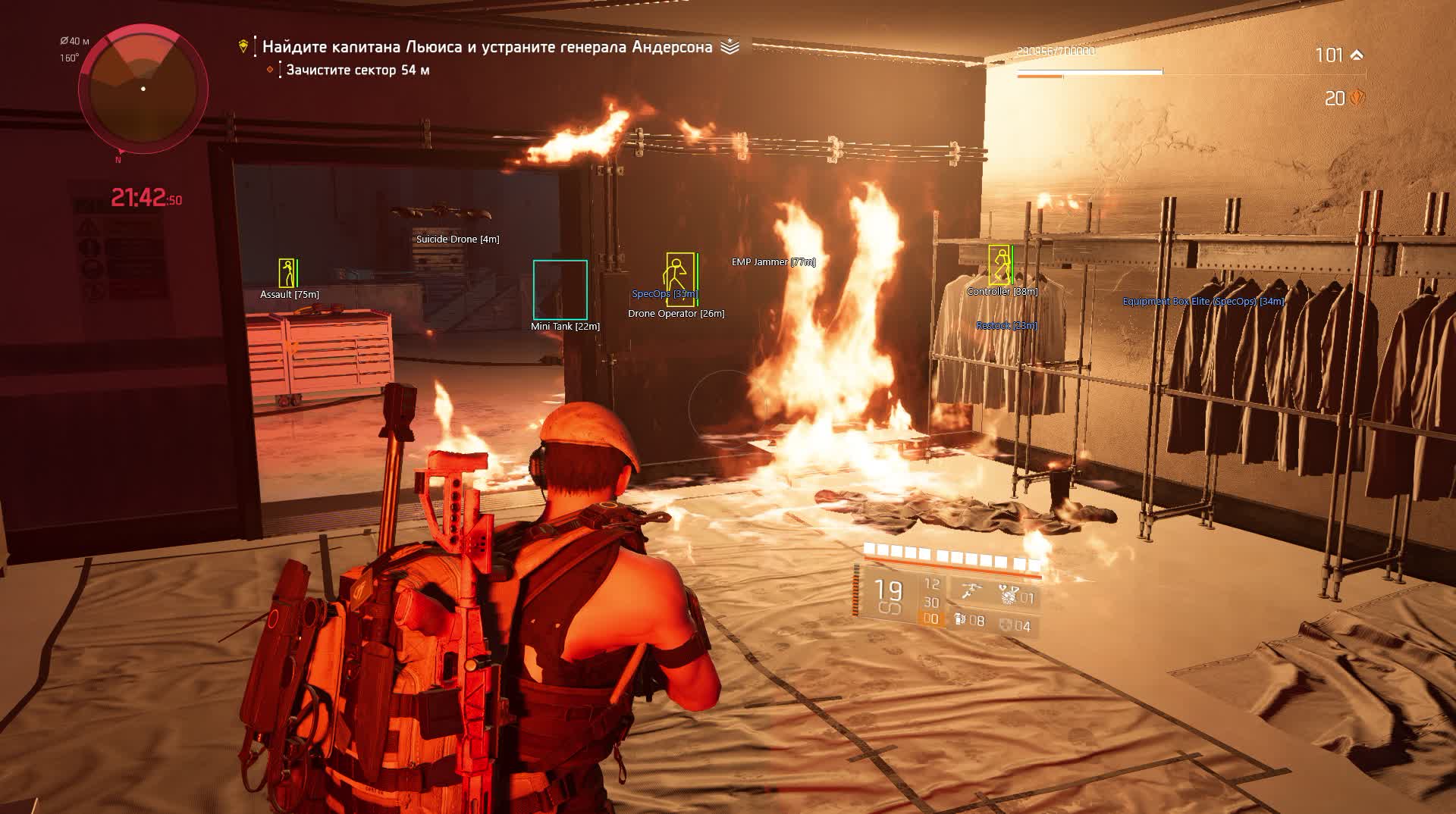
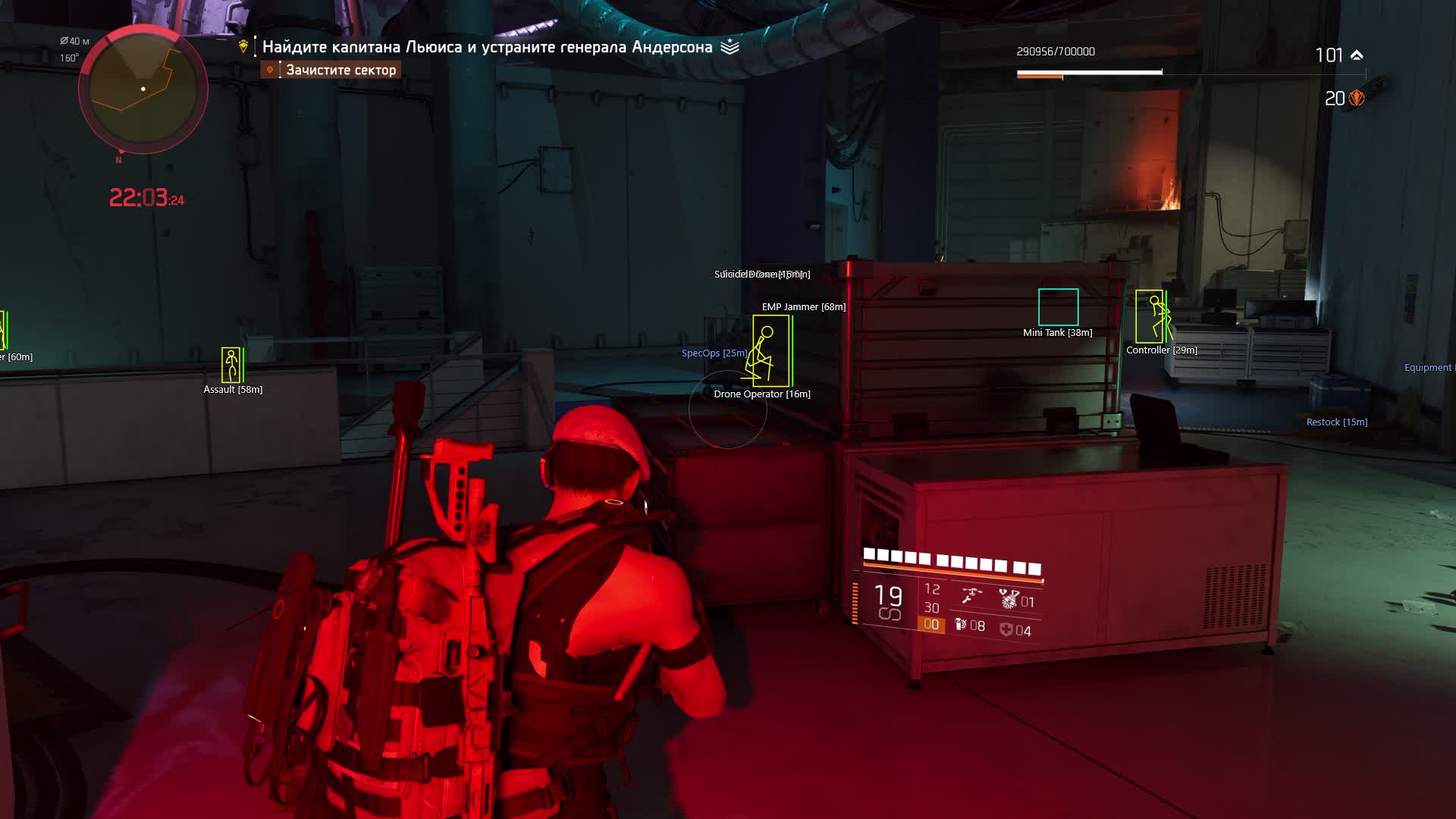
Division 2 on Heroic is elites with millions of HP who hide behind cover and flank in groups. You pop out for a second and an assault trooper has already circled around the side, the medic is healing the boss, and the grenadier has your position zeroed in. The Division 2 cheat from Soft HUB flips the situation: ESP shows every NPC and player through walls, Aimbot with Magic Bullet registers hits regardless of cover, and No Recoil with No Spread turns any weapon into a laser. In the Dark Zone the same setup works against live agents, you see rogues before they close to firing range.

Soft HUB is an External cheat that runs on top of the game process. That said, the feature set goes well beyond a standard overlay: Silent Aim hits the target without any visible crosshair movement, Magic Bullet registers shots through obstacles, and RCS compensates recoil during burst fire. Add fast reload and increased fire rate, and on elite NPCs with massive health pools that makes a real difference in time-to-kill.

Product features

Aimbot

Silent Aim

Hits the target without any visible crosshair movement - from the outside you appear to be shooting into a wall, but the hits register on the chosen target. In Division 2 this works on both NPCs and players in the Dark Zone.

Magic Bullet

Registers hits regardless of obstacles between you and the target. The enemy ducked behind a concrete block - the bullets go through anyway. On Heroic missions it saves the minutes of waiting for an elite to peek out.

Rotation Aim

Classic aim assist that visually rotates the crosshair toward the target. More noticeable than Silent Aim, but familiar for players who want to see where they're shooting.

Smooth Value

Controls how smoothly the crosshair moves to the target. High value means slow, natural-looking tracking. Low value means an instant snap to the head.

Target Bone: Head / Chest / Random

Sets the aim point. Head gives maximum crit damage. Chest is more consistent at range. Random alternates bones so the hit pattern looks natural.

FOV and FOV Circle

Sets the aimbot's capture radius and shows it as a circle on screen. Narrow FOV means the aimbot only picks up the target closest to your crosshair. Wide FOV covers the whole screen.

Sticky Aim

Locks onto the first acquired target and holds it until the target is dead. Useful when finishing off elite enemies with large health pools, stops the aim from jumping to a nearby NPC.

Aim Key

Activates the aimbot only while a key is held. The mouse is free between fights, hold the button during a firefight and the aimbot kicks in.

Highlight Aiming Target

Highlights whichever target the aimbot has locked. You can see exactly who is getting aimed at so you don't fire on the wrong target in a crowd of NPCs.

Priority (distance / closest to crosshair)

Chooses the targeting criterion: nearest by range or nearest to the screen center. In PvE distance priority is more comfortable, in PvP crosshair priority works better.

Aim at Rogue Only

Restricts the aimbot to rogues only - in the Dark Zone it ignores neutral agents and only targets players who have gone rogue.

Aim at Gadgets

Targets enemy gadgets: turrets, drones, traps. Division 2 NPCs use gadgets heavily - this takes down a turret in a second instead of hunting for it by eye.

RCS (Recoil Control System)

Compensates recoil with adjustable strength and activation speed. RCS Snap Value sets how much of the recoil is corrected, RCS Speed sets how fast the system responds to each shot.

Visuals (ESP)

Player ESP

Shows all players with boxes, skeletons, health and armor. In the Dark Zone you see every agent - their HP, armor, and distance to you.

Show Only Rogue

Filters ESP to rogues only. In a packed Dark Zone it cuts the visual noise from neutral agents and shows only actual threats.

Skeleton ESP

Draws bone lines over enemy models so you can see their pose through walls: standing, crouching behind cover, running. In Division 2 with its cover system this is critical information.

Show Health / Show Armor

Health and armor bars above every enemy. In Division 2 armor is a separate layer on top of health, and seeing both values at once matters for picking the right target first.

Show Names / Distance

Player names and distance in meters. Lets you identify a specific rogue by name and know exactly how far away they are.

2D Box

Bounding boxes around enemies - a basic visual marker for spotting targets quickly on screen.

Enemy NPC ESP

Separate ESP for hostile bots, shows every NPC with distance. On Heroic missions where NPCs push from the flanks you see the flanking move before it happens.

Gadgets ESP

Highlights enemy gadgets: turrets, drones, traps. You see where an NPC placed a turret before it starts shooting.

Players Distance / NPC Distance

Separate draw distance limits for players and bots. Set NPCs to 100m for close-quarters fights, players to 300m for Dark Zone control.

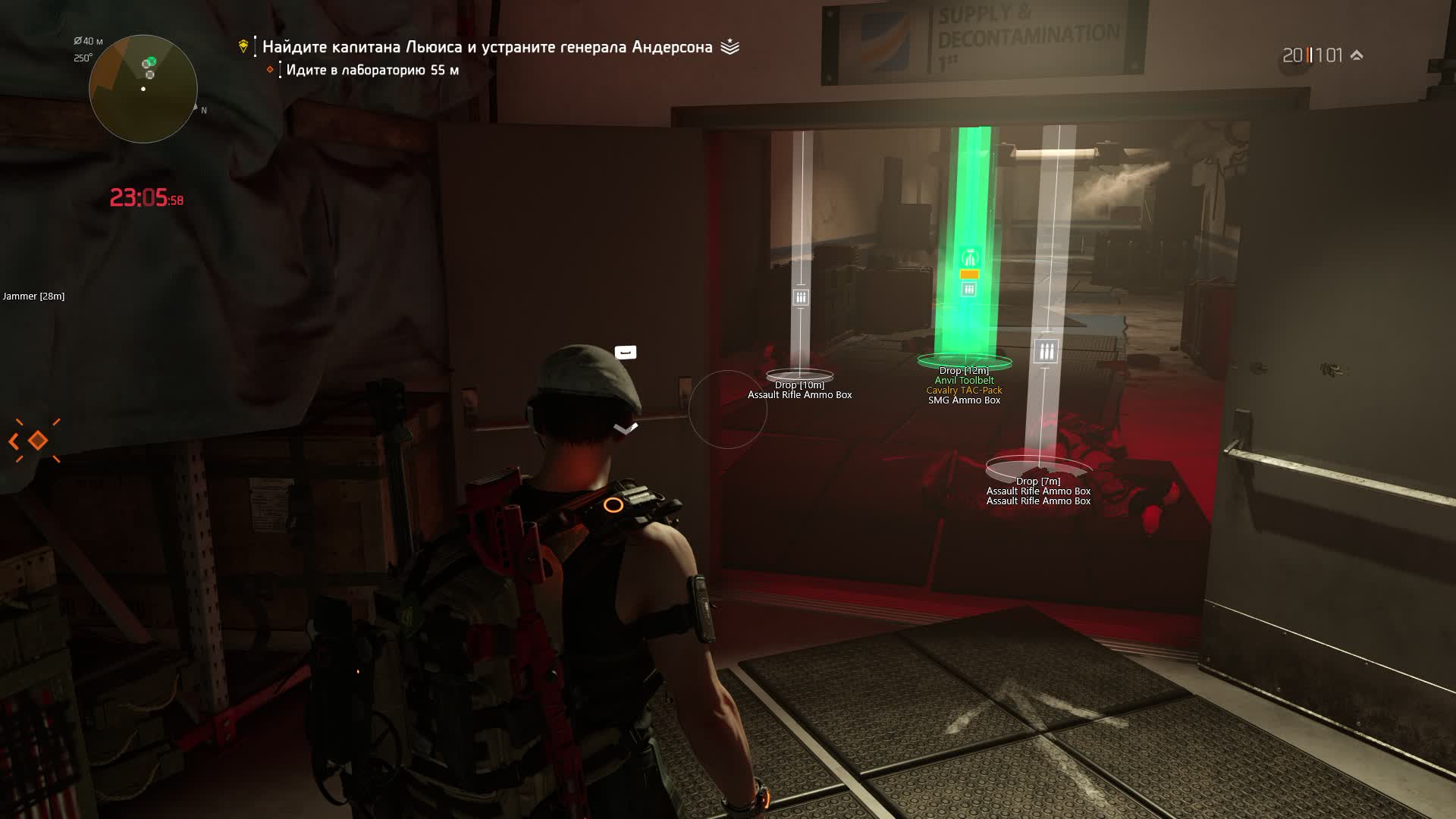
Loot ESP

Loot

Shows items on the map through walls and ceilings. In Division 2 with its random loot tables this cuts the time spent hunting the right drop.

Dropped Loot

Items dropped by players or NPCs. In the Dark Zone after a firefight you can see what fell off a dead rogue without walking up to the body.

Equipment

ESP for gear: weapons and armor pieces on the ground. You see what weapon or kneepads are in the next room before stepping inside.

Supplies

Consumables - ammo and medkits. On long Heroic missions ammo runs out, and knowing where the nearest crate is saves you at the worst moment.

Crafting

Crafting materials on the map. For players farming resources in the open world - no need to manually sweep every corner.

Loot Distance

Limits the loot draw range. Set it to 50m and only see nearby items without cluttering the screen with icons from across the map.

Additional Modifications

No Recoil

Completely removes weapon recoil. In Division 2 automatic weapons kick hard on long bursts - with No Recoil every bullet goes exactly where the crosshair points.

No Spread

Removes bullet spread. Even with perfect aim bullets scatter in a cone without this - No Spread collapses that cone to zero.

No Sway

Removes weapon sway when aiming down sights. Sniper rifles stop drifting - the crosshair sits dead on the spot.

Fast Reload

Speeds up the reload animation. On LMGs with 100-round magazines the stock reload takes 3-4 seconds. Fast Reload cuts that to a minimum.

Increase Fire Rate

Raises the base fire rate of any weapon. A semi-auto rifle fires like a full-auto, and an automatic dumps rounds twice as fast.

Known issues & fixes

Real questions from our support, with the fixes that worked. Based on user requests for this product.

Why did the software stop working right after a game update?

After every game update the software goes into a temporary "frozen" state until the developer adapts it to the new game version — this is normal and there is nothing you need to do.

While the status is "frozen", your remaining subscription time is paused, and the downtime is usually compensated. An update typically takes from a few hours up to a day.

When I enter my activation key it says the subscription is frozen — what does that mean?

It means the program is temporarily paused after a recent game update — it is not a problem with your key. Wait until the update is finished, then activate the key again.

Do not enter the key many times in a row: repeated attempts can trigger an automatic lock on the key that only support can remove. You can check the current status on the product page or with support.

How do I check whether my Windows version is supported, and what if my build isn't?

Press Win+R, type winver, and compare your version and build number with the supported list on the product page. If your build is newer than the listed maximum, the program will not run — support for new builds is added only after their official release, and Insider (beta) builds are usually not supported.

In that case, roll back or reinstall a supported official build. Use full editions of Windows 10/11 from an official source — stripped-down or modified builds often cause launch errors.

Loader hangs during loading or shows MPRC / DPRC error «previous load attempt was unsuccessful»

These errors indicate a previous load did not complete cleanly, or conflicting anticheat software is present on the system.

  • Uninstall Vanguard (Valorant Anti-Cheat) and FaceIt AC if they are installed.
  • Download the Sordum utility (available from technical support; archive password: sordum), run it, click «Search», and wait for it to finish.
  • Perform a full PC restart and make sure Windows Defender is disabled.
  • Launch the loader as Administrator.
Cheat menu does not open in game when pressing F2

To diagnose the issue, use the system-check utility: download the archive (password sordum), run it, click «Search» and wait for the scan to finish.

  • After that, toggle real-time protection in Windows Defender off and back on.
  • If the menu still does not appear , update Windows to the latest version.
  • If you have another USB drive available, try launching the cheat from it.
Do I have to run the loader from a USB drive, and what kind of drive do I need?

Yes, running the loader from a USB drive is a required part of the protection setup — it lowers the chance of the program being flagged by anti-cheat. A regular flash drive works fine, nothing special is needed.

Once the game has launched successfully, you can remove the drive — the program will keep working. If you don't have a physical drive, it can be emulated with a virtual one: contact support and they will walk you through it.

Kaspersky or another antivirus is blocking the launcher — how to fix?

Third-party antivirus software (especially Kaspersky and Norton) conflicts with the launcher. You need to fully uninstall the antivirus — disabling it is not enough.

  • Uninstall Kaspersky / Norton via "Programs and Features" or the vendor's dedicated removal tool.
  • Restart your PC after uninstalling.
  • Make sure no antivirus components remain in the installed programs list.
  • Windows Defender is sufficient — disable real-time protection temporarily if prompted.
Overlay and boxes are offset, menu clicks are misaligned

This is caused by Windows display scaling. Open Settings → System → Display and set scale to 100%. Then restart the cheat.

Cheat stopped launching or menu disappeared after PC restart or server reset

If the menu does not appear after a PC reboot or game server reset:

  • Run the diagnostic utility (archive password sordum) , download, launch, press Search, and send a screenshot of the result.
  • Delete leftover cheat files and reinstall the latest version.
  • Update Windows , outdated system components may block the cheat from starting.
Can I move my key to another computer, and how do I reset the hardware (HWID) lock?

The key is bound to a single computer by its hardware, so it won't activate on a new machine on its own, and it can't be used on several computers at once.

To switch computers, contact support with your software login — the hardware lock will be reset manually, and you can then activate the key on the new machine.

My computer freezes or blue-screens while the software is running — what should I do?

First, update Windows to the latest supported build via Windows Update and restart your computer. Disabling the page file (virtual memory) in the system performance settings also helps.

Wait 10–15 minutes after turning the computer on before launching, so the system finishes its background initialization. If the problem persists, contact support and attach a video of the freeze — it speeds up diagnosis.

Launcher file won't download or is blocked by the browser

Some browsers have built-in protection that blocks downloading and running loader executable files.

  • Open browser settings and disable the built-in protection feature (e.g. Protect / Safe Browsing).
  • If the file still won't download from the main server, install the MEGA extension and download via it.
  • Note: each user gets an individual launcher file — it cannot be shared with others.
Loader shows an error on startup — do I need a VPN, and what to check in BIOS?

If the loader throws an error on startup, first try connecting a VPN — the VPN is only required during the download and activation stage; once the loader is running you can disconnect it.

If VPN does not help, check the following in BIOS and Windows settings:

  • Secure Boot must be disabled in BIOS.
  • Core Isolation (Memory Integrity) must be disabled. Find it in Windows Security → Device Security → Core Isolation.

After changing these settings, reboot and try launching the loader again.

Windows Defender flags the loader as a Trojan — is this normal?

Yes, this is a false positive. The loader is protected with obfuscation and VMProtect — standard anti-reverse-engineering measures that antivirus software often flags as suspicious. The file is safe. Before launching, disable real-time protection in Windows Defender and add the loader folder to exclusions.

Some functions like aim and no-recoil work intermittently

Intermittent behaviour of certain features (aim, no-recoil, fast reload) is a known technical limitation of the method this cheat uses , it is not a bug or misconfiguration, and there is no workaround.

If the game crashes during specific activities, disable cheat functions one by one to identify which one triggers the issue.

The loader shows an error about the page file at startup — what should I do?

The error means an active page file (virtual memory) is blocking the loader. Disable it in the Windows performance settings: in the virtual memory options, uncheck automatic size management and set "No paging file" for every drive.

Save the changes, restart your computer, and launch the loader again.

I paid but it still says there is no payment — what should I do?

Sometimes the payment system needs a little time to confirm the transfer. Wait a few minutes — once the bank or payment provider sends confirmation, the payment status will update automatically.

If it is still not confirmed after 15–20 minutes, contact support and attach your payment receipt.

The game crashes, freezes, or the screen goes black while the software is running — what should I check?

A common cause is a conflict with third-party overlays — Steam, Discord, screen-recording tools, audio overlays, and similar utilities.

Disable all such overlays and unnecessary background programs before launching and try again.

At startup I get an error saying the anti-cheat driver is already loaded in the system — what should I do?

This happens when the game was launched before the loader. Fully close the game (use Task Manager if needed), start the loader, wait until it finishes loading completely, and only then open the game.

The cheat menu shakes or jitters on top of the game — how do I fix it?

This is usually caused by the game running in exclusive fullscreen mode. Switch the game to windowed or borderless windowed mode in its graphics settings — this normally stops the overlay from jittering.

If the issue persists after switching modes, take a screenshot and contact support.

I forgot my account password for the software — how do I recover access?

You can't reset the password yourself through the website. Contact support and provide your purchase details so the operator can confirm the account is yours.

After verification, the operator will manually reset the password and send you a new one.

All issues & general troubleshooting
TARIFFS
$3.46
BUY What happens after payment?
Got a question? Ask before you pay

We'll help you choose and sort out any launch issue. Ask us anything before buying, we're always on your side.

Support 10:00–22:00, sometimes we reply at night too
Ask a question
Update history
  • 30.08.2026 Working
    Received an update
  • 27.08.2026 Frozen
    Sent for update, time frozen
  • 11.08.2026 Working
    Received an update

Available tariffs

1 day
$3.46
START PURCHASE
7 days
$12.69
START PURCHASE
30 days
$29.99
START PURCHASE
Reviews about Division 2 Soft HUB

This product has 4 reviews across 323 sales, only about 1.24%. Most satisfied buyers never write a review, the ones who do are usually those who ran into a question. So do not judge the product by the number or the tone of reviews alone, weigh them against how many people actually bought it.

4.8 / 5
4 reviews · 323 sales on Digiseller
How the rating is calculated

Most satisfied buyers never leave a review — people write mainly when something went wrong, so text reviews skew negative. The score is smoothed over every sale, not just the written reviews.

rating = (G + S + 10·0.9) / (N + S + 10) × 5

  • G — sum of review positivity (5★ = 1, 1★ = 0)
  • N — number of text reviews = 4
  • S = (sales − N) × 0.15 — silent satisfied buyers

4 reviews against 323 sales — only 1.24% of buyers wrote anything.

Customer Recommends
Verified purchase · Digiseller 09.06.2026

Все отлично!

Customer Recommends
Verified purchase · Digiseller 22.05.2026

отличный софт рекомендую,бывает иногда проблемы по типа резко пропадает софт во время игры,но это так мелкие проблемы

Customer Not recommended
Verified purchase · Digiseller 26.04.2026

Сам хак в целом работает, но переодически либо вылетит игра из за него либо просто в какойто момент отключается и нужно заного перезапускать игру

ProCheat reply

можно попробовать обратиться за помощью

Customer Recommends
Verified purchase · Digiseller 23.04.2026

все гуд работает четко

Your review

Reviews are published after moderation.

Join our gaming community chat

Discuss current cheats from developers and how to use them effectively in popular online games. Share tactics, exchange useful info and find like-minded players in our community.

1 900+Members
24/7Online
Join our gaming community chat

Technical support

Run into a technical issue? Our team of experts will help. We handle all requests in a live queue, so please be understanding if it sometimes takes a little wait. We guarantee that no request goes unanswered.

Availabilityfrom 10:00 to 23:00
Fast responseIn queue order
Get help
Technical support
PROCHEAT

PROCHEAT news channel

Follow product status changes, update history and important announcements.

Subscribe

Division 2 Soft HUB Cheat - What the External Software Can Do

Soft HUB is an External cheat for Division 2 that runs on top of the game process without injecting into memory. That architecture reduces detection risk during surface-level scans. The feature set still matches Internal solutions: three aimbot modes - Rotation, Silent Aim and Magic Bullet. RCS handles recoil, No Spread kills bullet scatter, No Sway locks the weapon while aiming. Fast Reload and Increase Fire Rate push your damage per second higher. For Division 2 with its thick-health elites this aimbot and weapon mod combo cuts farm time by a solid margin.

Magic Bullet and Silent Aim - Hidden Shooting in Division 2

Two aimbot modes in Soft HUB you won't find in most Division 2 cheats. Silent Aim registers hits without any visible crosshair movement - you're technically shooting at a wall but the hits count on the chosen target. Magic Bullet goes further: hits register through any obstacle between you and the enemy. On Heroic missions where elite NPCs sit behind concrete and only peek for half a second, Magic Bullet removes the need to time those windows at all. In the Dark Zone both modes work against live players - a rogue behind cover takes damage without understanding where it's coming from.

Wallhack and Soft HUB ESP - Dark Zone Control

The Dark Zone in Division 2 is a place where any agent can turn on you at any moment. A group of four rogues is waiting at the extraction point, a solo player is creeping up behind you, and without ESP you won't see either of them coming. Wallhack through Skeleton ESP shows every player's pose through walls: who's crouching behind cover, who's running toward you. Show Only Rogue filters out neutral agents and leaves only threats on screen. Health and Armor show remaining durability, so you can see a rogue is at 20% armor after a fight with NPCs and finish them off in two shots.

No Recoil and Additional Mods - Weapons Without Limits

Division 2 deliberately makes weapons uncomfortable: automatics kick on long bursts, sniper rifles sway while scoping, spread grows with each shot. Soft HUB removes all three of those constraints at once. No Recoil locks the barrel - hold the trigger on a FAMAS and all 30 rounds hit the same point. No Spread collapses the bullet cone to zero. No Sway freezes weapon drift when aiming through optics. Add Fast Reload and increased fire rate, and an assault rifle outputs damage the game was never balanced around.

Loot ESP for Division 2 Farm - Finding Gear Through Walls

Farming in Division 2 is hours of repeating the same missions for a chance at a useful item drop. Loot ESP from Soft HUB cuts the wasted time: you see gear, weapons and consumables through walls before even entering a room. Dropped Loot highlights what fell from killed NPCs and players - in the Dark Zone after a big firefight you don't need to loot every body individually. Equipment ESP separately shows weapons and armor pieces, Supplies shows ammo and medkits. Crafting ESP highlights crafting materials in the open world. Distance Limit caps the draw range so the screen doesn't turn into an icon dump.

Soft HUB Aimbot - Three Targeting Modes

Soft HUB's aimbot offers three methods for different situations. Rotation is classic aim assist with visible crosshair movement, tunable through Smooth Value from a hard snap to a smooth track. Silent Aim keeps the crosshair in place while hits go to the chosen bone. Magic Bullet sends those hits through any obstacle. Target Bone switches between head, chest and random. Sticky Aim holds the lock on one target until it's dead - on Division 2 bosses with enormous health pools this stops the aimbot from randomly switching to a regular NPC mid-fight.

Latest updates

30.08.2026 11:08
Working
Received an update
27.08.2026 15:31
Frozen
Sent for update, time frozen
11.08.2026 15:24
Working
Received an update
11.08.2026 15:12
Frozen
Sent for update, time frozen
21.07.2026 17:25
Working
Received an update
Open full history
from $3.46 Choose a plan
Ask a question