MEMEZ for Apex Legends: Aimbot, ESP and Wallhack

Working
MEMEZ MEMEZ
Last update 06.06.2026 This date shows when the software was last updated. An old date doesn't mean the software stopped working! Most likely the developer just had nothing new to add. If you have any doubts, you can always check the current status with our support team.
Add another cheat from this game too — to compare them.
APEX Memez
Steam
Windows support: 10: all builds; 11: all builds
Menu language: English
Spoofer:No
USB drive:No
BIOS:Yes
VIDEO
SCREENSHOTS
Description

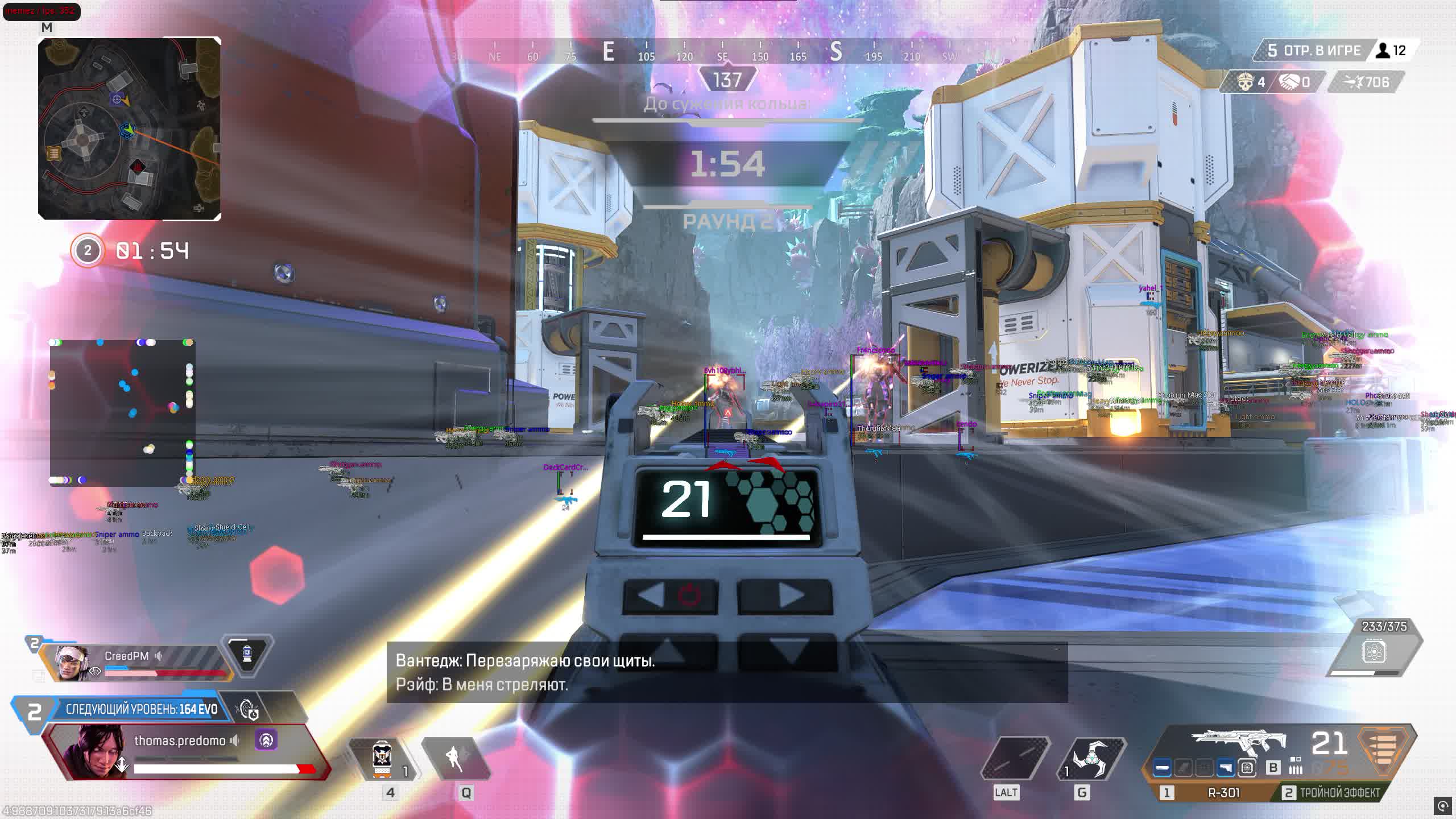
Apex Legends drops 60 players onto the map, and the first minutes of a match are pure chaos. You land in Fragment East, grab a Wingman, and the enemy already has an R-301 pointed at your head. MEMEZ closes that gap: ESP shows every player through walls within 500 meters along with their HP and shields, and the aimbot with movement prediction tracks targets while they strafe. The RCS kills Flatline recoil so your spray lands in one spot out to 50 meters.

The software runs as an External solution: it doesn't touch the game's process memory and doesn't modify any files. According to procheat.pro customers, that approach is exactly what keeps it stable over the long run. Add a loot filter by rarity and you only see gold and purple items instead of digging through trash. The panic button instantly cuts the overlay if someone glances at your stream or walks up to your monitor.

Product features

Visual features

Draw Players

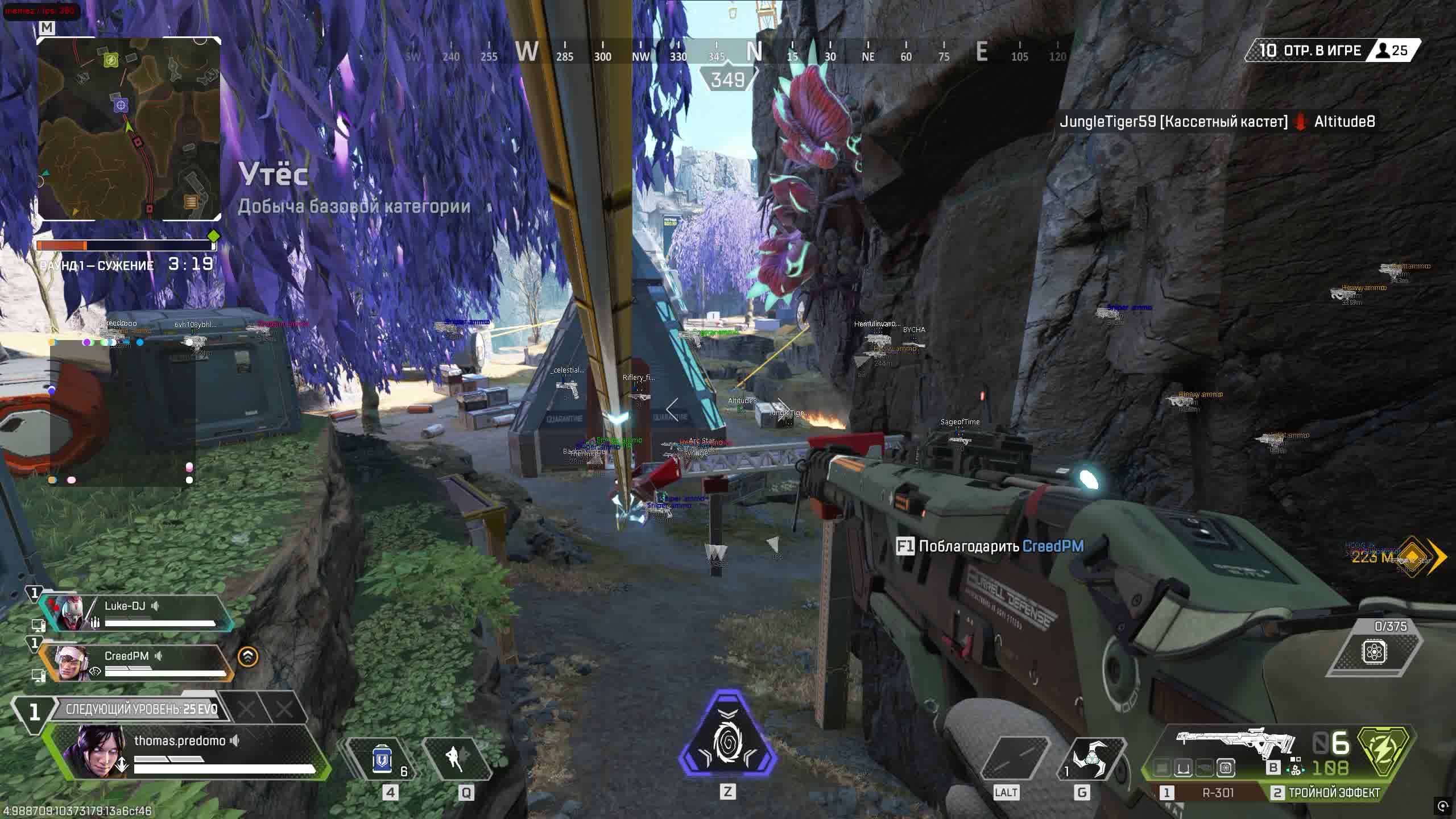
Renders enemies through walls with HP, shield and distance up to 500m

Player Box

2D box around the enemy model so you can snap onto it fast

Player Skeleton

Skeleton shows the pose: sitting, running, climbing a zipline

Player Name

Nickname above the head, handy for callouts in squad voice

Player Weapon

Shows the enemy's current weapon: spot a PK and you keep your distance

Out of FOV Arrows

Arrows point to enemies off screen with adjustable radius

Draw Radar

Mini-map with enemy dots in real time

Draw Dummies

Draws dummies on the training range so you can calibrate the aimbot

Aim features

Aimbot

Aims at the head, body or nearest bone with adjustable FOV and smoothing

Aim Bone Selector

Pick the aim point: head for the Wingman, body for ARs

Aimbot Smooth

Smoothing from 1 to 100: low values are a sharp snap, high values give a human-like drag

Movement Prediction

Leads the strafe, bullets land where the target will be in 50ms

Recoil Control System

Auto recoil compensation: the R-99 and CAR turn into lasers

Auto Target

Switches target after a knock so you don't waste time re-acquiring manually

Draw Aim FOV

A circle on screen shows the aimbot's trigger zone

World objects

Loot Filter

Filter by rarity: show only gold and purple, ignore the white junk

Loot Distance

Distance to an item so you can prioritize close loot on a hot drop

Armor ESP

Armor is color-coded: red for red, gold for gold

Weapons & Attachments

See weapons and attachments through walls, straight to the Turbocharger instead of a Mozambique

Grenades & Supplies

Thermites, arc stars, batteries and med kits on the radar

Extra settings

Menu Bind

Your own key to open the menu, no conflict with the game's binds

Panic Bind

Instantly disable the overlay with one button

Battle Mode

Switch to a combat preset with aggressive settings

Save/Load Config

Save your settings to a file: set it up once, then load it in a second

Language

Russian and English interface

Known issues & fixes

Real questions from our support, with the fixes that worked. Based on user requests for this product.

What should I do if the cheat won't launch or shows an error on startup?

Contact support and describe the error you're seeing — you'll likely be asked to run a system compatibility checker and send a screenshot of the result so the cause can be identified.

It also helps to:

  • launch the loader through a VPN;
  • add the loader's folder to your antivirus exclusions;
  • temporarily disable third-party overlays (screen recording, chat apps, etc.).
After entering the activation key it says the key is frozen — what does that mean?

This message means the game received an update and the software is temporarily being reworked for the new version — it affects everyone with an active subscription, not just your key.

  • The update usually takes anywhere from a couple of hours to a day, often faster.
  • The subscription time lost while waiting gets compensated.
  • Check with support for status updates — they will let you know once it is working again.
My computer immediately reboots or shows a blue screen right after I start the loader — what should I do?

The most common cause is an outdated motherboard firmware (BIOS) or secure boot settings conflicting with the loader's driver.

  • Check your motherboard manufacturer's site for a newer BIOS version (ideally no older than 2022–2023) and update it.
  • Before trying again, create a system restore point or back up important files — in rare cases the crash affects Windows boot.
  • If the problem continues, contact support with a screenshot of the error so they can guide you further.
  • If Windows stops booting entirely, you'll need to repair or reinstall the system; it's best to reach out to support beforehand to avoid this.
After launching the loader, the cheat's menu won't open with its hotkey — what should I do?

This is usually caused by Secure Boot being enabled in the BIOS, which prevents the cheat from working. Disable Secure Boot in your BIOS settings and relaunch the loader.

If your game requires Secure Boot to be on to run at all, contact support — there is sometimes a workaround for this case.

The cheat shows an HWID binding error after a hardware change or reset — what should I do?

This error means your activation no longer matches your current hardware — for example, after reinstalling the OS or changing hardware identifiers.

Contact support with your activation key: they will reset the binding so you can activate the cheat again on the same key.

Launcher won't download

If the launcher fails to download, try two things: enable a VPN and retry, or switch to a different browser (e.g., from Chrome to Firefox or vice versa).

The cheat shows a "Disk is MBR, GPT required" error at launch — what does that mean?

This means the drive with Windows installed uses the older MBR partition style, while the cheat requires a GPT-partitioned drive.

The fix is to reinstall Windows and choose GPT instead of MBR when partitioning the drive during setup.

All issues & general troubleshooting
TARIFFS
$2.88
BUY What happens after payment?
Got a question? Ask before you pay

We'll help you choose and sort out any launch issue. Ask us anything before buying, we're always on your side.

Support 10:00–22:00, sometimes we reply at night too
Ask a question
Update history
  • 06.06.2026 Working
    Updated, time unfrozen
  • 05.06.2026 Frozen
    Sent for update, time frozen
  • 28.05.2026 Working
    Updated, time unfrozen

Available tariffs

1 day
$2.88
START PURCHASE
3 days
$5.67
START PURCHASE
7 days
$9.14
START PURCHASE
30 days
$18.39
START PURCHASE
Reviews about APEX Memez
7 sales on Digiseller No text reviews yet — be the first to leave one.

Your review

Reviews are published after moderation.

Join our gaming community chat

Discuss current cheats from developers and how to use them effectively in popular online games. Share tactics, exchange useful info and find like-minded players in our community.

1 900+Members
24/7Online
Join our gaming community chat

Technical support

Run into a technical issue? Our team of experts will help. We handle all requests in a live queue, so please be understanding if it sometimes takes a little wait. We guarantee that no request goes unanswered.

Availabilityfrom 10:00 to 23:00
Fast responseIn queue order
Get help
Technical support
PROCHEAT

PROCHEAT news channel

Follow product status changes, update history and important announcements.

Subscribe

How the MEMEZ Aimbot works in Apex Legends

The aimbot grabs a target inside the FOV radius you set and tracks aim to the bone you choose. For the Wingman and Longbow set it to head, one shot to the head takes off a purple helmet. For the R-301 and Flatline the body makes more sense: hits are more consistent and damage stacks faster. Movement prediction accounts for the enemy's movement vector and corrects the aim point. Smooth controls how fast it drags onto target: a value of 15-25 looks natural, a value of 1 is an obvious snap that any spectator will spot. Recoil Control kills the recoil, and a CAR spray stays tight even at 40 meters.

MEMEZ ESP and Wallhack: what you see through walls

ESP in MEMEZ draws boxes, skeletons and HP bars on enemies out to 500 meters. The Ignore Teammates setting cuts out allies so the screen doesn't get cluttered with green boxes. Player Weapon shows what the enemy is holding: if you see a Kraber, don't peek out of cover. Out of FOV Arrows put arrows off screen when an enemy comes up behind you. From procheat customer experience, the combo of radar and ESP covers your blind spots even in the tight corridors of Fragment West.

MEMEZ External architecture: why it's safer

MEMEZ runs as an External cheat: it reads data from the game's memory but doesn't inject code into the process. EAC anti-cheat checks file integrity and monitors injects, so the External approach lowers the chance of detection. The software launches through a loader that pulls the current version from the server. After you close the game, nothing is left behind in the system. From what the store has seen, External solutions hold up better against the ban wave in the first days after patches, when the anti-cheat gets new signatures.

Loot filter and World ESP in Apex with MEMEZ

On a hot drop into Skulltown every second counts: whoever grabs the R-99 and a purple shield first dictates the fight. The Loot Filter in MEMEZ shows items of the rarity you want, set Lowest Tier to Epic and you only see purple and gold. White and blue items disappear from the radar. Loot Distance highlights how far an item is: all else equal, run to the nearest Turbocharger. Armor ESP colors armor to match, so you know right away whether to push a red shield or keep farming.

Setup and safe launch of the MEMEZ cheat

The loader downloads the current build before every launch, so there's no need to update files by hand after Apex patches. The menu opens with a custom bind, and your config saves to a file. Battle Mode switches the preset to aggressive settings with one button, handy for final circles when the pace of the fight picks up. Panic Bind instantly kills the overlay: if someone's looking at your screen or you're streaming, hit it and the visuals are gone. The interface is available in Russian and English.

Latest updates

06.06.2026 06:13
Working
Updated, time unfrozen
05.06.2026 17:28
Frozen
Sent for update, time frozen
28.05.2026 17:39
Working
Updated, time unfrozen
20.05.2026 06:01
Working
Updated, time unfrozen
19.05.2026 15:11
Frozen
Sent for update, time frozen
Open full history
from $2.88 Choose a plan
Ask a question


