Ghost Cheat for Delta Force: Aim and Loot ESP

Working
Ghost Ghost
Last update 19.08.2026 This date shows when the software was last updated. An old date doesn't mean the software stopped working! Most likely the developer just had nothing new to add. If you have any doubts, you can always check the current status with our support team.
Add another cheat from this game too — to compare them.
Cheat Ghost
Official
Windows support: 10: all builds; 11: all builds
Menu language: English
Spoofer:No
USB drive:No
BIOS:No

User information

Delta Force is protected by ACE, Tencent's kernel-level anti-cheat. It installs with the game and is known for clashing with other kernel-level drivers, EAC above all. The practical takeaway is simple: close EAC-based games before launching Delta Force, or one of them may refuse to start at all.

What you need for it to run:

  • A current Windows 10 or 11.
  • The official version of the game.
  • The loader runs as administrator, with the antivirus and Defender switched off during launch.
  • The key binds to your hardware on first launch: change your PC or reinstall Windows and support has to reset it.

There is no bundled spoofer in this build. Under ACE that matters: if a hardware ban has already landed, a spoofer is bought separately and the Delta Force catalog has one. Your key and the instructions arrive by email at the address used for payment; we have no account area. While a build sits on an update after a game patch, subscription days are frozen.

VIDEO
SCREENSHOTS
Description

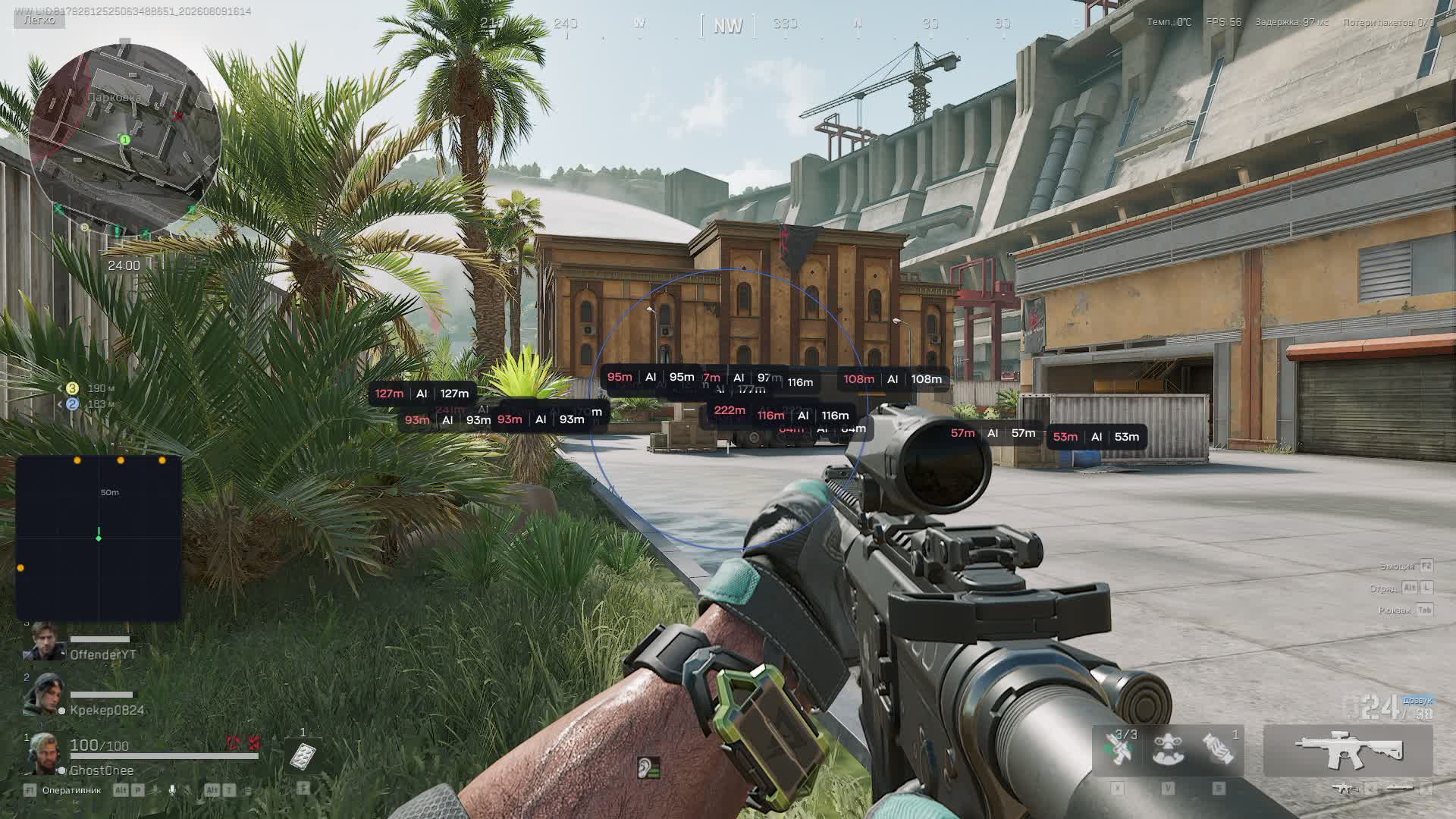
Ghost for Delta Force is built around Hawk Ops and solves two problems in a raid: finding loot and winning trades. Loot ESP splits items by rarity, marks safes and containers separately and can hide empty or already-opened crates, so your route through a location only touches live points.

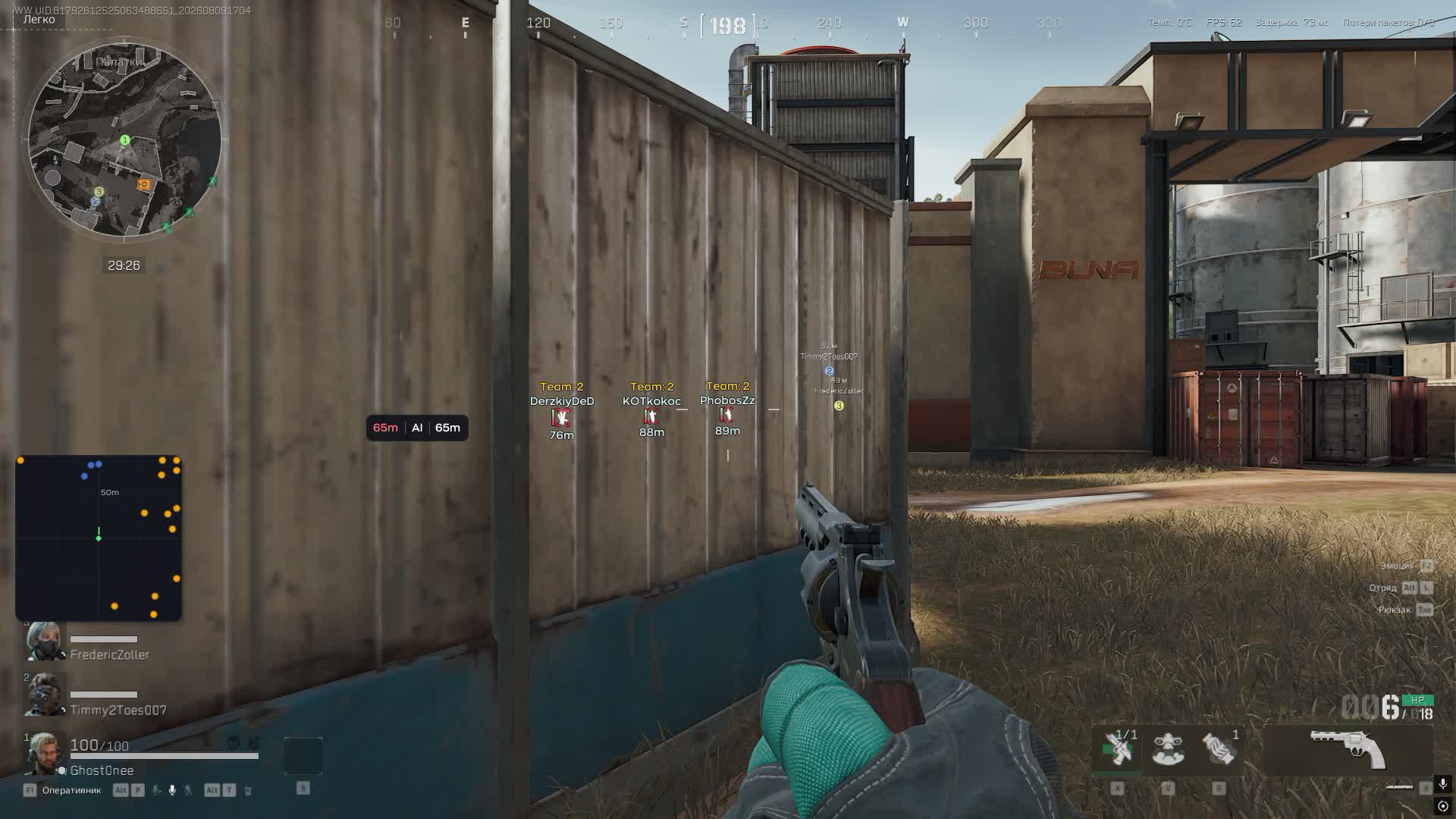
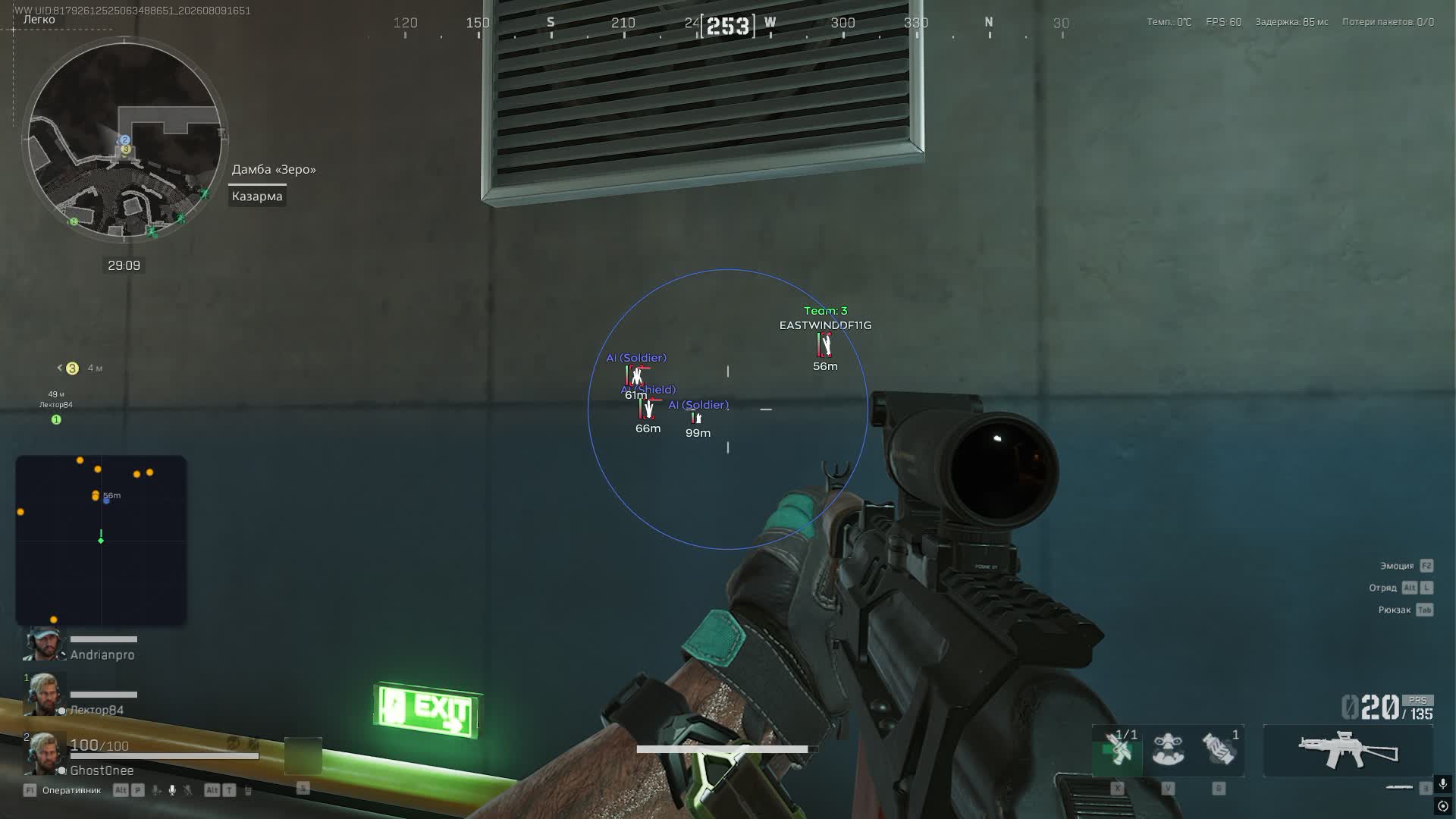
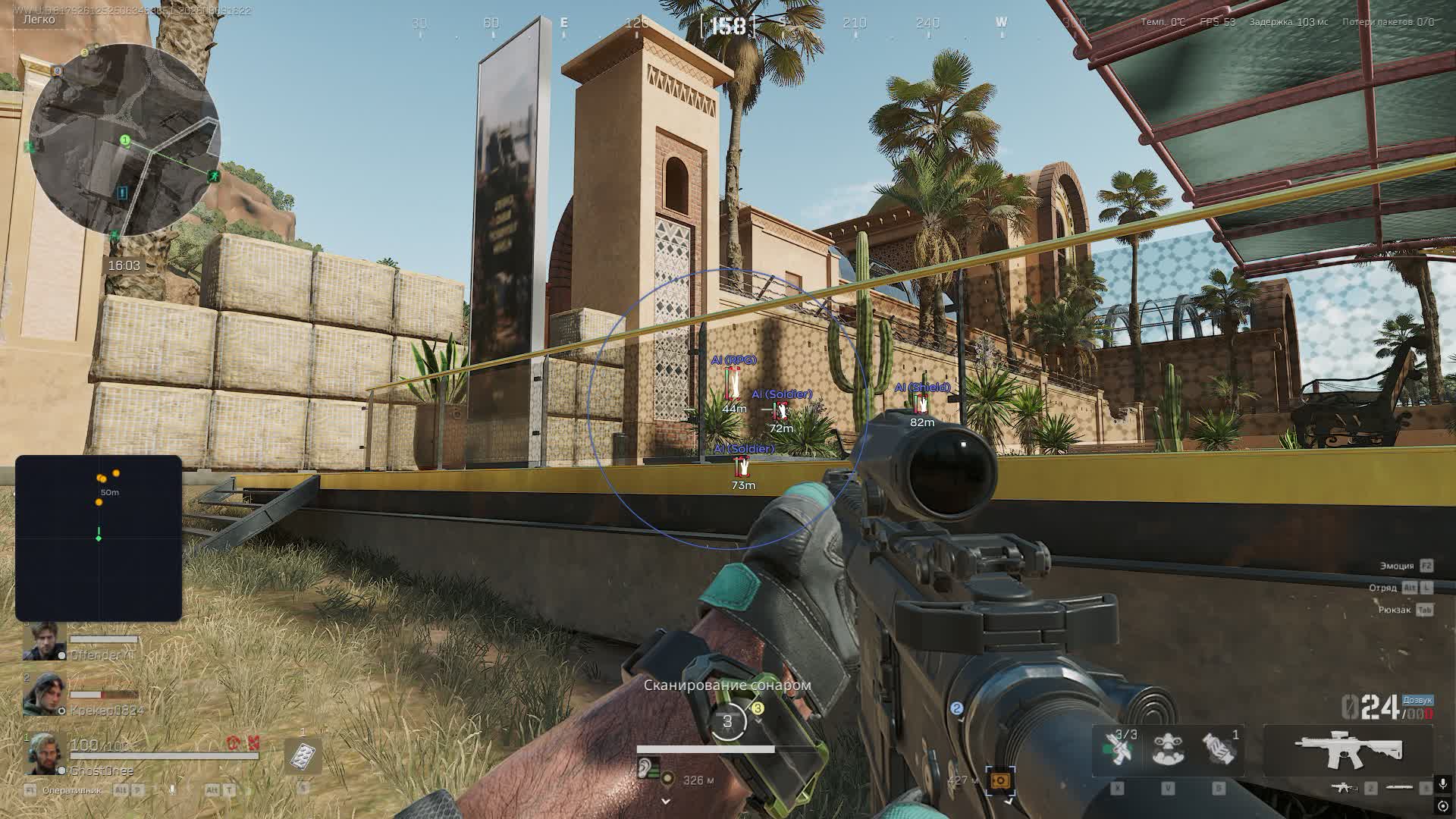
The aimbot runs in two modes, Memory and Silent, and comes wrapped in humanization: jitter, a deadzone, a spread of reaction times and a cap on drag speed. Alongside sit visuals with box, skeleton, health and view direction, plus a mini radar with adjustable scale and range. The game runs kernel-level ACE, so launching and risk get their own section below.

Product features

Aimbot

Aim mode

Two types to pick from: Memory and Silent. The first visibly drags your crosshair, the second puts the bullet on target without an obvious camera move.

Capture angle

FOV sets the cone the aim works inside. Narrow suits holding an angle, wide helps in close quarters on a point.

Smoothing

Drag smoothness sits on a slider. The higher the value, the calmer the crosshair looks to a squadmate watching you.

Hitbox and bone

Choose the body part to aim at and the exact bone on the model. Head against light armor, torso against heavy.

Max distance

The aim's working range is capped by a number, so it stops reaching for targets halfway across the map.

Humanize: jitter

Micro-movements while tracking, so the crosshair never sits perfectly still. A perfectly still crosshair is what gives software away on video.

Humanize: deadzone

The deadzone keeps the aim from nudging your crosshair until the target leaves that zone. Small twitches disappear.

Humanize: reaction

Minimum and maximum delay before tracking are set separately. The spread imitates real reaction time instead of an instant lock.

Humanize: speed

Max Speed caps how fast the aim drags. The crosshair physically cannot jump to a head in a single frame.

Visuals

Box and skeleton

A frame around the model plus bone lines. The pose shows whether an operator is prone in a bush or sprinting for evac.

Name and health

Nickname or target type plus an HP bar. You know whether to finish a wounded player or back off from a healthy one.

Distance

Range to each target in meters. It helps pick the right gun before the trade even starts.

View direction

A line showing where a player is looking. You take their back while they face the other way.

Party

Separate highlighting for your own squad. In a four-stack on a contested point nobody trades shots with a teammate.

World: loot and containers

Bodies

Corpse drawing across the map with its own toggle for bots. You go for the enemy backpack instead of circling the spot where the fight happened.

Containers and safes

Crates are highlighted and safes get their own marker. Priority spots are visible before you even enter the building.

Hide empty and opened

Two filters clear anything already looted or empty. Your route through the location only touches live points.

Loot by rarity

Items split into value tiers: common, rare, epic and legendary. Kill the junk and keep whatever you came into the raid for.

Label format

Short mode trims names, while armor level and stack count are shown separately. The screen never turns into a wall of text.

Radar

Mini radar

A separate window with the situation around you. Size and scale adjust to your resolution.

Dots and range

Marker size, its style as circle, square or triangle, and a maximum detection distance. Far markers are trimmed so the map stays readable.

Settings

Configs

Create, save, load and delete presets. One set for quiet looting, another for a fight in Havoc Warfare.

Interface

Text shadow for readability on bright textures, a watermark and an on-screen list of active binds. All of it optional.

Development history

08.08.2025

Critical Ghost Cheat Update for Delta Force!

Critical Ghost Cheat Update for Delta Force!

🤯 We're thrilled to announce that our Delta Force product has been fully updated and is back online! All active subscription time has been unfrozen and compensated.

☝️ While the product was down, we weren't sitting idle. The cheat has been completely rewritten from scratch with a new, more robust anti-cheat bypass, significantly improving its security and stability.

⚠️ In the interest of maximum user safety and the stability of the new bypass, we made the tough call to remove the Spoofer from this version. Your safe and comfortable gaming experience is our top priority.

✅ What's new:

  • Full-featured Loot ESP tab added.
  • Display of item price and rarity .
  • Display of containers .
  • Display of corpses .
  • Configurable maximum loot distance .

🔧 Key changes:

  • Enhanced security: Brand new bypass, rewritten from the ground up.
  • Optimization: The product runs smoother and more stable than ever.
  • Spoofer removed: This decision was made to improve overall cheat safety.

Thank you for your patience and trust. Enjoy the game with the new and improved product!

Known issues & fixes

Real questions from our support, with the fixes that worked. Based on user requests for this product.

The download site or loader won't open, or shows a connection error — what should I do?
  • Try connecting through a VPN — access to the site or activation servers is sometimes blocked at the ISP or regional level.
  • Check your internet connection and try downloading the file again.
  • If the issue persists after using a VPN, contact support — they may ask for additional diagnostics of your system and a screenshot of the result.
I pasted my key into the loader but it says key not found or not active

Make sure you copy the key in full with no extra spaces at the beginning or end. If the error persists right after purchase, contact support and provide: a screenshot of the key from your payment confirmation, the key as plain text, and a screenshot of the error in the loader , the operator will forward this to the developer to verify activation.

Loader launched and says to open the game, but after starting the game the loader doesn't close and the cheat doesn't activate

Launch order matters: start the loader first and wait for the prompt to open the game, then launch the game , not the other way around. Do not start the product while the game is already running.

If the order is correct and the issue persists, download the Sordum utility (available from technical support; archive password: sordum), run it, click Search, and send a screenshot of the results to support , this helps diagnose conflicts on your system.

Loader closes by itself or loops on startup

Reinstall the loader and update your GPU drivers , this resolves the issue in most cases. If the loader still closes on its own, try launching with a VPN enabled, then fully reboot your PC.

If nothing helps, the developers may be actively working on a fix , check with support for the current status.

My account gets banned or flagged soon after I play with the cheat — what can I do?

If your account gets flagged or banned soon after using the software, this is usually anti-cheat detection on the game's side rather than a bug in the product. Registering a new account and using the hardware-spoofing feature (spoofer), if your product version includes one, usually helps. This doesn't guarantee you won't get flagged again. If your main account is already flagged, don't count on it being unbanned — it's better to switch to a new account.

The loader says my Windows version isn't supported — what should I do?

Only officially released builds of Windows 11 are supported — beta and Insider builds (early versions of updates that haven't been officially released yet) may not be supported by the loader. The opposite can also happen: a very old, long-unupdated system can also prevent the software from launching. Update Windows to the latest officially released version (not a beta channel) and try again.

After a game update the product stopped connecting, what should I do?

If the product stops connecting right after a game update, without any error messages, this is expected: the developer needs time to adapt it to the new game version.

The update usually takes about a day, sometimes less. Wait for it and start the loader again — everything will work automatically, no reinstall is needed.

All issues & general troubleshooting
TARIFFS
$5.77
BUY What happens after payment?
Got a question? Ask before you pay

We'll help you choose and sort out any launch issue. Ask us anything before buying, we're always on your side.

Support 10:00–22:00, sometimes we reply at night too
Ask a question
Update history
  • 19.08.2026 Working
    Received an update
  • 13.08.2026 Working
    Received an update
  • 11.08.2026 Working
    Received an update

Available tariffs

1 day
$5.77
START PURCHASE
7 days
$23.08
START PURCHASE
30 days
$46.16
START PURCHASE
Reviews about Cheat Ghost

This product has 3 reviews across 746 sales, only about 0.4%. Most satisfied buyers never write a review, the ones who do are usually those who ran into a question. So do not judge the product by the number or the tone of reviews alone, weigh them against how many people actually bought it.

4.9 / 5
3 reviews · 746 sales on Digiseller
How the rating is calculated

Most satisfied buyers never leave a review — people write mainly when something went wrong, so text reviews skew negative. The score is smoothed over every sale, not just the written reviews.

rating = (G + S + 10·0.9) / (N + S + 10) × 5

  • G — sum of review positivity (5★ = 1, 1★ = 0)
  • N — number of text reviews = 3
  • S = (sales − N) × 0.15 — silent satisfied buyers

3 reviews against 746 sales — only 0.4% of buyers wrote anything.

Аим блокается а все остальное робит
Customer review 22.08.2026

Во время операций аим блокается через минут 10, просто играешь и он просто в одну точку смотрит и персонаж не двигается

Customer Not recommended
Verified purchase · Digiseller 30.08.2025

Чит сразу детектится игрой на этапе закрузки карты. Даже из самолёта выйти не успеваешь. "Наша система обнаружила нерегулярную обработку данных в вашей учетной записи. В целях безопасности вашего персонажа вы были временно выведены из системы. Просьба обеспечить соблюдение правил надлежащей игровой практики Время разбана: 2025-08-30 10:25:36 EUTC/GMTI- UID:189658240298085594773 помощь"

ProCheat reply

Обращайтесь в поддержку за помощью

Customer Not recommended
Verified purchase · Digiseller 05.05.2025

после 1 матча сразу выдали временную блокировку.

ProCheat reply

^(

Your review

Reviews are published after moderation.

Join our gaming community chat

Discuss current cheats from developers and how to use them effectively in popular online games. Share tactics, exchange useful info and find like-minded players in our community.

1 900+Members
24/7Online
Join our gaming community chat

Technical support

Run into a technical issue? Our team of experts will help. We handle all requests in a live queue, so please be understanding if it sometimes takes a little wait. We guarantee that no request goes unanswered.

Availabilityfrom 10:00 to 23:00
Fast responseIn queue order
Get help
Technical support
PROCHEAT

PROCHEAT news channel

Follow product status changes, update history and important announcements.

Subscribe

Ghost for Delta Force: the menu layout

The menu splits across five tabs. Here is a short map of what sits where and which mode it works for.

Tab What is adjustable Where it decides things
Aimbot Memory or Silent, FOV, smoothing, hitbox, bone, max distance mid-range trades and pushing a point
Humanize jitter, deadzone, min and max reaction, speed ceiling an aim that does not look robotic on video
Visuals box, skeleton, name, health, distance, view direction, party enemy positions and intent through walls
World bodies, containers, safes, empty and opened filters, loot by rarity your collection route in Hazard Operations
Radar window size, scale, dot size and style, range situational awareness without leaving your sights
Settings configs, text shadow, watermark, bind list separate presets for looting and for fighting

Aimbot: Memory versus Silent

The two aim modes solve different problems. Memory drags the crosshair visibly: the camera turns toward the target, and from the outside it looks like a very fast player. Silent works differently, leaving the camera where it is while the shot lands on target. The second is less visible to anyone watching your screen, but it looks sharper in hit statistics if you push it to the maximum.

The remaining settings are shared by both modes. FOV sets the capture cone, smoothing controls how sharply it drags, and hitbox with bone mode choose the point of impact. Max distance deserves its own note: without a cap the aim starts reaching for silhouettes at the far end of the sector, and even your own squad notices that.

Humanization: why it matters under ACE

The Humanize block is the most interesting part of this build. It holds four settings: jitter adds micro-movements so the crosshair never sits perfectly still; the deadzone forbids the aim from nudging your camera while the target stays inside a set radius; minimum and maximum reaction delay define the spread before tracking begins; and Max Speed caps how fast it drags.

The point is that ACE and live players catch different things but agree on one: unnaturalness. An instant lock within a single frame, a perfectly steady crosshair and an identical delay before every shot form a pattern that reads both in logs and on video. Tuned humanization turns the aim into a believably fast hand. It does not remove the risk, but it clears out the crudest tells.

Loot ESP: safes, rarity and filters

In Hazard Operations a raid is time-limited, and the whole question is where to run. Loot ESP splits items into four value tiers: common, rare, epic and legendary. Common usually gets switched off entirely while rare and above stay on, which turns the screen into a map of priorities instead of a soup of labels.

Containers are drawn separately and safes get their own marker. Two filters make the feature genuinely useful: hide empty and hide opened clear the points where there is nothing to take or where someone already passed through. That saves exactly the seconds you lack on the way out. Label format is adjustable too: short mode trims names, and armor level and stack count can be shown on their own.

Visuals and radar: reading positions

The visual set here carries no excess: box, skeleton, name or target type, health, distance. The most useful line is view direction. It shows where an operator is looking, and flanking stops being a coin flip. Party highlighting in its own color removes any question about trading shots with a teammate on a contested point.

The mini radar fills in the rest. Window size, scale, dot size and dot style, whether circle, square or triangle, plus a maximum detection range are all adjustable. On tight locations pull the radius in; on the open stretches of Havoc Warfare let it out, or half the markers end up outside anything you care about.

Hazard Operations and Havoc Warfare: what matters where

The two modes are built differently, and the same set of settings does not behave the same in both. Hazard Operations is the extraction mode: you go in on a timer, gather loot and leave through an evac point, and everything you carried dies with your operator. The World tab carries the value here: item rarity, safes, filters for empty and opened containers, corpse drawing. Aim is secondary, because a raid is more often lost to a bad route than to bad shooting.

Havoc Warfare is large-scale combat with vehicles and respawns, where nobody hauls loot around. The priorities flip: visuals with view direction, a radar with extended range and a properly humanized aim move to the front. Loot ESP can be switched off there so it stops crowding the screen. That is exactly what the config system is for: one preset for quiet looting, another for the fight, swapped in a couple of clicks.

ACE in Delta Force: what to know before buying

Delta Force is protected by Tencent's Anti-Cheat Expert, a kernel-level anti-cheat. It gets deep system access, installs with the game and is known for clashing with other kernel-level protections: with an EAC-based game running alongside, one of them may not start. That same behavior earned ACE a wave of negative Steam reviews.

What that means for a buyer. First, public free trainers do not survive protection like this, so a private build lives on updates for every patch. Second, the ban risk is real and nobody hands out absolute guarantees, which is the developer's own wording rather than our caution. Third, there is no bundled spoofer: if a hardware ban already happened, a Delta Force spoofer is a separate product in this very section. And the obvious one: do not run the cheat alongside overlays and questionable FPS boosters.

How to buy the Ghost Delta Force cheat

Three terms are available: a day, a week and a month. People take the day for a specific session when they need to pull off a couple of heavy raids. A week or a month works out cheaper per day and suits anyone living in Hawk Ops. The current price and build status are shown right on the card.

After payment the key and the loader arrive by email at the address you gave; there is no account area on the site, so check that address in advance. Look at the status before buying: if the cheat is on an update after a patch, your paid days survive but you will not get in right now. Questions about ACE conflicting with other anti-cheats are best asked in support before payment rather than after the first launch.

FAQ

How is Ghost different from other Delta Force cheats?

By pairing a humanized aim with filtered loot ESP. The aim is tuned through jitter, a deadzone and reaction timing, while loot splits across four rarities with separate safe highlighting and empty-container hiding.

What are the Memory and Silent modes?

Memory visibly turns your camera onto the target; Silent sends the shot to the target without an obvious crosshair move. The first feels familiar, the second is less visible to anyone watching your screen.

Is a spoofer included?

No. Delta Force runs kernel-level ACE, and if a hardware ban has already hit you, a separate spoofer is needed. There is one in this same catalog section.

Is it true that ACE conflicts with other anti-cheats?

Yes, it is a known issue: the ACE driver does not get along with EAC, which can stop EAC-based games from launching alongside it. Close them before a Delta Force session.

Does it have loot and safe ESP?

It does. Containers and safes are highlighted separately, items are split into common, rare, epic and legendary, and empty or already-opened crates are removed by a filter.

Will I get banned?

Nobody offers guarantees, and the developer says so openly. The risk drops with properly tuned humanization, avoiding blatant plays in front of other players, and running without extra software in the background.

What happens after a game update?

The build goes in for fixes against the new patch, the status on the card changes, and subscription days are frozen until it is repaired.

Latest updates

19.08.2026 17:39
Working
Received an update
13.08.2026 18:36
Working
Received an update
11.08.2026 23:48
Working
Received an update
09.12.2025 12:05
Frozen
Sent for update, time frozen
18.11.2025 16:38
Working
Updated, time unfrozen
Open full history
from $5.77 Choose a plan
Ask a question


