Last update 25.06.2026
This date shows when the software was last updated. An old date doesn't mean the software stopped working! Most likely the developer just had nothing new to add. If you have any doubts, you can always check the current status with our support team.
Add another cheat from this game too — to compare them.
Steam
Epic Games
Windows support:
10: all builds; 11: all builds
Menu language:English
Spoofer:No
USB drive:Yes
BIOS:No
SCREENSHOTS
Description
TOP-1 IS WAITING FOR YOU!
Stop hiding in the bushes! With the ESP cheat from Covcheg for Fortnite, you always know where the action is hottest on the island. This cheat is built for smart players who value information and security. No aimbot, just clean, crystal-clear Wallhack!
A product from the trusted developer Covcheg lets you see enemies through any structure, whether it's a skyscraper in Tilted Towers or a humble shack. Plan, attack, and claim your Victory Royale!
Product features
Visuals (Sharp Visuals)
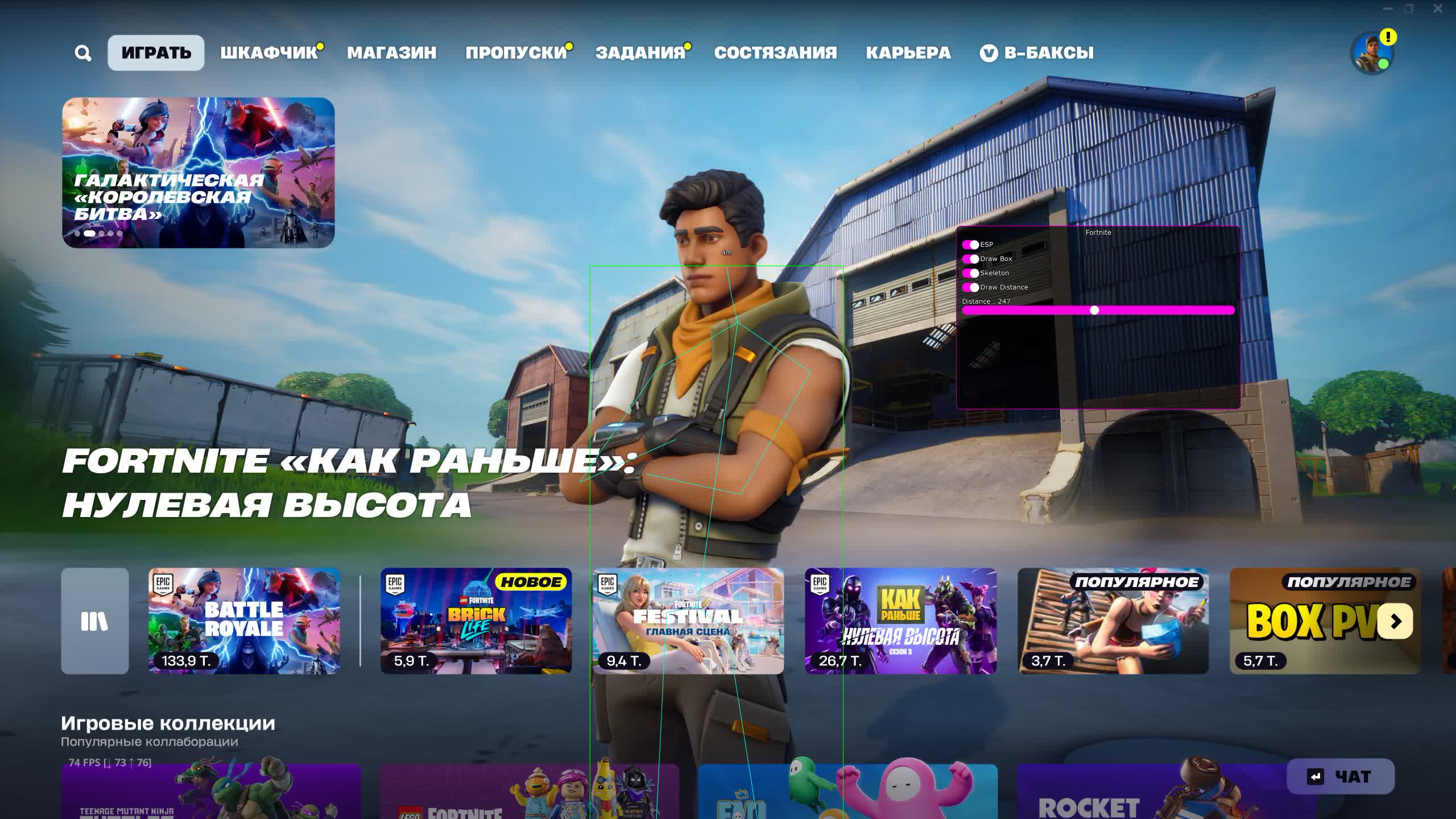
Enable Boxes
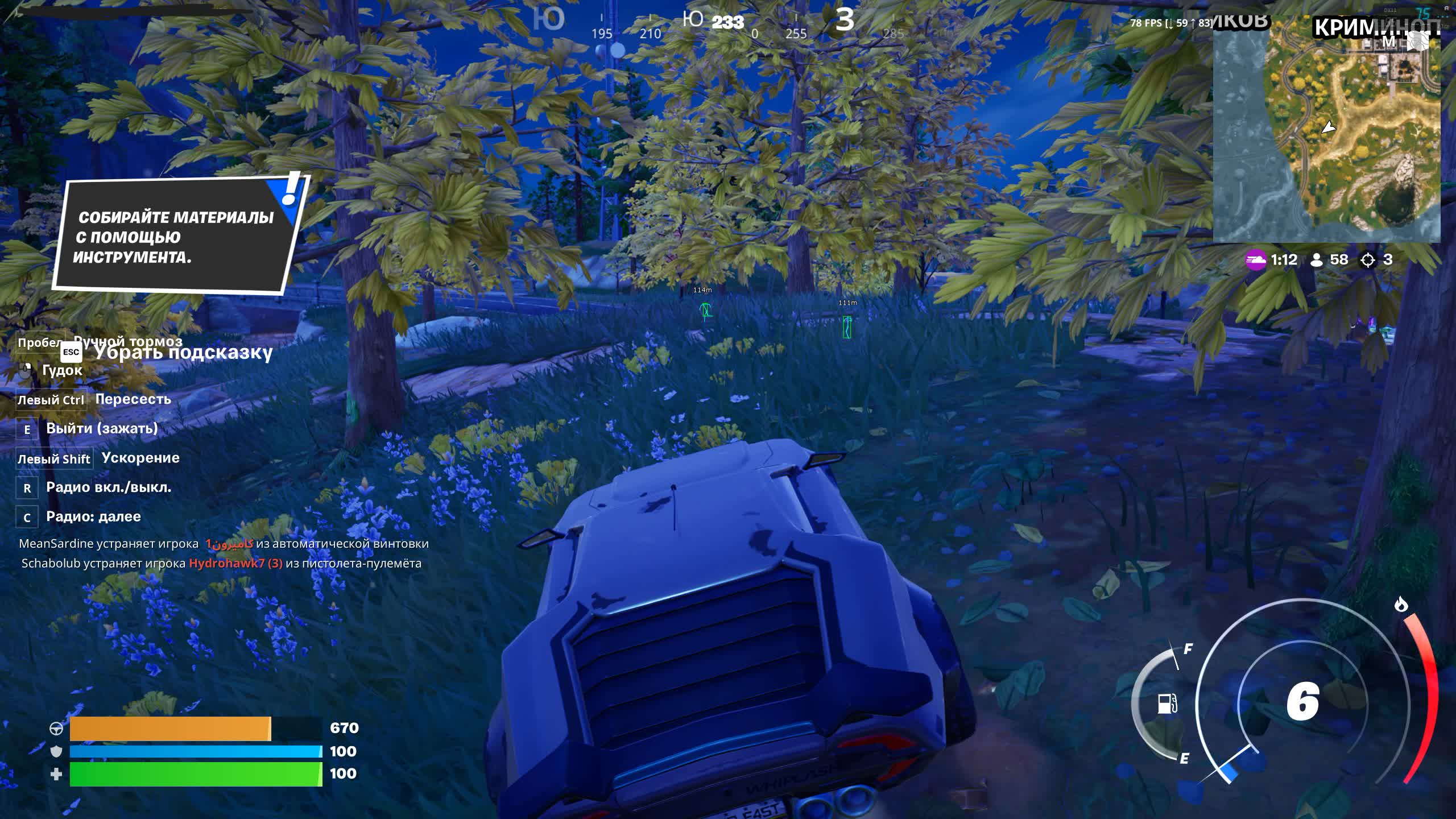
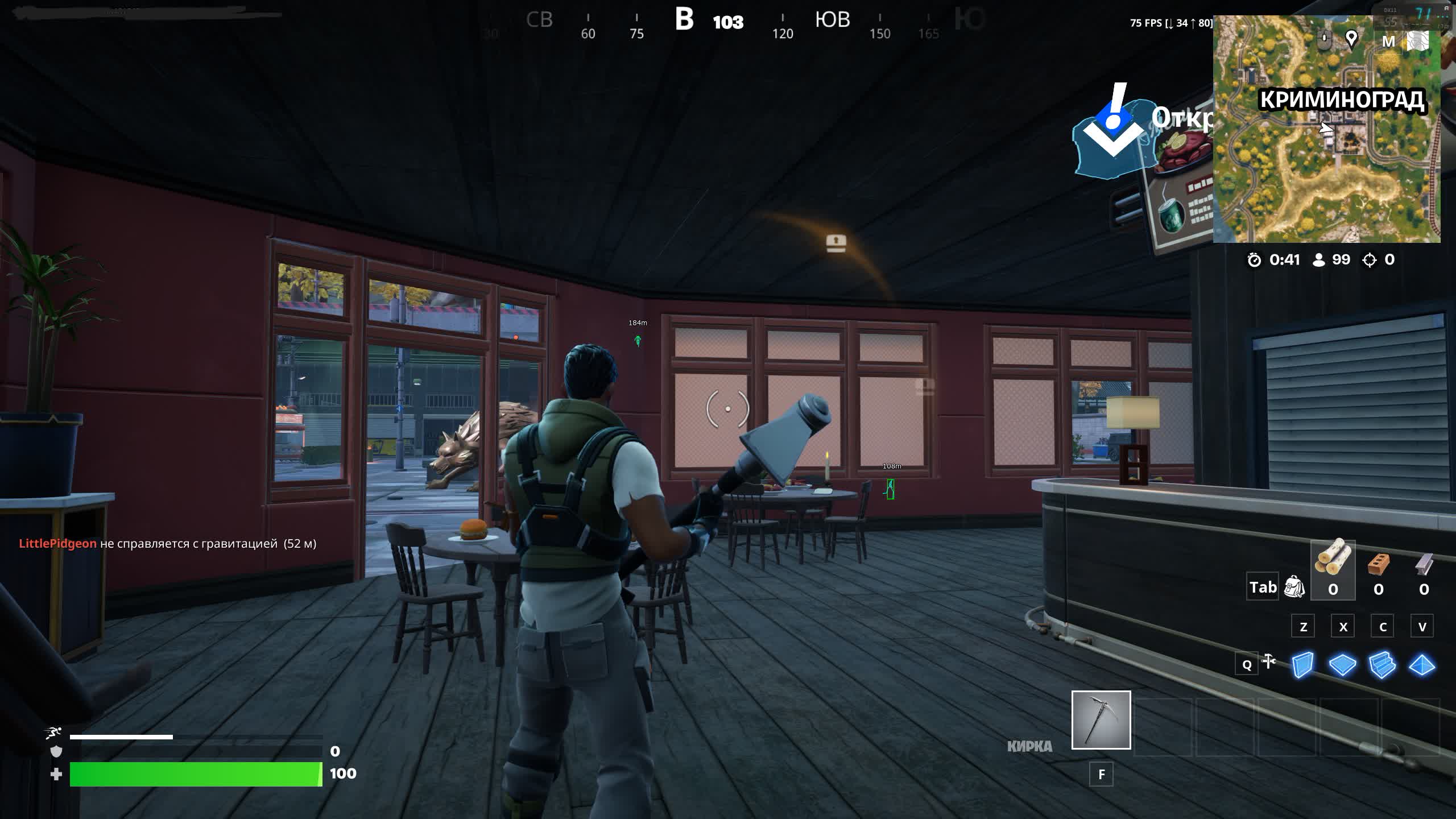
Always in sight. Bright boxes around enemies show through walls and buildings. Nobody hides in a bush or behind a tree!
Enable Skeletons
X-ray vision. See the enemy's skeleton and read their pose: are they sitting, jumping, or aiming at you. Full control of the situation!
Player Distance
Pick your moment. Instantly know the distance to your target. Grab the sniper for long range or the shotgun for close quarters, and hit with confidence!
Distance Filter
Focus on what matters. Clear the extra markers off your screen. See only the players nearby who pose a real threat. No clutter!
Known issues & fixes
Real questions from our support, with the fixes that worked. Based on user requests for this product.
The loader can't connect to the server and shows a connection error on launch
This is usually caused by your internet provider blocking the connection, not by the program itself.
Connect through a VPN and try a few different server locations — sometimes one specific server is also blocked.
If the error persists, download the loader again, as the version you have may be outdated.
Check that your computer's date and time are set correctly.
If nothing helps, contact support with details of the error.
Loader shows anticheat error on launch or crashes when starting the game
Anticheat errors and loader crashes when starting the game are typically resolved by enabling a VPN. Connect to a VPN, then relaunch the loader and the game.
Also ensure Windows Defender is disabled (e.g. via Defender Control), no third-party antivirus is running, and no unnecessary background software is active.
Loader window appears but cheat menu does not open after injection
If after injection only the loader window appears and the cheat menu never shows, follow these steps:
Download the Sordum utility (available from technical support; archive password: sordum).
Run it, click Search, and wait for it to finish.
Take a screenshot of the result, then repeat the loader launch procedure.
This clears conflicting processes that prevent the menu from appearing.
The checker tool still detects active antivirus protection even though I disabled it
If the checker keeps flagging active protection, the antivirus was likely only turned off in settings rather than fully removed — some of its services and drivers can stay behind.
Uninstall the antivirus completely using the official uninstaller from its vendor, not just by disabling it in settings.
Restart your computer and run the checker again.
If it still detects protection, contact support so they can help identify what's left.
After injecting I get an error like "failed to load module" or "module not found"
This kind of error usually points to corrupted or outdated loader files, or leftover antivirus components still in the system.
If any antivirus is still installed, remove it completely with its official uninstaller.
Download the latest version of the loader again instead of reusing old files.
Run the loader as administrator and try again.
If the error keeps appearing, contact support with a screenshot of the message.
The cheat stopped working after a game update — what should I do?
After a major game update, the cheat's developer needs time to adapt the program to the new version — during this period the cheat may be temporarily unavailable or behave incorrectly.
Wait for an official update notice from support.
Do not try to run the old build against the new patch — this increases the risk of a ban.
An external cheat only launches from a USB drive — can it be switched to run directly from the PC?
No, the launch method cannot be changed: if the cheat is an external type, loading it from a separate storage device is part of its anti-detection architecture, not an optional setting.
If this launch method does not suit you, check with support whether the product has a separate internal version.
I got banned by anti-cheat — how do I get back into the game with the cheat?
If an account gets banned by anti-cheat, the hardware ID (HWID) tied to it is also considered burned, so simply activating a new license key will not fix the issue.
Before using the cheat again, it is recommended to get a separate HWID-spoofing tool — it makes the system see the hardware as new.
Most satisfied buyers never leave a review — people write mainly when something went wrong, so text reviews skew negative. The score is smoothed over every sale, not just the written reviews.
rating = (G + S + 10·0.9) / (N + S + 10) × 5
G — sum of review positivity (5★ = 1, 1★ = 0)
N — number of text reviews = 43
S = (sales − N) × 0.15 — silent satisfied buyers
Customer
Recommends
Verified purchase · Digiseller10.06.2026
ВХ работает отлично, всё чётко. Обновы выходят быстро, после патчей игры чит фиксят без задержек. Поддержка помогла, ответили быстро и по делу. За неделю ни одной проблемы, всё заявленное работает
Customer
Not recommended
Verified purchase · Digiseller07.12.2025
ужасно
Customer
Not recommended
Verified purchase · Digiseller26.03.2024
не совпадает с описанием
Customer
Not recommended
Verified purchase · Digiseller13.03.2024
The product crashes my PC even though I followed all the instructions. The product definitely does not work and the reseller doesn't want to refund.
Customer
Not recommended
Verified purchase · Digiseller25.01.2024
Отвратительный чит, боюсь не только что забанят сразу, боюсь что комп нахуй взлетит от этого говна!
Customer
Not recommended
Verified purchase · Digiseller11.01.2024
Проблема С Софтом, Не Хочет РАботать В Самой игре, Вроде как всё запустилось по факту, Но на деле ничего не произошло, Менюшка не вышла, Вх нет...
Customer
Not recommended
Verified purchase · Digiseller17.11.2023
Только заинжектил сразу в бан улетел, даже стрельнуть не разу не успел
забанило аккаунт после суток использования лайт версия параша а не чит
Customer
Not recommended
Verified purchase · Digiseller25.07.2023
прошло 7 а чита нет не покупайте бред деньги не хочет возращать
Customer
Recommends
Verified purchase · Digiseller20.07.2023
норм
Customer
Recommends
Verified purchase · Digiseller19.07.2023
Все супер брали у Azewolf на Funpay
Customer
Recommends
Verified purchase · Digiseller18.07.2023
Все четко брали у Azewolf на Funpay
Customer
Recommends
Verified purchase · Digiseller17.07.2023
Все супер брали у Azewolf
Customer
Recommends
Verified purchase · Digiseller16.07.2023
Все супер, брали у Azewolf
Customer
Recommends
Verified purchase · Digiseller15.07.2023
Hachico you are the best
Customer
Recommends
Verified purchase · Digiseller15.07.2023
Все супер брали у Azewolf на Funpay
Customer
Recommends
Verified purchase · Digiseller12.07.2023
супер брали у Azewolf на Funpay
Customer
Recommends
Verified purchase · Digiseller07.07.2023
Все супер, брали у Azewolf на Funpay
Customer
Recommends
Verified purchase · Digiseller05.07.2023
Все супер брали у Azewolf на Funpay
Customer
Recommends
Verified purchase · Digiseller02.07.2023
Все супер, покупали у Azewolf на Funpay
Customer
Recommends
Verified purchase · Digiseller30.06.2023
Хороший чит хочу доп время
Customer
Recommends
Verified purchase · Digiseller30.06.2023
Все супер, брали у Azewolf на Funpay
Customer
Recommends
Verified purchase · Digiseller30.06.2023
Все супер, брали у Azewolf на Funpay
Customer
Recommends
Verified purchase · Digiseller25.06.2023
Все супер, беру Apex Lite у Azewolf на FUnpay и не первый день, все четко работает
Customer
Recommends
Verified purchase · Digiseller22.06.2023
Все супер брали у Azewolf на Funpay
Customer
Recommends
Verified purchase · Digiseller20.06.2023
все топ норм
Customer
Recommends
Verified purchase · Digiseller27.05.2023
Товар супер крутой
Работает всё очень качественно и быстро
Играю уже очень долго и не детект.
Буду ещё покупать обязательно!
Customer
Recommends
Verified purchase · Digiseller05.05.2023
Всё супер, горячо рекомендую к покупке)
Customer
Not recommended
Verified purchase · Digiseller27.02.2023
Где скачать сам чит
Customer
Not recommended
Verified purchase · Digiseller25.02.2023
не работает
Customer
Recommends
Verified purchase · Digiseller20.02.2023
666
Customer
Not recommended
Verified purchase · Digiseller17.02.2023
ключь не верен
Customer
Not recommended
Verified purchase · Digiseller14.02.2023
лохотрон ключ не отправили не покупайте короче
Customer
Not recommended
Verified purchase · Digiseller03.02.2023
купил продукт на апекс,1)на странице покупки только фаил,не каких инструкций.
2)сам лоадер не работает (консоль чёрная и пропадает 2-3с)
Customer
Recommends
Verified purchase · Digiseller26.01.2023
все быстро и оперативно советую!
Join our gaming community chat
Discuss current cheats from developers and how to use them effectively in popular online games. Share tactics, exchange useful info and find like-minded players in our community.
Run into a technical issue? Our team of experts will help. We handle all requests in a live queue, so please be understanding if it sometimes takes a little wait. We guarantee that no request goes unanswered.
Safe Play: Why Covcheg ESP Is the Best Choice for Fortnite
Fortnite is known for its powerful anti-cheats, EAC and BattleEye, which don't forgive mistakes. That's exactly why the ESP cheat from Covcheg is the ideal choice for careful players. It has no aimbot or other "crude" features that are easy to detect. The developers focused on one task, a quality and safe Wallhack. The cheat's code is updated regularly to bypass anti-cheat checks and keep your game stress-free. You get a huge tactical advantage while staying "clean" in the eyes of the system.
See Everything: How ESP Improves Your Tactics in Fortnite
With the ESP cheat from Covcheg you stop reacting to events and start predicting them. Seeing an enemy through the wall they just built, you know where they're going to edit it. Spotting a whole squad inside a building, you won't rush in alone. The skeleton display feature shows whether an enemy is sitting in ambush or healing, which gives you the perfect moment to attack. This cheat is your personal tactics coach, feeding you all the information in real time so you make the one right decision.
Nothing Extra, Just the Win
In the heat of battle there's no time for complicated settings. Covcheg ESP gets that. The cheat has the simplest, most intuitive interface possible. Every feature toggles on and off in an instant. The distance filter lets you set your priorities easily, clearing distant players off your screen and focusing on the ones who pose a real threat. This is the ideal tool for players who value their time and want maximum effectiveness without the hassle. Launch it, set it up in 10 seconds, and go grab your Top-1.
What happens after payment?
After successful payment you receive access details on the order page at oplata.info. The product key and usage instructions are shown inside the purchased item page.
Contact technical support first. Support requests can be escalated to the developer, so you get the most accurate answer for the selected product.
Status changes are published in the Telegram news channel, on the update history page, and directly on the product page.
The product can be temporarily frozen while the developer updates it. Subscription time is frozen as well, so you do not lose paid time.
Contact support with the order link, product name, Windows build, and a video of the issue. If the problem cannot be solved, we help with the refund process.
Use the public Telegram community for general discussion. Technical support questions should still go through support channels.
If the payment fee looks too high, contact support. We can suggest an alternative payment option when available.
Support replies in queue order. A complete request with screenshots or video is usually processed faster.
Send clear details, stay constructive, and keep the order link available. This helps support solve the issue faster.

 Covcheg



 Join all games chat