Last update 12.05.2026
This date shows when the software was last updated. An old date doesn't mean the software stopped working! Most likely the developer just had nothing new to add. If you have any doubts, you can always check the current status with our support team.
Add another cheat from this game too — to compare them.
Steam
Windows support:
10: all builds; 11: 21h2, 22h2, 23h2, 24h2
Spoofer:Yes
USB drive:No
BIOS:No
User information
Works only on Nvidia graphics cards
SCREENSHOTS
Description
Operation: "Clean Sweep"
In Rainbow Six Siege, information is a weapon. Chams from Covcheg is your personal tactical advantage. This cheat was built with one goal: to give you full visual superiority without cluttering your screen or putting your account at risk. No aimbot, no extra functions, just pure information, clear as day.
This product from trusted developer Covcheg highlights operator models and their gadgets through walls, floors and ceilings. You always know where the enemy is setting a trap, where they are about to push from and where their drone is. This is the pick for operators who win with their heads.
Product features
Chams (High-Contrast Vision)
Chams on Players
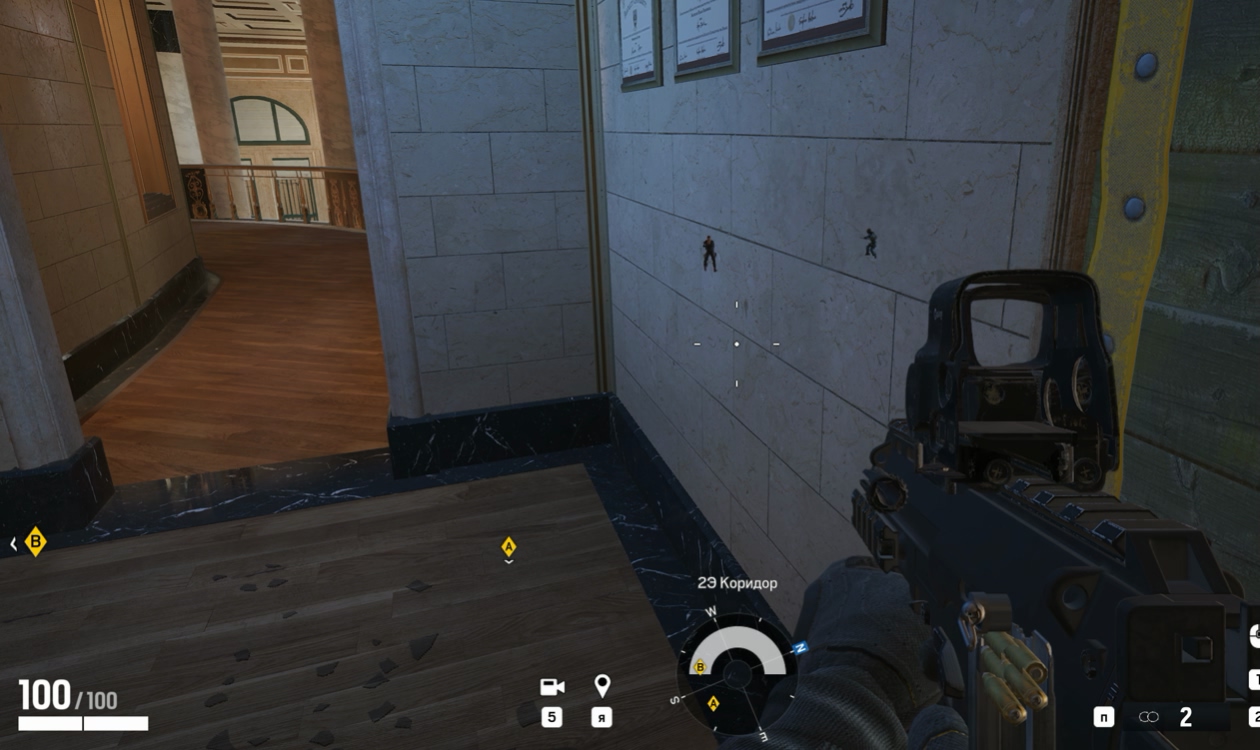
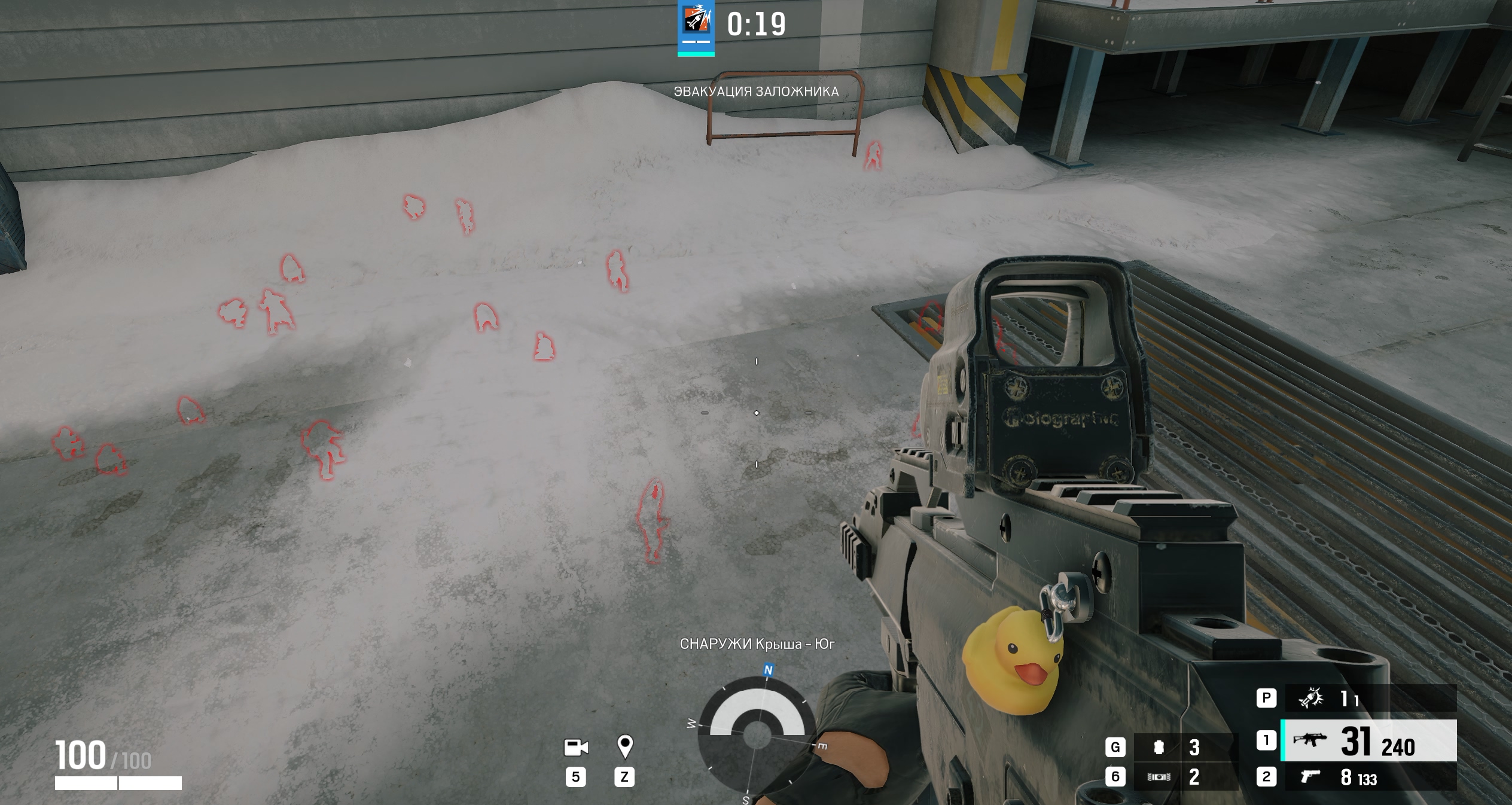
Bright targets. Operators are fully filled with color. See them through breakable walls, barricades and smoke. Perfect reaction on peeks.
Chams on Gadgets
Sapper. Highlights enemy gadgets through walls. Spot Frost traps, Lesion mines and Valkyrie cameras before you walk into them.
Chams on Bots
Training. Turn on bot highlights in Terrorist Hunt to warm up and tune your aim before ranked matches.
Known issues & fixes
Real questions from our support, with the fixes that worked. Based on user requests for this product.
The loader can't connect to the server and shows a connection error on launch
This is usually caused by your internet provider blocking the connection, not by the program itself.
Connect through a VPN and try a few different server locations — sometimes one specific server is also blocked.
If the error persists, download the loader again, as the version you have may be outdated.
Check that your computer's date and time are set correctly.
If nothing helps, contact support with details of the error.
Loader shows anticheat error on launch or crashes when starting the game
Anticheat errors and loader crashes when starting the game are typically resolved by enabling a VPN. Connect to a VPN, then relaunch the loader and the game.
Also ensure Windows Defender is disabled (e.g. via Defender Control), no third-party antivirus is running, and no unnecessary background software is active.
Loader window appears but cheat menu does not open after injection
If after injection only the loader window appears and the cheat menu never shows, follow these steps:
Download the Sordum utility (available from technical support; archive password: sordum).
Run it, click Search, and wait for it to finish.
Take a screenshot of the result, then repeat the loader launch procedure.
This clears conflicting processes that prevent the menu from appearing.
The checker tool still detects active antivirus protection even though I disabled it
If the checker keeps flagging active protection, the antivirus was likely only turned off in settings rather than fully removed — some of its services and drivers can stay behind.
Uninstall the antivirus completely using the official uninstaller from its vendor, not just by disabling it in settings.
Restart your computer and run the checker again.
If it still detects protection, contact support so they can help identify what's left.
After injecting I get an error like "failed to load module" or "module not found"
This kind of error usually points to corrupted or outdated loader files, or leftover antivirus components still in the system.
If any antivirus is still installed, remove it completely with its official uninstaller.
Download the latest version of the loader again instead of reusing old files.
Run the loader as administrator and try again.
If the error keeps appearing, contact support with a screenshot of the message.
The cheat stopped working after a game update — what should I do?
After a major game update, the cheat's developer needs time to adapt the program to the new version — during this period the cheat may be temporarily unavailable or behave incorrectly.
Wait for an official update notice from support.
Do not try to run the old build against the new patch — this increases the risk of a ban.
An external cheat only launches from a USB drive — can it be switched to run directly from the PC?
No, the launch method cannot be changed: if the cheat is an external type, loading it from a separate storage device is part of its anti-detection architecture, not an optional setting.
If this launch method does not suit you, check with support whether the product has a separate internal version.
I got banned by anti-cheat — how do I get back into the game with the cheat?
If an account gets banned by anti-cheat, the hardware ID (HWID) tied to it is also considered burned, so simply activating a new license key will not fix the issue.
Before using the cheat again, it is recommended to get a separate HWID-spoofing tool — it makes the system see the hardware as new.
Most satisfied buyers never leave a review — people write mainly when something went wrong, so text reviews skew negative. The score is smoothed over every sale, not just the written reviews.
rating = (G + S + 10·0.9) / (N + S + 10) × 5
G — sum of review positivity (5★ = 1, 1★ = 0)
N — number of text reviews = 64
S = (sales − N) × 0.15 — silent satisfied buyers
Customer
Not recommended
Verified purchase · Digiseller06.03.2026
Активировать код не буду. Прошу просто вернуть средства так как не указаны полные требования по использованию софта на сайте - продажнике - https://yougame.biz/threads/265669/
Требования к запуску: Поддержка процессоров INTEL и AMD, Видеоадаптеров NVIDIA и всё на этом.
Про флешку и OBS там речи не было.
Customer
Not recommended
Verified purchase · Digiseller31.12.2025
It doesn't work
Loading failed with error:
Failed to found game
Customer
Recommends
Verified purchase · Digiseller17.02.2025
Fast delivery and the product is as described.
Customer
Recommends
Verified purchase · Digiseller17.02.2025
Fast delivery and the product is as described.
Customer
Recommends
Verified purchase · Digiseller16.01.2025
GOOD
Customer
Not recommended
Verified purchase · Digiseller07.01.2025
скам , лоадер содержит вирусы , после установки выходит со всех аккаунтов и удаляет стим . просит ввести пароли чтобы их увести и сам софт оказался не рабочим развод чистой воды
Customer
Not recommended
Verified purchase · Digiseller28.12.2024
не рабоатет не появляеться лоадре
Customer
Recommends
Verified purchase · Digiseller01.11.2024
купил 2 часа назад, до сих пор жду спуфер(прошло 20ч до сих пор спуфер не получил)
Customer
Recommends
Verified purchase · Digiseller20.10.2024
good
Customer
Not recommended
Verified purchase · Digiseller12.10.2024
Ужас. Не покупайте, продавец не умеет предупреждать заранее о тех или иных нюансах.
Customer
Not recommended
Verified purchase · Digiseller11.10.2024
Слишком сложно запускать данный продукт - возврат по их мнению из за этого невозможен
Customer
Not recommended
Verified purchase · Digiseller07.10.2024
I got invalid code
Customer
Not recommended
Verified purchase · Digiseller06.10.2024
doesnt work i want a refund
Customer
Recommends
Verified purchase · Digiseller17.09.2024
GOOD
Customer
Recommends
Verified purchase · Digiseller15.09.2024
good
Customer
Recommends
Verified purchase · Digiseller15.09.2024
good
Customer
Recommends
Verified purchase · Digiseller27.08.2024
11
Customer
Recommends
Verified purchase · Digiseller10.08.2024
все идеально, выдержка у продавцов респект. тех.поддержка топ
Customer
Not recommended
Verified purchase · Digiseller07.08.2024
Античит обнаружил данный чит, на сайте не было указано что чит обнаружен и покупка была доступна. Деньги на ветер и плохое настроение
Customer
Not recommended
Verified purchase · Digiseller27.07.2024
Софт рабочий но на следующий день висел бан в стиме.Врядли из-за жалоб.Инструкция чуть более подробно-пошагово должна быть сделана.
Customer
Not recommended
Verified purchase · Digiseller11.07.2024
Играл с ним пару месяцев назад без проблем, а сейчас не работает(У меня)
Написал продавцу прочитал и скипнул. Поддержка такая себе, сказали переустановите винду может поможет(Гении).
Customer
Not recommended
Verified purchase · Digiseller27.06.2024
После перезагрузки пк, софт пишет hwid missmatch, тех поддержка игнорит - не советую никому покупать месяц, сутки может еще имеет смысл
Customer
Recommends
Verified purchase · Digiseller24.06.2024
top
Customer
Not recommended
Verified purchase · Digiseller15.06.2024
doesnt work after support
Customer
Recommends
Verified purchase · Digiseller06.05.2024
Лучший чит в мире
Customer
Not recommended
Verified purchase · Digiseller03.05.2024
It keeps saying HWID Mismatch?
Customer
Recommends
Verified purchase · Digiseller14.03.2024
Все супер не первый раз беру в магазине у Azewolf
Customer
Not recommended
Verified purchase · Digiseller14.03.2024
Did not specify only for nvidia graphics card.
Customer
Recommends
Verified purchase · Digiseller12.03.2024
Все топ, пользуюсь не первый день, брал у Azewolf
Customer
Recommends
Verified purchase · Digiseller08.03.2024
Софт рабочий,банов вроде нету.
Customer
Not recommended
Verified purchase · Digiseller05.03.2024
Первый раз всё было отлично, а когда купил во второй раз, то мне просто не дали ключ для спуфера, а без него не работает основной чит, или если работает, то без спуфера ты получишь бан.
В общем не советую, ключ не дали, деньги на ветер, очень жаль, чит был хороший.
Customer
Not recommended
Verified purchase · Digiseller27.02.2024
Ключ не рабочий, купил второй, ни один из них не работает, HELLперы не отвечают
Customer
Recommends
Verified purchase · Digiseller05.01.2024
топовый читикс,Мне все понравилось
Customer
Recommends
Verified purchase · Digiseller27.12.2023
Та все четко взял на cheatside
Customer
Recommends
Verified purchase · Digiseller27.12.2023
Все супер, брал у Azewolf
Customer
Recommends
Verified purchase · Digiseller19.12.2023
Все супер брал у Azewolf
Customer
Not recommended
Verified purchase · Digiseller03.12.2023
.
Customer
Not recommended
Verified purchase · Digiseller23.11.2023
Не работает не советую
Customer
Recommends
Verified purchase · Digiseller10.11.2023
Все супер, беру уже 4 раз чит у Azewolf, 4 акаунта бустанул без проблем вообще, аккаунты живые, как гвоорится цена и качество на высоте
Customer
Not recommended
Verified purchase · Digiseller03.11.2023
гавно софт, а разраб не отвечает нигде, так что ебал его в рот
Customer
Recommends
Verified purchase · Digiseller18.10.2023
пушка
Customer
Not recommended
Verified purchase · Digiseller18.10.2023
не было написана что надо скачивать OBS слишком долго
Customer
Not recommended
Verified purchase · Digiseller01.10.2023
сразу аккаунт отлетел не берите
Customer
Recommends
Verified purchase · Digiseller25.09.2023
Все топ, беру не первый раз, беру постоянно у Azewolf
Customer
Recommends
Verified purchase · Digiseller16.09.2023
Все супер, брал на 1 день-2 раза, понравилось, при должнос снаровке, и аккуратной игре бана не будет, сразу взял на месяц что бы не заморачиваться и с экономить, все четко, буду брать еще, брал у Azewolf на Funpay
Customer
Recommends
Verified purchase · Digiseller15.09.2023
Все супер, все работает
Customer
Recommends
Verified purchase · Digiseller14.09.2023
Все четко, беру не первый раз, самый лучший и легитный чит для R6S, цена и качество исполнения супер, беру на постоянке у Azewolf по 1 дню, так как работаю
Customer
Recommends
Verified purchase · Digiseller14.09.2023
Все супер барли у azewolf на funpay
Customer
Recommends
Verified purchase · Digiseller13.09.2023
Все супер, брали у Azewolf насайте
Customer
Recommends
Verified purchase · Digiseller11.09.2023
Все супер, все четко
Customer
Recommends
Verified purchase · Digiseller05.09.2023
Took the test for 1 day, liked it very much, extended at Azewolf, naturally the guy smart and competent, gave the key instantly
Customer
Recommends
Verified purchase · Digiseller05.09.2023
All super, took from Azewolf on Funpаy for a test, I will take more if you like cheat
Customer
Recommends
Verified purchase · Digiseller29.08.2023
все супер брали у Azewolf на Funpay
Customer
Recommends
Verified purchase · Digiseller29.08.2023
Все супер- брали у Azewolf на Funpay
Customer
Recommends
Verified purchase · Digiseller28.08.2023
Все супер брали у Azewolf
Customer
Recommends
Verified purchase · Digiseller26.08.2023
Все супер все работает брали на сайте cheatside.ru
Customer
Recommends
Verified purchase · Digiseller26.08.2023
балдеж
Customer
Recommends
Verified purchase · Digiseller25.08.2023
Все супер барли у Azewolf на Funpay
Customer
Recommends
Verified purchase · Digiseller25.08.2023
Все супер барли у Azewolf
Customer
Recommends
Verified purchase · Digiseller16.07.2023
Все гуд взяли у Azewolf на Funpay
Customer
Recommends
Verified purchase · Digiseller18.06.2023
Все супер брали у Azewolf на FunPay
Customer
Recommends
Verified purchase · Digiseller17.06.2023
Взял на Funpay у Azewolf
Customer
Recommends
Verified purchase · Digiseller11.06.2023
Все бомбезно, взяли у Azewolf (CheatSide) на FunPay
Customer
Recommends
Verified purchase · Digiseller11.06.2023
Все супер, CheatSide топчик
Join our gaming community chat
Discuss current cheats from developers and how to use them effectively in popular online games. Share tactics, exchange useful info and find like-minded players in our community.
Run into a technical issue? Our team of experts will help. We handle all requests in a live queue, so please be understanding if it sometimes takes a little wait. We guarantee that no request goes unanswered.
Plenty of cheats offer standard ESP with 2D boxes. But for a game as vertical and multi-level as Rainbow Six Siege, that often isn't enough. Chams (or Chameleon Skins) from Covcheg work differently: they fill the enemy's entire 3D model with color. This lets you not just know someone is behind a wall, but clearly see their pose: whether they're crouching, prone or standing. You can tell which way they're looking and what they're doing. This gives far more tactical info than a simple box, and lets you make better decisions on prefires and lineups.
Nothing Extra, No Risk
The BattleEye anti-cheat used in R6 Siege is known for being unforgiving toward any interference with the game. That's exactly why Covcheg went the minimalist route. Their Chams cheat has no aggressive functions that are easy to detect: no aimbot, no recoil edits, no speedhack. Just one perfectly polished visual function. This significantly lowers the detection risk and makes the product as safe as possible for long-term use. By choosing Covcheg Chams, you're investing in stability and peace of mind while getting a massive in-game advantage.
Not Just Enemies: How Chams on Gadgets Changes the Game
In Rainbow Six Siege, winning depends not only on your gunfights, but also on the right use and counter-play of gadgets. Covcheg Chams gives you the ability to see not only enemy operators, but all of their deployed devices too. You can spot a Frost trap under a window, a Kapkan mine on a door or a hidden Valkyrie camera ahead of time. This lets you avoid traps, destroy the enemy's key gadgets and push the objective safely. This small function at first glance completely shifts the balance of power and gives your team a huge edge in gathering information.
Built-In Spoofer in Covcheg Chams: Your Second Life in R6 Siege
Getting a hardware ban (HWID ban) in Rainbow Six Siege is a serious problem that can permanently lock you out of the game on your PC. The developers at Covcheg took care of this too, including a built-in HWID Spoofer in their Chams cheat for free. What does this mean for you? It's your insurance and your second chance.
A spoofer is a program that temporarily changes your hardware identifiers (hard drive, motherboard and so on), making your computer "unrecognizable" to the BattleEye anti-cheat. If your main account gets a hardware ban, the spoofer lets you create a new account and get back into the game like nothing happened. It's an essential tool for anyone who takes cheating seriously, and having it bundled with Covcheg Chams makes this product an even more valuable and safe choice.
What happens after payment?
After successful payment you receive access details on the order page at oplata.info. The product key and usage instructions are shown inside the purchased item page.
Contact technical support first. Support requests can be escalated to the developer, so you get the most accurate answer for the selected product.
Status changes are published in the Telegram news channel, on the update history page, and directly on the product page.
The product can be temporarily frozen while the developer updates it. Subscription time is frozen as well, so you do not lose paid time.
Contact support with the order link, product name, Windows build, and a video of the issue. If the problem cannot be solved, we help with the refund process.
Use the public Telegram community for general discussion. Technical support questions should still go through support channels.
If the payment fee looks too high, contact support. We can suggest an alternative payment option when available.
Support replies in queue order. A complete request with screenshots or video is usually processed faster.
Send clear details, stay constructive, and keep the order link available. This helps support solve the issue faster.

 Covcheg



 Join all games chat