Memez Internal: private software for RUST

Working
Top seller
MEMEZ MEMEZ
Last update 04.09.2026 This date shows when the software was last updated. An old date doesn't mean the software stopped working! Most likely the developer just had nothing new to add. If you have any doubts, you can always check the current status with our support team.
Add another cheat from this game too — to compare them.
Memez Internal
Steam
Don't risk your main — grab a spare account
Windows support: 10: all builds; 11: all builds
Menu language: Russian, English
Spoofer:No
USB drive:No
BIOS:No
SCREENSHOTS
Description

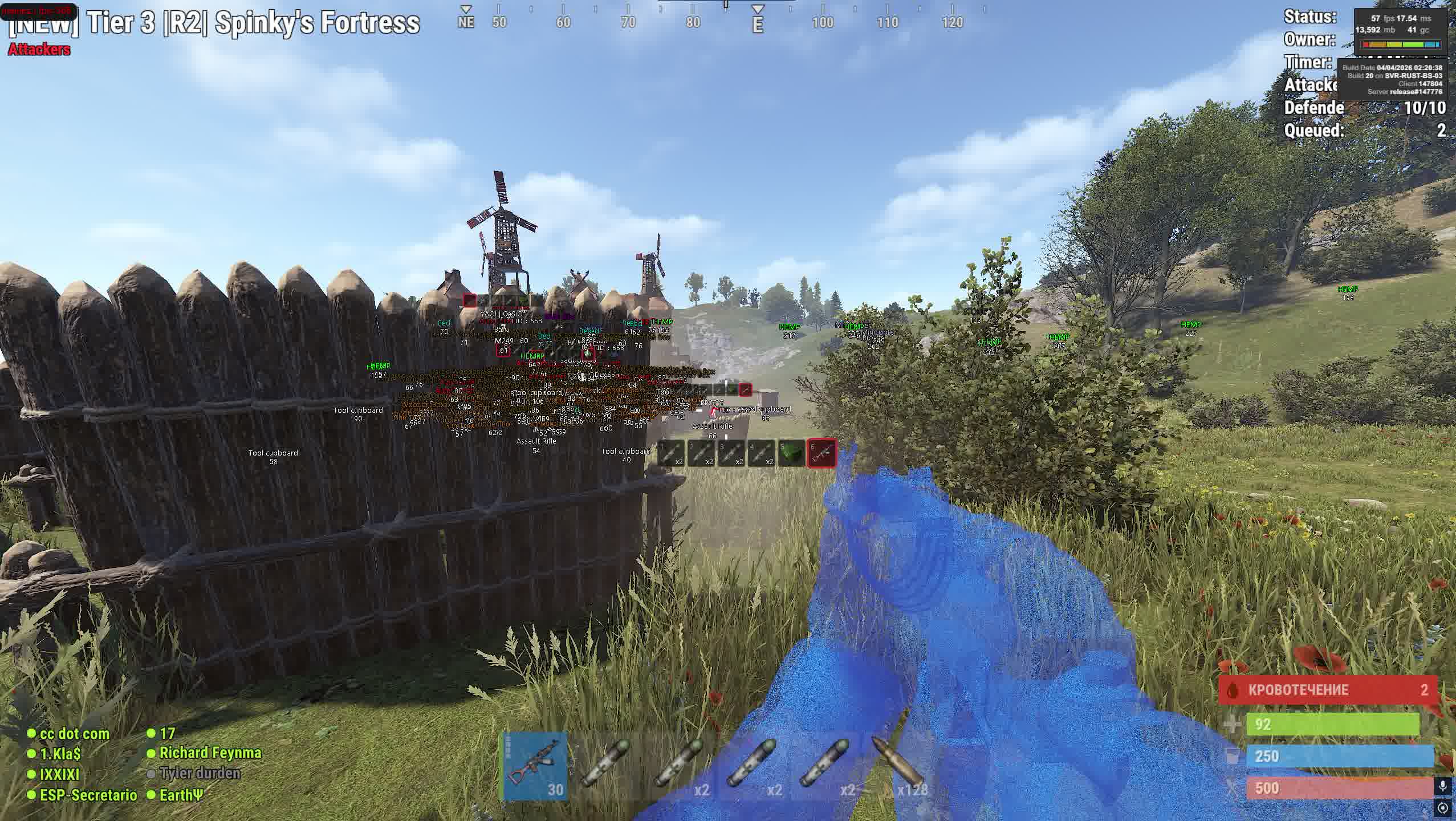
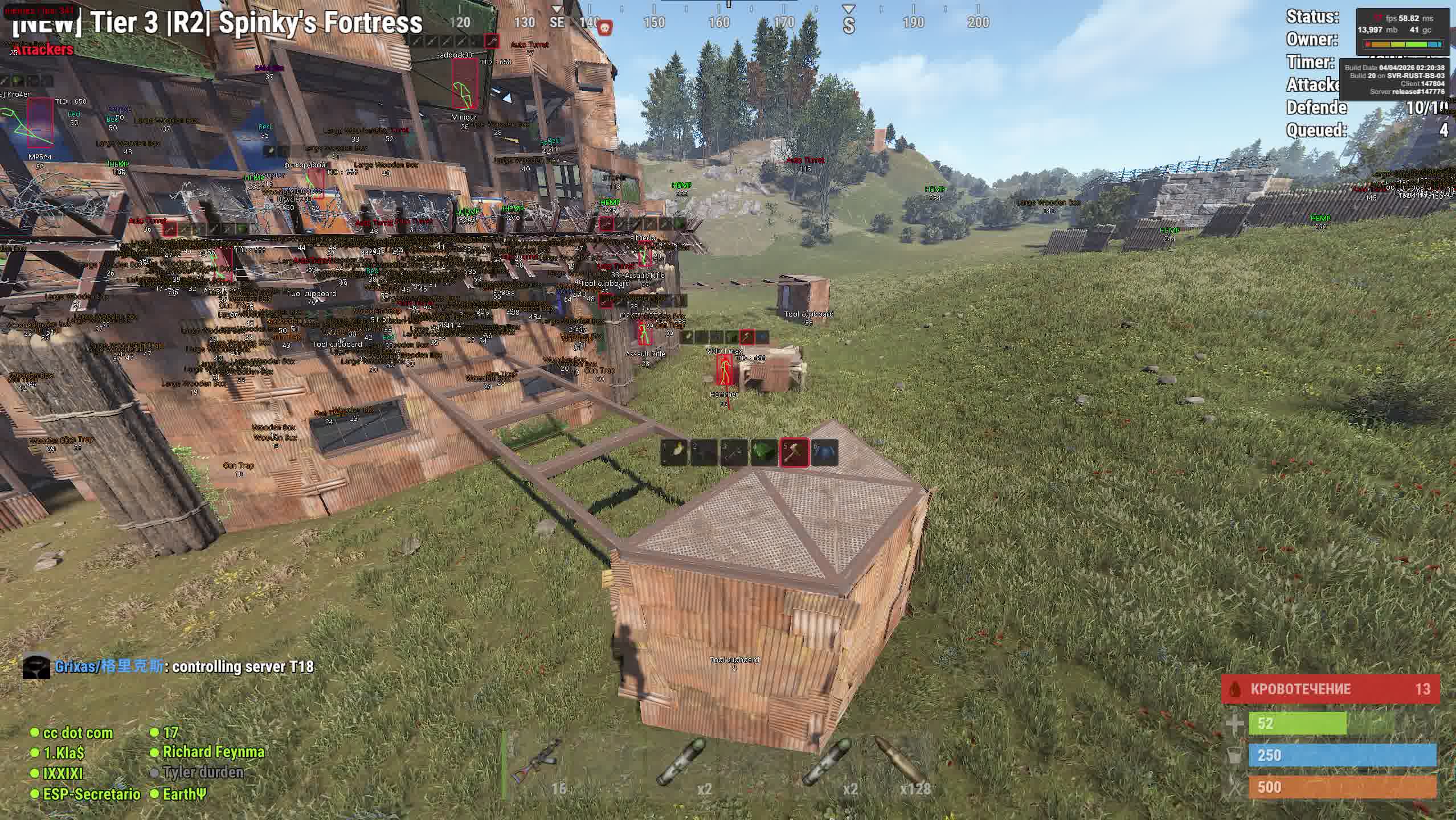
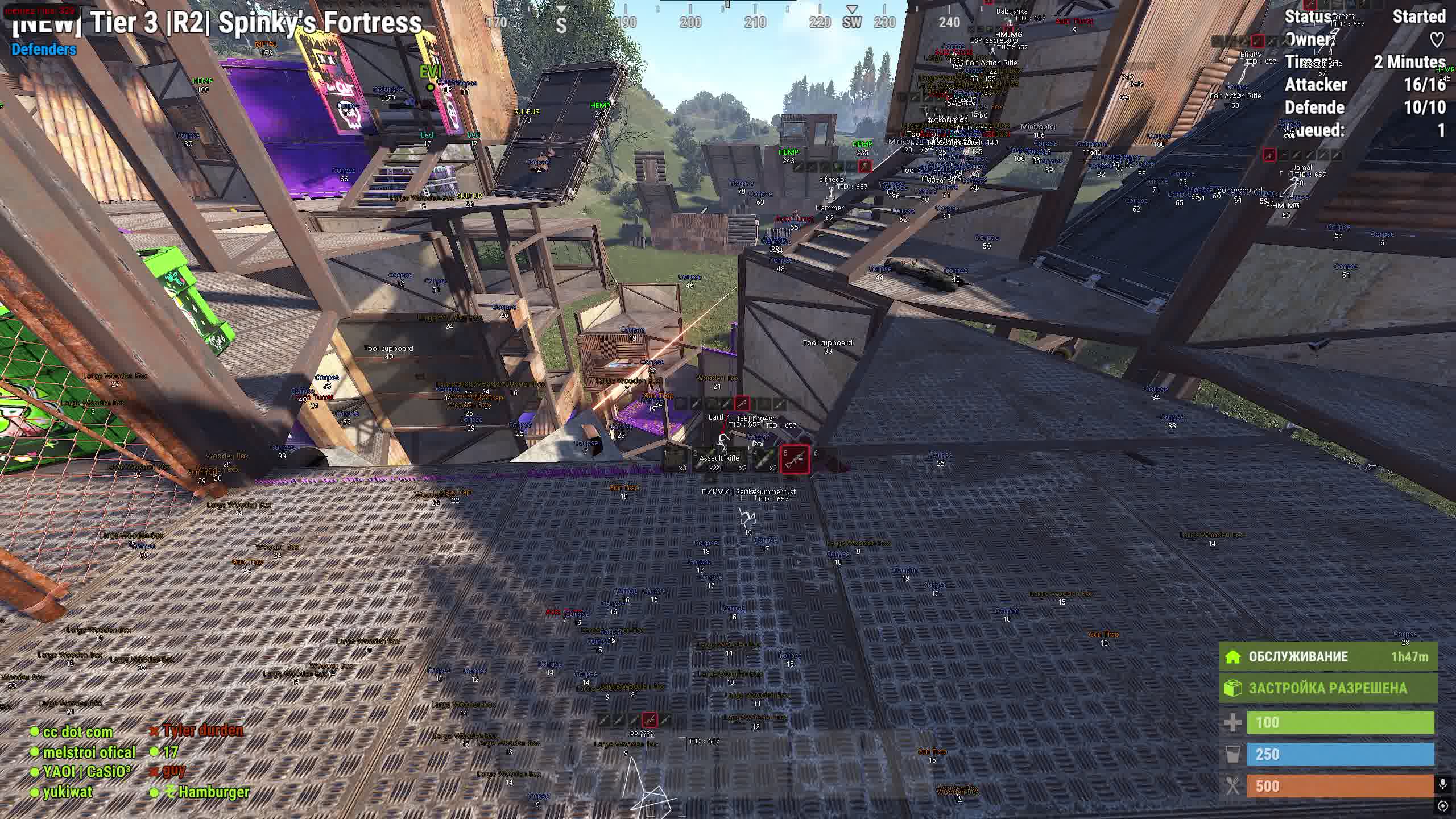
When you load onto a freshly wiped server and need to lock down a position in the first hour, MEMEZ gives you a real edge right from the spawn. Resource ESP highlights sulfur and metal nodes along your route, Traps ESP shows enemy turrets and mines before you walk into the kill zone, and Player ESP with hotbar readout lets you decide whether it's even worth picking a fight with the neighbor running past you.

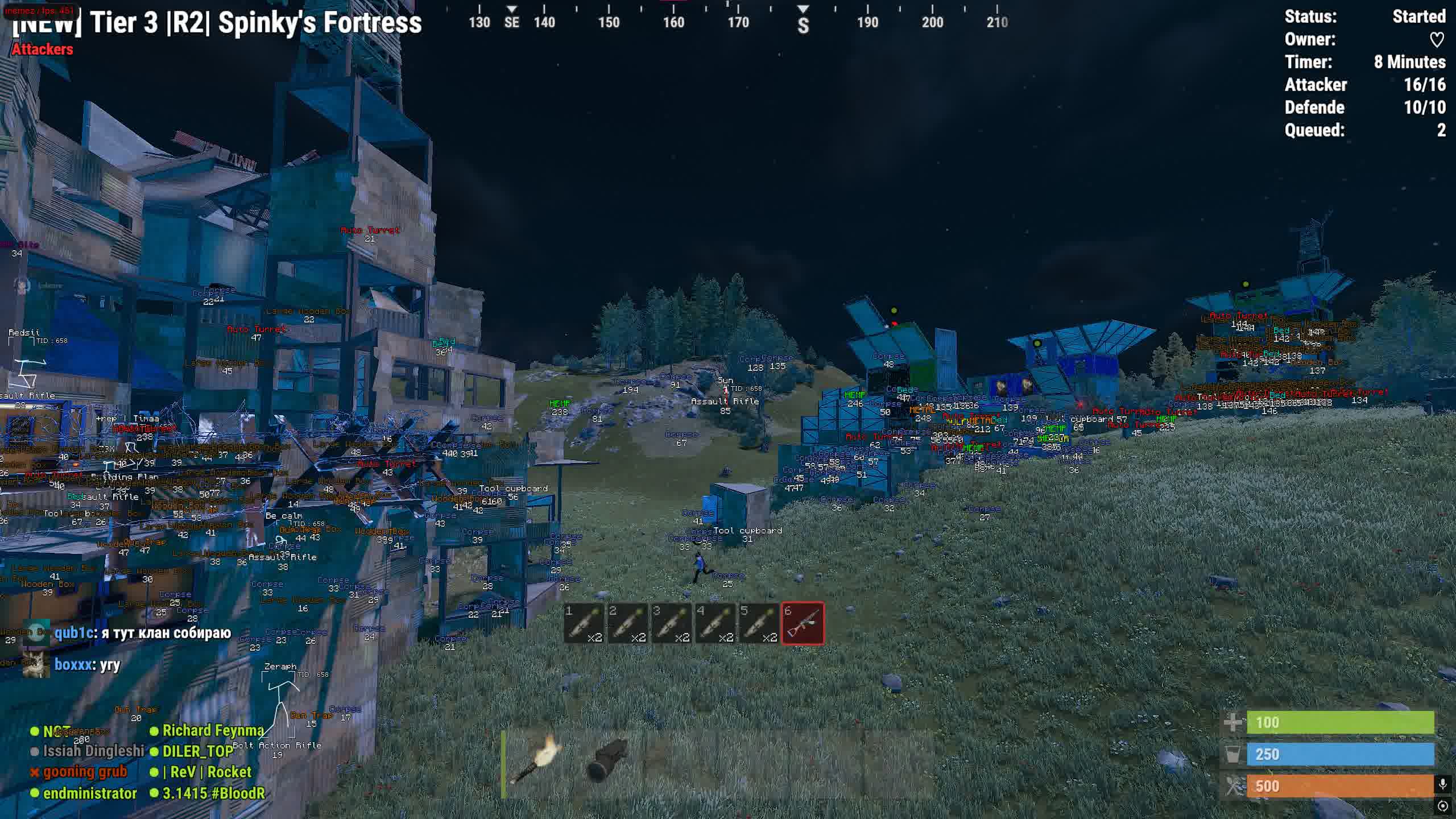
In gunfights on Rust, the winner is whoever shoots more accurately and knows more. The MEMEZ aimbot with adjustable smoothing pulls your aim softly, with no jerky snaps, and No Recoil compensates for AK and LR kickback so your spray lands flat at 150 meters. Skeleton ESP shows the enemy's pose behind cover: reloading, crafting, standing AFK. Bright Night kills the darkness, and a nighttime online raid turns into a routine cleanup with full visibility.

Product features

Aimbot

Aimbot

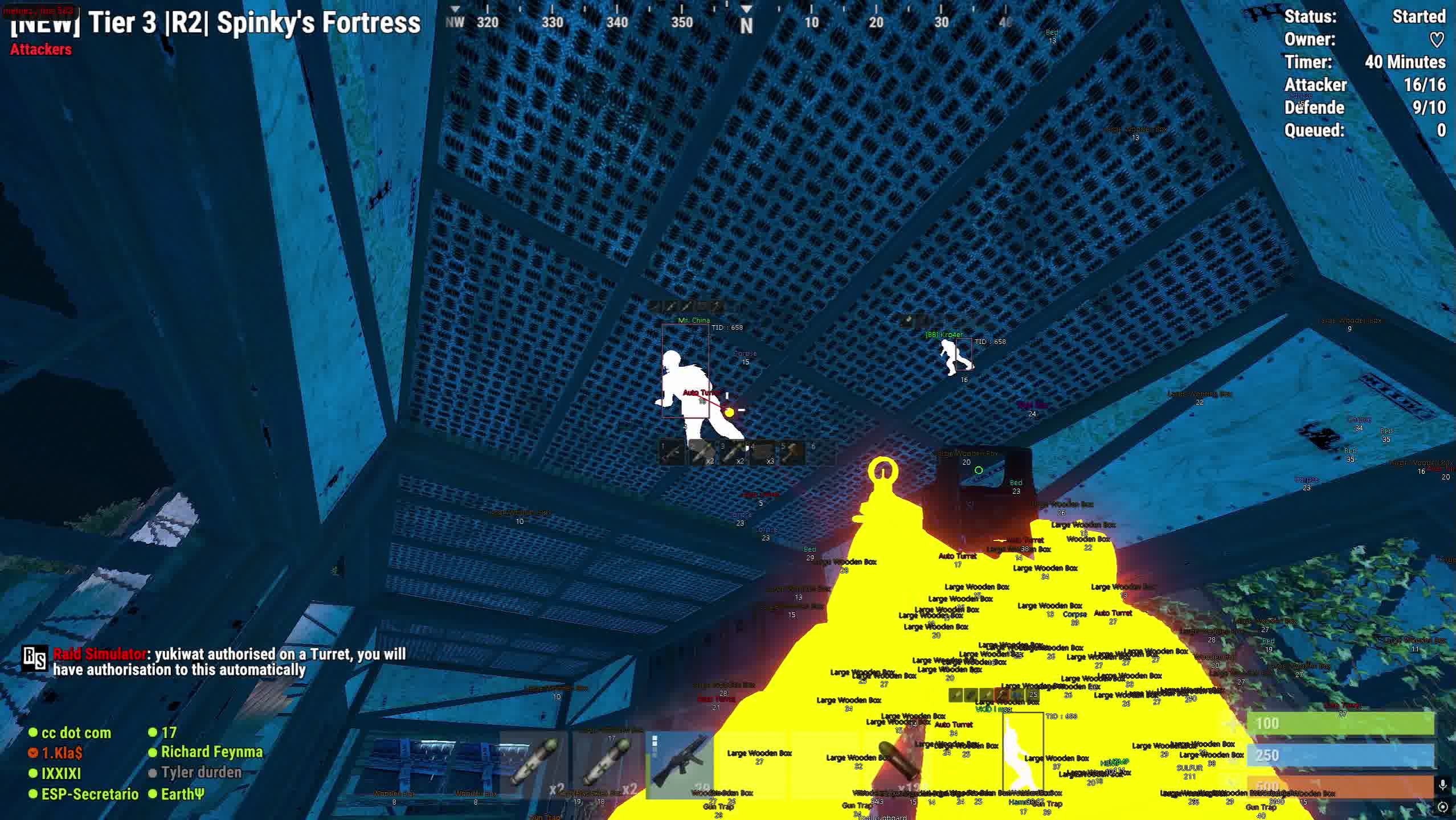
Locks onto a target with a choice of mode: vector for precise tracking of enemy movement or silent for invisible aim correction. Adjustable smoothing, capture radius and bone priority, head or nearest point

Target Hotbar

Shows the contents of the enemy's hotbar, you can see what weapon and supplies they have on hand before the fight starts

Target Line

A line from your crosshair to the locked target with adjustable color, an instant visual link to your current opponent

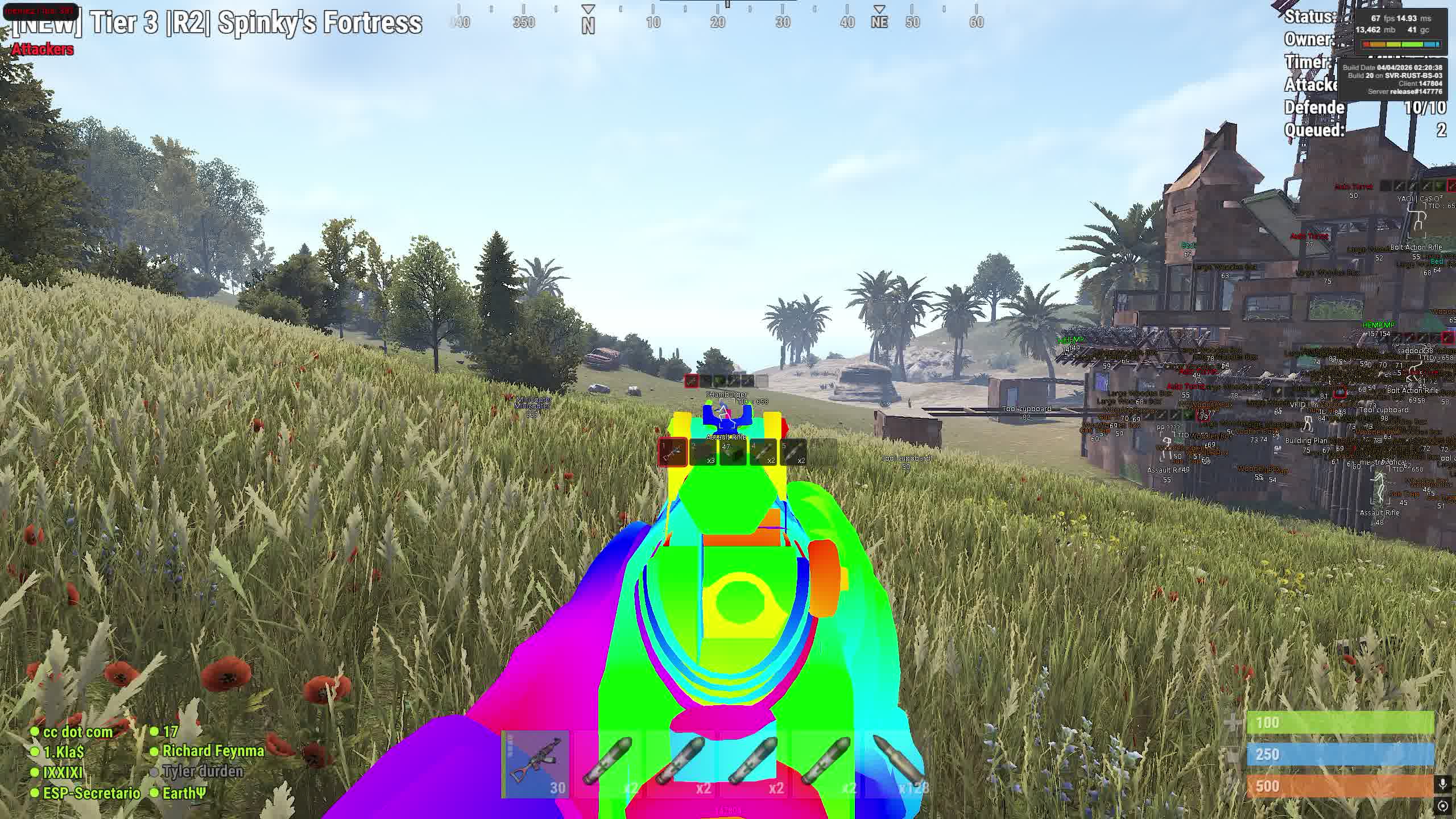
Weapon Chams

Weapon Chams

The silhouette of your character's hands and weapon with a choice of 12 visual styles: from white with see-through walls to rainbow, glitch effects and glowing variants. Separate setting to ignore crosshairs and hands

Player ESP

Box ESP

A box around every player on the map. Six display types: corner, rounded corner, full, rounded full, filled and rounded filled. Color is adjustable

Player Info ESP

Info above the player: nickname, distance, current weapon as text or icon, team ID. Each element toggles separately with adjustable color

Skeleton ESP

The enemy's skeleton is drawn over the model, you can see their pose, direction of movement and reload moment even at long range

Player Hotbar ESP

The full contents of the quick access bar of every player on the server, threat assessment before contact

Player Chams

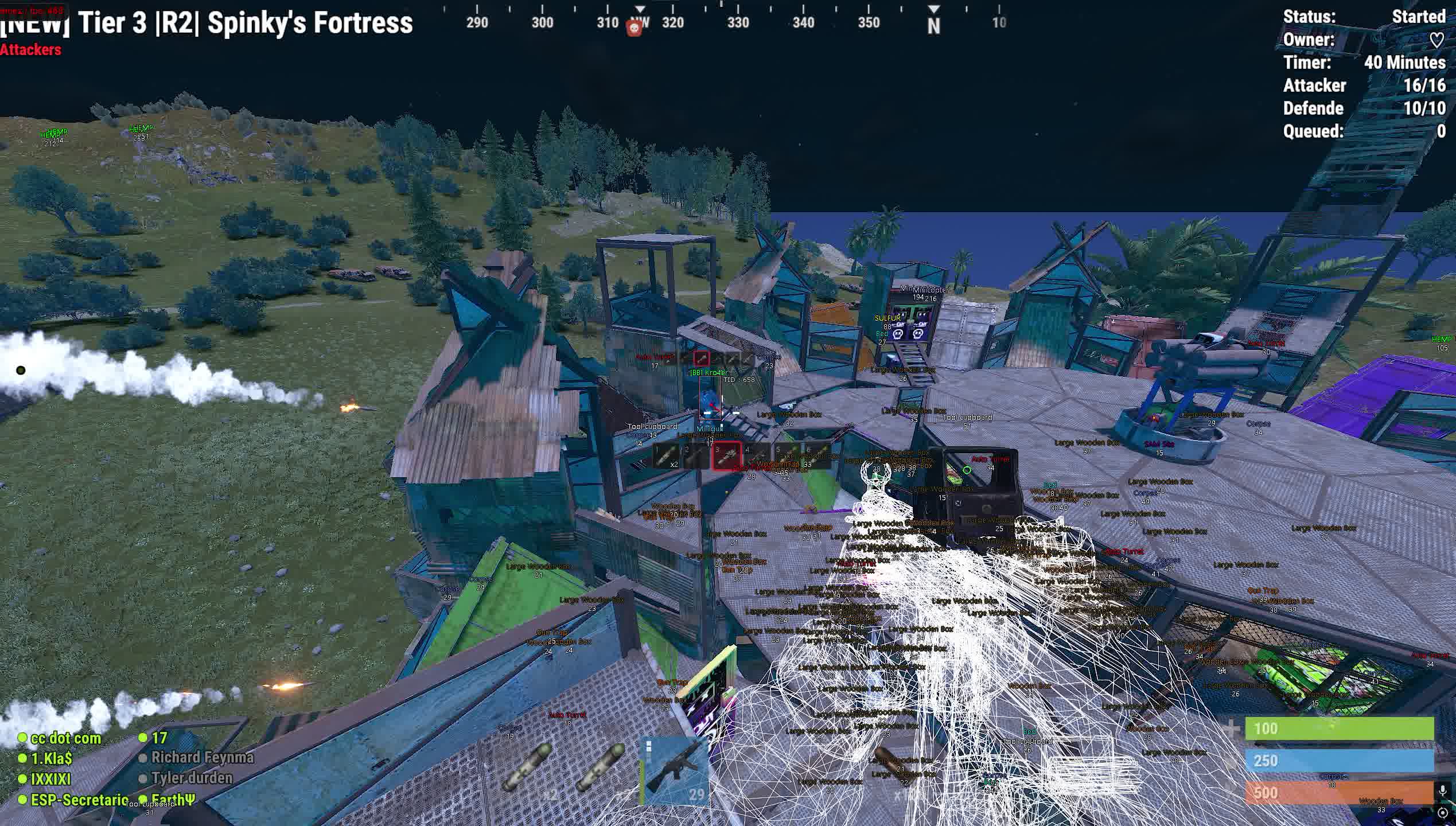
Colored player silhouettes visible through walls and objects. Display type setting and the option to ignore NPCs

Max Distance

Limits the maximum ESP render distance, cuts the clutter from far-off players and lowers the load

Item ESP

Resources ESP

Highlights resource nodes on the map: stone, sulfur, metal, hemp. Each type toggles separately, farm along the route you need with no extra stops

House ESP

Shows key base objects: tool cupboards, beds, wooden boxes and large wooden boxes

Loot ESP

ESP for all types of loot containers: supply crates, military, tool, medical, elite crates, barrels and regular crates

Traps ESP

Detects traps before you hit them: auto turrets, shotgun traps, SAMs, mines, bear traps and flame turrets

Transport ESP

Highlights transport on the map: RHIB boats, minicopters, rowboats, transport helicopters, motorbikes and bicycles

Other ESP

Shows corpses and dropped items, quick loot pickup after gunfights and raids

Item Distance ESP

The distance to each item with category filtering: resources, house, loot, traps, transport, other

Misc

No Recoil

Recoil compensation with adjustable percentage, from light smoothing to full suppression. Each weapon's pattern is corrected automatically

No Spread

Removes bullet spread, every shot flies exactly to your aim. Higher risk of anti-cheat detection

No Sway

Disables weapon sway while aiming, the barrel stays still, especially noticeable on bolt-action rifles

100% Eoka

The homemade pistol fires on the first press every time, no randomness on the shot

Rapid Fire

Switches semi-automatic weapons to full-auto fire, hold the button and shoot in bursts

Spider Man

The ability to crawl along walls and vertical surfaces, access to positions normal players can't reach

Debug Camera

A free camera with adjustable speed, scout the surrounding area without moving your character

Bright Night

Bright Night, full visibility during dark hours while other players navigate blind

Battle Mode

Battle mode, automatic switching of cheat settings for an active fight

Remove Layers

Remove Layers

Disables visual map layers: structures, debris, bushes, terrain. Removes obstructions and opens up a view of hidden enemies and loot

Settings

Config System

Save and load setting configurations. Supports three interface languages: Russian, English, Chinese. Choice of fonts and text size

Development history

07.04.2026

Krupnoe Update

Perezalili skrinshoty and obnovili spisok funktsiy

10.09.2025

UPDATE PROTOCOL: MEMEZ INTERNAL

UPDATE PROTOCOL: MEMEZ INTERNAL

While external threats keep shifting, we've been digging deeper. Internal systems have been rebuilt and upgraded. Here's the report.

[+] NEW MODIFICATIONS:

  • Visual Customization: Added 16 new chams styles for hands and player models. Now you can personalize your visuals like no one else can.
  • Aim Precision: Introduced aimbot bone selection. Want to target only the legs or the torso? Now you can.
  • Styling: Added full chams style selection. Experiment to find the perfect look for any weather or time of day.
  • View Flexibility: Integrated Aspect Ratio support. Stretch the image and gain a visual edge.

[⚙️] SYSTEMS REWORK:

  • FlyHack completely rebuilt: We rewrote the flight mechanic from scratch. It's now smoother, more stable, and carries a lower detection risk. Fly like never before.

Explore the new capabilities. Adapt. Survive.

Known issues & fixes

Real questions from our support, with the fixes that worked. Based on user requests for this product.

What should I do if the cheat won't launch or shows an error on startup?

Contact support and describe the error you're seeing — you'll likely be asked to run a system compatibility checker and send a screenshot of the result so the cause can be identified.

It also helps to:

  • launch the loader through a VPN;
  • add the loader's folder to your antivirus exclusions;
  • temporarily disable third-party overlays (screen recording, chat apps, etc.).
PC restarts or BSOD when launching the cheat

The most common cause is leftover Kaspersky (or another antivirus) still present on the system. Fully uninstall Kaspersky: use its uninstaller first, then clean remaining registry entries with CCleaner or a similar tool.

After removal, download the Sordum tool (available from technical support; archive password: sordum), run it, click Search, wait for it to finish, and send a screenshot of the results to support.

After entering the activation key it says the key is frozen — what does that mean?

This message means the game received an update and the software is temporarily being reworked for the new version — it affects everyone with an active subscription, not just your key.

  • The update usually takes anywhere from a couple of hours to a day, often faster.
  • The subscription time lost while waiting gets compensated.
  • Check with support for status updates — they will let you know once it is working again.
My computer immediately reboots or shows a blue screen right after I start the loader — what should I do?

The most common cause is an outdated motherboard firmware (BIOS) or secure boot settings conflicting with the loader's driver.

  • Check your motherboard manufacturer's site for a newer BIOS version (ideally no older than 2022–2023) and update it.
  • Before trying again, create a system restore point or back up important files — in rare cases the crash affects Windows boot.
  • If the problem continues, contact support with a screenshot of the error so they can guide you further.
  • If Windows stops booting entirely, you'll need to repair or reinstall the system; it's best to reach out to support beforehand to avoid this.
After launching the loader, the cheat's menu won't open with its hotkey — what should I do?

This is usually caused by Secure Boot being enabled in the BIOS, which prevents the cheat from working. Disable Secure Boot in your BIOS settings and relaunch the loader.

If your game requires Secure Boot to be on to run at all, contact support — there is sometimes a workaround for this case.

Driver Failed error when starting Memez Internal

A Driver Failed error is almost always caused by an active antivirus , especially Kaspersky. Fully remove the antivirus, including registry leftovers (use CCleaner).

Then run the Sordum tool (available from technical support; archive password: sordum), click Search, and send the resulting screenshot to support.

The cheat shows an HWID binding error after a hardware change or reset — what should I do?

This error means your activation no longer matches your current hardware — for example, after reinstalling the OS or changing hardware identifiers.

Contact support with your activation key: they will reset the binding so you can activate the cheat again on the same key.

Cheat says SUCCESS but the in-game menu doesn't appear

Make sure the game was closed before launching the cheat and reopened only after a successful inject. Try pressing Insert or Numpad 0 to open the menu.

If the menu still doesn't appear, try launching with a VPN active. Record the entire launch process (from starting the launcher to joining a server) and send the video link to support for diagnosis.

What does the "key frozen" error mean?

The key frozen error means the cheat is temporarily offline for an update. Wait until the update is complete; your subscription time is not consumed while the cheat is down for maintenance.

Launcher won't download

If the launcher fails to download, try two things: enable a VPN and retry, or switch to a different browser (e.g., from Chrome to Firefox or vice versa).

The cheat shows a "Disk is MBR, GPT required" error at launch — what does that mean?

This means the drive with Windows installed uses the older MBR partition style, while the cheat requires a GPT-partitioned drive.

The fix is to reinstall Windows and choose GPT instead of MBR when partitioning the drive during setup.

All issues & general troubleshooting
TARIFFS
$5.66
BUY What happens after payment?
Got a question? Ask before you pay

We'll help you choose and sort out any launch issue. Ask us anything before buying, we're always on your side.

Support 10:00–22:00, sometimes we reply at night too
Ask a question
Update history
  • 04.09.2026 Working
    Received an update
  • 02.09.2026 Working
    Received an update
  • 27.07.2026 Working
    Received an update

Available tariffs

1 day
$5.66
START PURCHASE
7 days
$22.99
START PURCHASE
30 days
$48.40
START PURCHASE
Reviews about Memez Internal
71 sales on Digiseller No text reviews yet — be the first to leave one.

Your review

Reviews are published after moderation.

Join our gaming community chat

Discuss current cheats from developers and how to use them effectively in popular online games. Share tactics, exchange useful info and find like-minded players in our community.

1 900+Members
24/7Online
Join our gaming community chat

Technical support

Run into a technical issue? Our team of experts will help. We handle all requests in a live queue, so please be understanding if it sometimes takes a little wait. We guarantee that no request goes unanswered.

Availabilityfrom 10:00 to 23:00
Fast responseIn queue order
Get help
Technical support
PROCHEAT

PROCHEAT news channel

Follow product status changes, update history and important announcements.

Subscribe

How the MEMEZ Internal architecture affects gameplay

Internal cheats for Rust run inside the game process and get direct access to the Unity engine's data. For MEMEZ this means minimal delay between the player's action and the software's reaction, the aimbot fires in real time, with no lag between locking on and shooting. Weapon Chams with its twelve display styles is also only possible thanks to internal injection: external software can't recolor weapon and hand models from inside the renderer. At the same time, the internal architecture requires updates after every Rust patch, and the MEMEZ dev team ships updates on the day each update drops.

Resource farming with Resource ESP on wipe

The first two hours after a wipe decide who will dominate the server until the next wipe. Resource ESP in MEMEZ highlights nodes of sulfur, metal, stone and hemp across the entire visible area. You can build a farm route so that one loop nets you the maximum sulfur for early explosives crafting. Nodes are highlighted separately by type, so when you're farming metal specifically you won't have to run up to every rock to find out what's inside. On busy servers with 300+ online, this time saving cuts the path to a full kit in half.

Traps ESP and safe raids in Rust

An online raid on Rust is a lottery if you don't know where the defender's traps are. MEMEZ shows auto turrets, shotgun traps, flame turrets, mines and bear traps before you walk into the kill zone. You can plan your wall-blow route to go around the turrets, or prep an ammo drain on an auto turret in advance, knowing its exact position. On offline raids, Traps ESP lets you check the base for traps before entering and avoid losing your gear to a trap in the doorway.

The MEMEZ aimbot, tuned to your playstyle

The MEMEZ aimbot works in two modes: vector and silent. Vector smoothly pulls your aim onto the target, it looks like manual aiming when Smoothing is set right. The silent aimbot corrects the bullet's trajectory with no visible crosshair movement on screen. The FOV parameter limits the capture radius so the aimbot doesn't yank your aim onto an enemy behind you. Bone priority switches between the head and the nearest point, the head makes sense for a bolt-action, while for a no-recoil auto the nearest bone gives consistent hits.

Player ESP and controlling PvP situations

Player ESP in MEMEZ pulls together five layers of info on each enemy: the box around the model, nickname, distance, current weapon and skeleton. The skeleton shows what a player is doing behind a wall, standing, running, aiming, lying down. Hotbar ESP reveals their full set of quick access slots, and if an enemy is holding a Thompson while a rocket and a C4 sit in their hotbar, you know you're facing a raider with a full load. The Max Distance filter limits render range so your screen doesn't get cluttered with markers from far-off players on big-map servers.

Latest updates

04.09.2026 14:12
Working
Received an update
02.09.2026 10:48
Working
Received an update
27.07.2026 07:48
Working
Received an update
27.07.2026 07:48
Working
Received an update
23.07.2026 17:54
Working
Issues fixed, time unfrozen
Open full history
from $5.66 Choose a plan
Ask a question


