Valorant ESP: MEMEZ Valorant LITE (ESP Only)

Working
MEMEZ MEMEZ
Last update 15.07.2026 This date shows when the software was last updated. An old date doesn't mean the software stopped working! Most likely the developer just had nothing new to add. If you have any doubts, you can always check the current status with our support team.
Add another cheat from this game too — to compare them.
Valorant ESP
Riot Games
Windows support: 10: all builds; 11: all builds
Menu language: Russian, English
Spoofer:No
USB drive:No
BIOS:No
VIDEO
SCREENSHOTS
Description

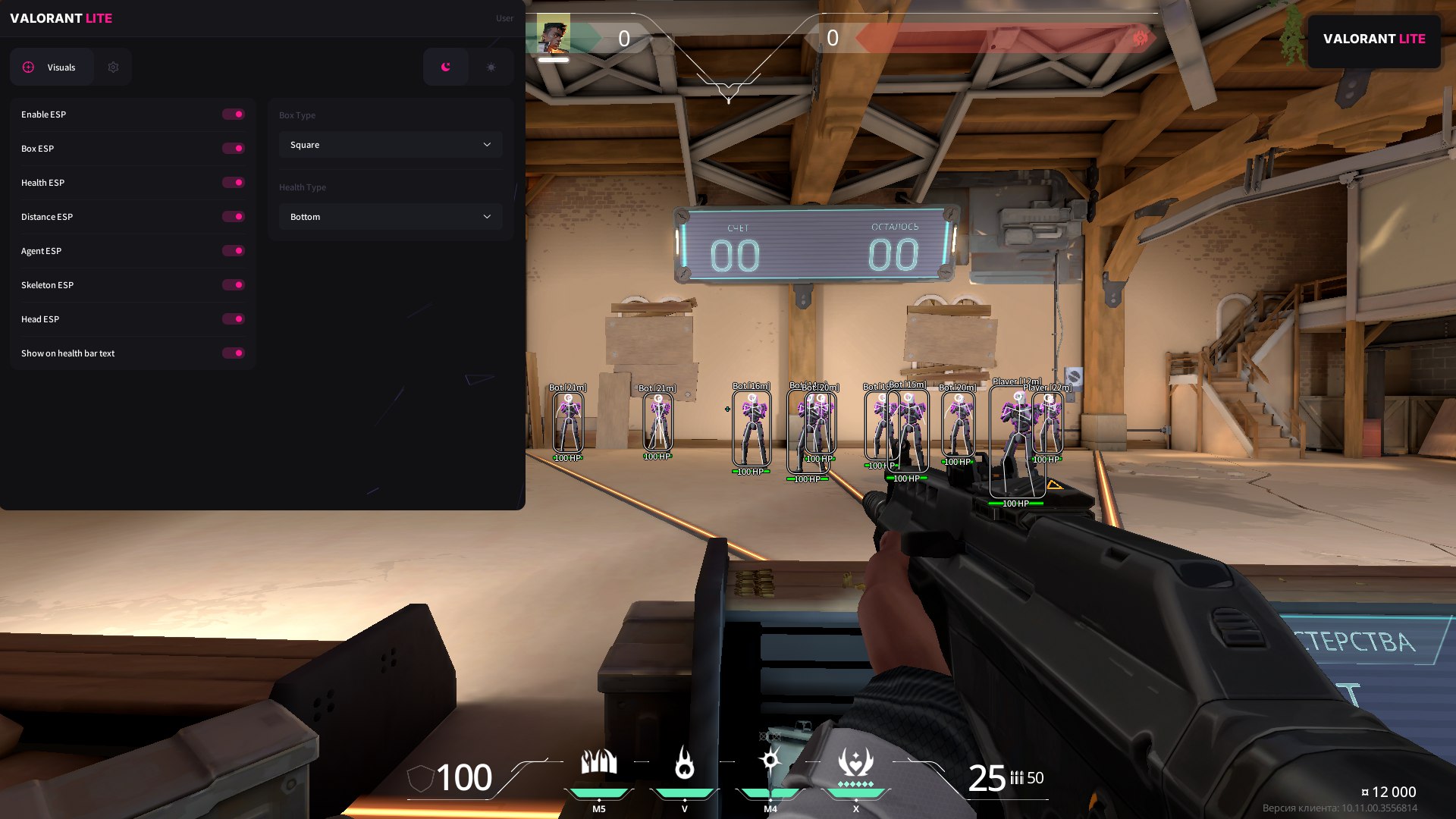
Meet MEMEZ Valorant LITE, a lightweight version of our popular cheat built specifically for VALORANT players who need a clean, reliable, and informative WallHack (ESP). If you're looking for a way to always stay aware of enemy positions, their health, and even agent names without cluttering your interface with extra features, this LITE version is your perfect choice.

Unlike more complex solutions, MEMEZ Valorant LITE focuses purely on delivering vital intel about your opponents through ESP. It lets you make fast, informed decisions in a fight by knowing who is where, how much health they have, and how far away they are. It's the ideal tool for tactical players who want to sharpen their situational awareness without using an aimbot or other aggressive features.

MEMEZ Valorant LITE: Simplicity. Information. Superiority.

Product features

VISUALS (Tactical Vision)

Skeleton & Head ESP

X-ray on agents. The skeleton shows the enemy's pose behind a wall, while the head marker helps you pre-aim for a headshot.

Agent & Distance

Read the situation. See the agent name and distance. Know who's holding the site: a Jett with an Operator or a Killjoy with a turret.

Health Info (Bar/Text)

Enemy status. An HP bar or text tells you when an enemy is "one-shot." Pick your moment to push or pre-fire.

Box Type

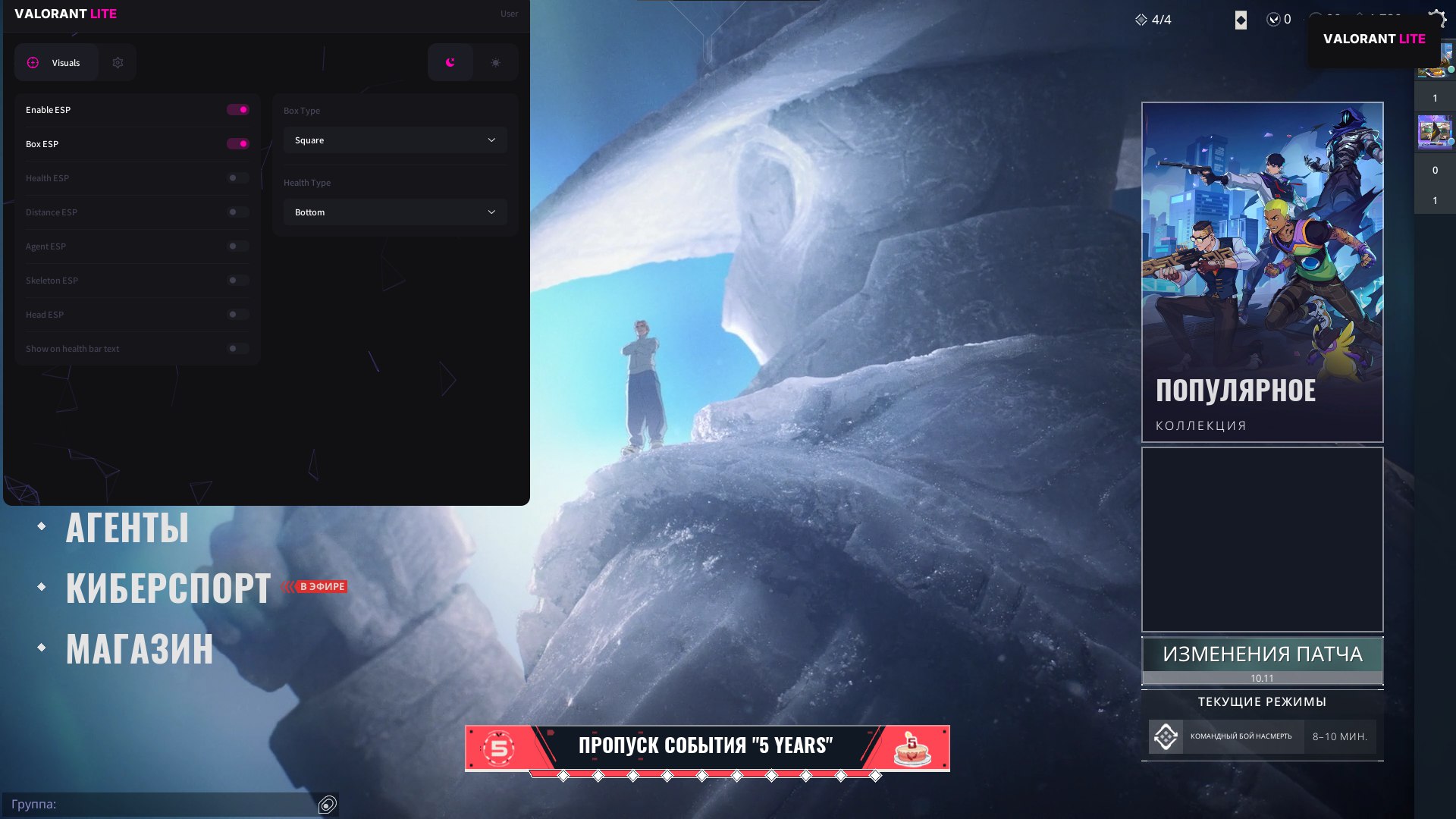
Your style. Set up the box view (2D/Corners) to fit you. Make the interface clean and informative without cluttering the screen.

Development history

22.12.2024

MEMEZ Valorant LITE: Technical Update — Stability & Bug Fixes!

The memez team is releasing an important technical update for MEMEZ Valorant LITE, targeting bug fixes and overall stability improvements. We listen to your feedback to ensure your experience is as smooth and issue-free as possible.

⏺ Fixes & Improvements

  • Fixed agent display issues.
    Enemy agent information now renders correctly without any glitches.
  • Fixed Spike display issues.
    All visual information related to the Spike now works stably and error-free.
  • Fixed potential crashes on F5 press.
    Overall program stability has been improved, and the crash triggered by this hotkey has been eliminated.

This update is all about improving your experience and ensuring MEMEZ Valorant LITE runs reliably.

28.11.2024

MEMEZ Valorant LITE: New Protection & Overhauled Visuals!

The memez team is excited to announce the release of a **highly anticipated update** for MEMEZ Valorant LITE! We focused on the most critical aspects — improving security and enhancing the user experience. This update makes your Valorant wallhack even more reliable, pleasant to use, and effective.

🔥 Key Changes & Improvements

  • Cheat protection improved.
    We constantly work to keep our product safe, and this update introduces new protection mechanisms.
  • Bypass improved.
    Anti-cheat bypass methods have been updated, reducing the risk of detection and bans.
  • Skeleton ESP added.
    You can now see the enemy's skeleton through walls, giving you an even clearer read on their position and movement.
  • Cheat visuals overhauled.
    The cheat's interface has been given a major facelift and now looks far cleaner and more polished for a more comfortable experience.

This update makes MEMEZ Valorant LITE safer, more effective, and better-looking for your VALORANT sessions!

Known issues & fixes

Real questions from our support, with the fixes that worked. Based on user requests for this product.

What should I do if the cheat won't launch or shows an error on startup?

Contact support and describe the error you're seeing — you'll likely be asked to run a system compatibility checker and send a screenshot of the result so the cause can be identified.

It also helps to:

  • launch the loader through a VPN;
  • add the loader's folder to your antivirus exclusions;
  • temporarily disable third-party overlays (screen recording, chat apps, etc.).
After entering the activation key it says the key is frozen — what does that mean?

This message means the game received an update and the software is temporarily being reworked for the new version — it affects everyone with an active subscription, not just your key.

  • The update usually takes anywhere from a couple of hours to a day, often faster.
  • The subscription time lost while waiting gets compensated.
  • Check with support for status updates — they will let you know once it is working again.
My computer immediately reboots or shows a blue screen right after I start the loader — what should I do?

The most common cause is an outdated motherboard firmware (BIOS) or secure boot settings conflicting with the loader's driver.

  • Check your motherboard manufacturer's site for a newer BIOS version (ideally no older than 2022–2023) and update it.
  • Before trying again, create a system restore point or back up important files — in rare cases the crash affects Windows boot.
  • If the problem continues, contact support with a screenshot of the error so they can guide you further.
  • If Windows stops booting entirely, you'll need to repair or reinstall the system; it's best to reach out to support beforehand to avoid this.
After launching the loader, the cheat's menu won't open with its hotkey — what should I do?

This is usually caused by Secure Boot being enabled in the BIOS, which prevents the cheat from working. Disable Secure Boot in your BIOS settings and relaunch the loader.

If your game requires Secure Boot to be on to run at all, contact support — there is sometimes a workaround for this case.

HWID binding error, cheat won't launch after hardware change or using a spoofer

The HWID binding error occurs when your hardware configuration changes or a spoofer is used. Contact support to reset your HWID binding.

Always follow the correct launch order: run the spoofer first, then the cheat. If the spoofer does not require a reboot, the order may be reversed. Launching out of sequence will trigger the binding error again.

HYPER-V FAILED error when launching Valorant cheat

The HYPER-V FAILED error means Hyper-V is not active at the system level. Do the following:

  • Enter your BIOS and make sure virtualization (Intel VT-x / AMD-V) is enabled.
  • Ensure Hyper-V is enabled in Windows Features (not turned off).
  • If the error persists after these steps, a clean Windows reinstall is the only reliable fix.
The Valorant cheat menu will not open with F1

This usually happens when the menu key is pressed too early, before you are fully loaded into a match. The correct order is:

  • start the loader and wait until it is ready;
  • launch Valorant and wait until you are fully loaded into a match or the training range;
  • only then press F1.

Also make sure the game is running in windowed mode rather than fullscreen — the cheat menu may not display in fullscreen.

Secure Boot conflict: Valorant requires it enabled, cheat requires it disabled

The cheat emulates Secure Boot, so you do not need to physically disable it. Keep Secure Boot enabled in your BIOS.

  • If you get a launch error, reset Secure Boot keys in BIOS settings (look for "Reset Secure Boot keys" or similar).
  • Run Discord as administrator and enable the legacy overlay in Discord settings.
  • For diagnostics, use the Sordum utility (available from technical support): download the archive (password , sordum), run it, click Search, and send a screenshot of the result to support.
Cheat launched and menu opened but ESP doesn't work in game

If the cheat menu is open but ESP features are not showing in game, press F5 in the cheat menu , this activates rendering. Make sure all desired options are enabled in the menu.

If pressing F5 has no effect, send a screenshot of the cheat console to support for diagnosis.

The cheat shows an HWID binding error after a hardware change or reset — what should I do?

This error means your activation no longer matches your current hardware — for example, after reinstalling the OS or changing hardware identifiers.

Contact support with your activation key: they will reset the binding so you can activate the cheat again on the same key.

Launcher won't download

If the launcher fails to download, try two things: enable a VPN and retry, or switch to a different browser (e.g., from Chrome to Firefox or vice versa).

Do I need to disable Vanguard to run a cheat in Valorant?

No, Vanguard is a required anti-cheat component of Valorant, and the game will not launch without it. You do not need to (and cannot) disable or remove it — leave it running as normal, the cheat is designed to run alongside it.

Valorant crashes and complains about HVCI after I turn on the cheat — what should I do?

If the game starts crashing with a kernel-protection message after HVCI is enabled, and it happens specifically when trying to load into a match, this usually means the account has already been flagged by the game's built-in protection.

In that case, an HWID spoofer or switching to a new game account usually resolves it.

MemezHV error / cr3 0x0000000000000000 on launch

The cr3 0x0000000000000000 error means the loader cannot access virtualization. To diagnose:

  • Download the Sordum utility (available from technical support; archive password , sordum), run it, and click Search.
  • Send a screenshot of the results to support , this will show whether virtualization and Hyper-V are correctly enabled.
The cheat shows a "Disk is MBR, GPT required" error at launch — what does that mean?

This means the drive with Windows installed uses the older MBR partition style, while the cheat requires a GPT-partitioned drive.

The fix is to reinstall Windows and choose GPT instead of MBR when partitioning the drive during setup.

All issues & general troubleshooting
TARIFFS
$3.11
BUY What happens after payment?
Got a question? Ask before you pay

We'll help you choose and sort out any launch issue. Ask us anything before buying, we're always on your side.

Support 10:00–22:00, sometimes we reply at night too
Ask a question
Update history
  • 15.07.2026 Working
    Received an update
  • 28.05.2026 Working
    Updated, time unfrozen
  • 28.05.2026 Frozen
    Sent for update, time frozen

Available tariffs

1 day
$3.11
START PURCHASE
7 days
$11.45
START PURCHASE
30 days
$25.32
START PURCHASE
Reviews about Valorant ESP
93 sales on Digiseller No text reviews yet — be the first to leave one.

Your review

Reviews are published after moderation.

Join our gaming community chat

Discuss current cheats from developers and how to use them effectively in popular online games. Share tactics, exchange useful info and find like-minded players in our community.

1 900+Members
24/7Online
Join our gaming community chat

Technical support

Run into a technical issue? Our team of experts will help. We handle all requests in a live queue, so please be understanding if it sometimes takes a little wait. We guarantee that no request goes unanswered.

Availabilityfrom 10:00 to 23:00
Fast responseIn queue order
Get help
Technical support
PROCHEAT

PROCHEAT news channel

Follow product status changes, update history and important announcements.

Subscribe
What is a Wallhack for VALORANT and why does it change the rules of the game?

What is a Wallhack for VALORANT and why does it change the rules of the game?

In a tactical shooter like VALORANT, information is your main weapon. Knowing where your opponent is positioned is the key to winning the round. To gain that decisive advantage, the Wallhack for valorant (Wallhack or WH) exists. This tool completely changes the dynamic of a match, turning you from a simple shooter into a well-informed tactician.

How it works: Seeing the invisible

At its core, wh valorant is the general name for features that provide visual information through obstacles. The most common implementation is ESP (Extra Sensory Perception), which pulls location, health, and other enemy data from the game and displays it on your screen.

A modern valorant esp can display:

  • Outlines or boxes: 2D or 3D frames around enemy models that are visible through walls.
  • Health bars: A graphic indicator showing how much more damage you need to deal to an enemy.
  • Skeletons: A detailed render of the character's "bones" that precisely shows their pose (crouching, standing, aiming).
  • Info tags: Display of the distance to a target, the agent's name, and even the weapon in their hands.

Tactical superiority with ESP

Using a valorant wallhack cheat doesn't just give you the ability to shoot through walls. It's a tool for deep analysis and planning:

  1. Predicting moves: You see how the enemy team is setting up to attack a site, and you can prepare your defense or counterattack in advance.
  2. Information warfare: You become the main source of intel for your team, calling out the exact location of enemies.
  3. Personal safety: It becomes nearly impossible to catch you off guard. Any ambush or quiet flank shows up right on your screen.

Safety questions

When choosing a Wallhack for valorant, it's crucial to pay attention to the provider's reliability. Quality private cheats are developed with the constant Vanguard anti-cheat updates in mind, which minimizes the risk of a ban. Investing in proven software is an investment in your account's safety and a stable gaming experience.

Latest updates

15.07.2026 20:36
Working
Received an update
28.05.2026 18:55
Working
Updated, time unfrozen
28.05.2026 06:01
Frozen
Sent for update, time frozen
19.05.2026 08:36
Working
Updated, time unfrozen
13.05.2026 14:52
Working
Updated, time unfrozen
Open full history
from $3.11 Choose a plan
Ask a question


