Covcheg: private software for DayZ

Working
Covcheg Covcheg
Last update 12.08.2026 This date shows when the software was last updated. An old date doesn't mean the software stopped working! Most likely the developer just had nothing new to add. If you have any doubts, you can always check the current status with our support team.
Add another cheat from this game too — to compare them.
Dayz Covcheg Internal
Steam
Don't risk your main — grab a spare account
Windows support: 10: all builds; 11: all builds
Menu language: English
Spoofer:Yes
USB drive:No
BIOS:No
VIDEO
SCREENSHOTS
Description

SURVIVAL PROTOCOL: COVCHEG

In Chernarus every rustle in the bushes can be your last. There is no trust. There is almost no hope left. The Covcheg cheat for DayZ isn't a magic wand, it's a set of tools that gives you a chance. A chance to spot the enemy first. A chance to find food and meds when you need them most. A chance to not catch a bullet from behind some bush.

Built by survival veterans from Covcheg, this cheat focuses on what matters most: information and efficiency. From silent Silent Aim to item dupe, you get everything you need to do more than survive. You get to start dictating your own rules in this cursed world.

Product features

RECON (Predator's Eyes)

Boxes & Skeleton

Positioning. See the enemy behind any cover. The skeleton shows whether they're sitting in ambush, and the box marks their size.

Health & Names

Tactics. The health bar tells you the right moment to attack, and the name helps you identify a clan enemy.

HUNT (Lethal Shot)

Silent AIM

Magic. Bullets find the target on their own. Your aim can be pointing to the side, but the enemy still drops. Maximum stealth.

Aim Binder & FOV

Control. Activate aim only at the right moment with a key. Tune the radius and distance to fit your playstyle.

SURVIVAL & LOOT (Wealth)

Dupe Items

Endless. A unique dupe function. Clone ammo, weapons and top-tier Loot. Forget about shortages.

Remove Grass & Always Day

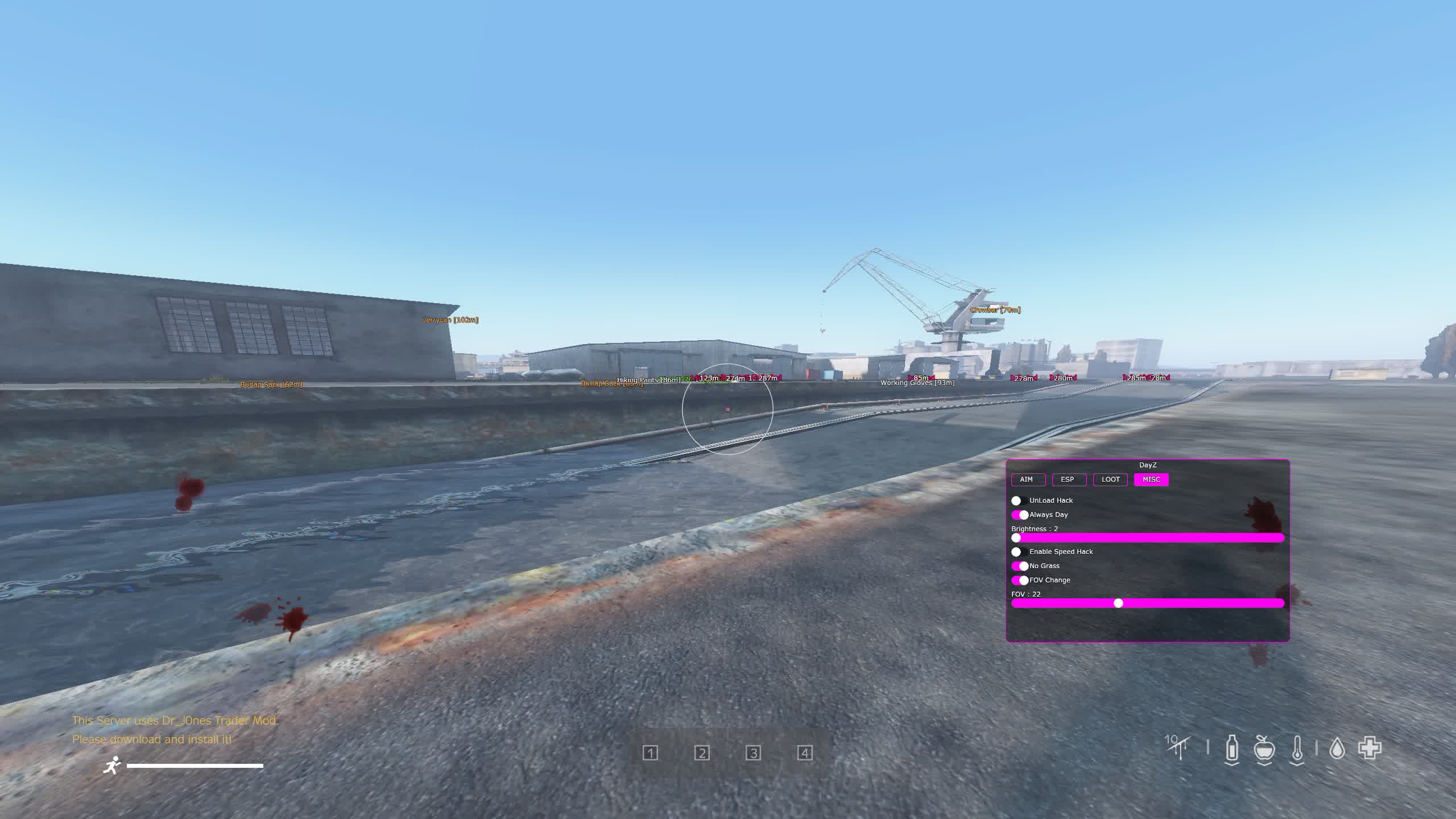
Comfort. Strip away the grass to spot campers, and switch on permanent day. You won't need NVGs.

Loot Filter & Unload

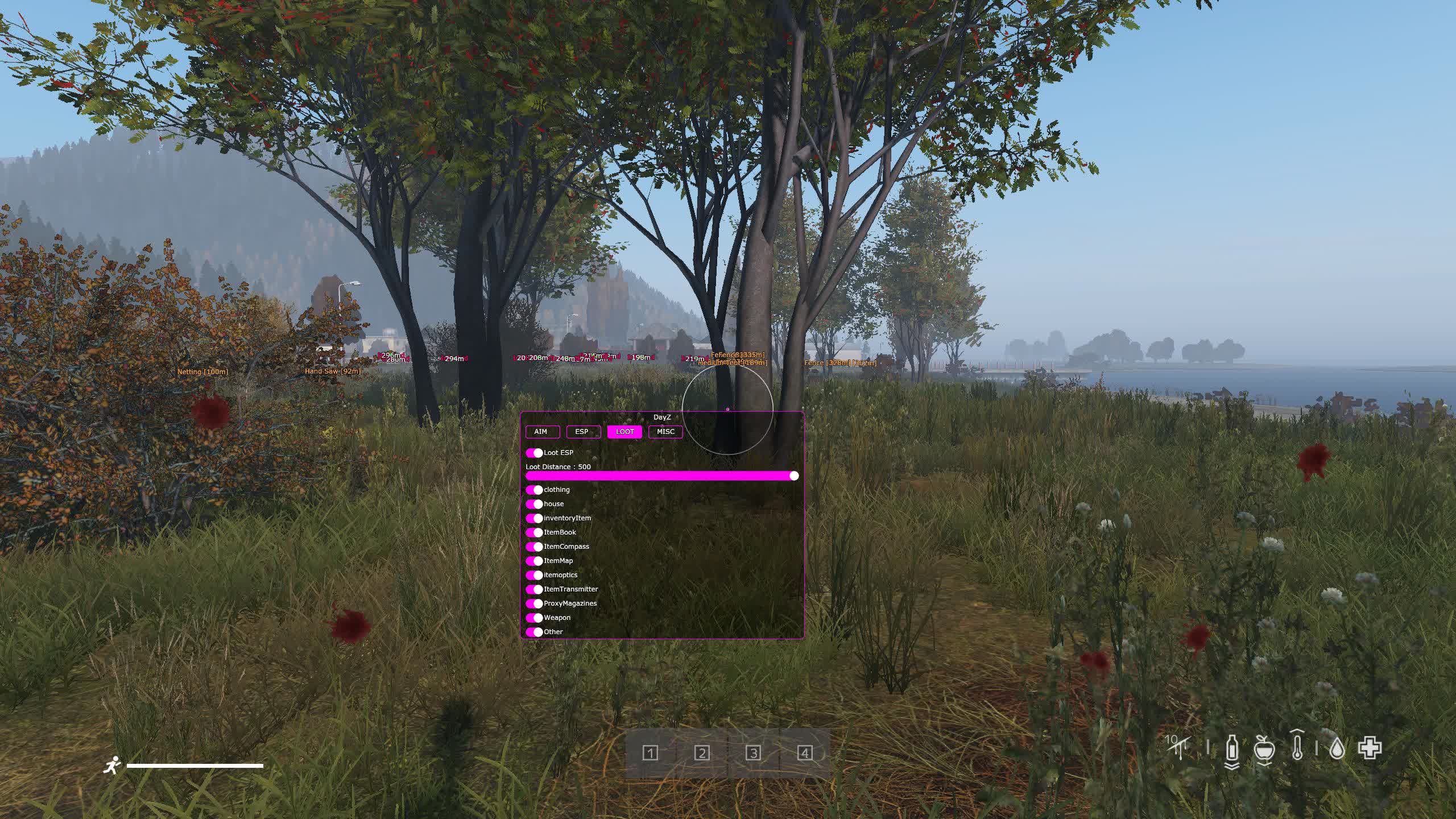
Filter & Security. Set it to show only the loot you need. The "Unload" button instantly dumps the cheat from memory during a check.

Known issues & fixes

Real questions from our support, with the fixes that worked. Based on user requests for this product.

The loader can't connect to the server and shows a connection error on launch

This is usually caused by your internet provider blocking the connection, not by the program itself.

  • Connect through a VPN and try a few different server locations — sometimes one specific server is also blocked.
  • If the error persists, download the loader again, as the version you have may be outdated.
  • Check that your computer's date and time are set correctly.
  • If nothing helps, contact support with details of the error.
Loader window appears but cheat menu does not open after injection

If after injection only the loader window appears and the cheat menu never shows, follow these steps:

  • Download the Sordum utility (available from technical support; archive password: sordum).
  • Run it, click Search, and wait for it to finish.
  • Take a screenshot of the result, then repeat the loader launch procedure.

This clears conflicting processes that prevent the menu from appearing.

DayZ Covcheg cheat shows anticheat error on launch or loader crashes when pressing F5 in game

Anticheat errors and loader crashes when launching via the in-game menu are typically resolved by enabling a VPN. Connect to a VPN, then relaunch the loader and the game.

Also ensure Windows Defender is disabled (e.g. via Defender Control), no third-party antivirus is running, and no unnecessary background software is active.

Cannot open the DayZ Covcheg cheat archive

If the archive does not open, download and install WinRAR. The archive password is sordum.

The checker tool still detects active antivirus protection even though I disabled it

If the checker keeps flagging active protection, the antivirus was likely only turned off in settings rather than fully removed — some of its services and drivers can stay behind.

  • Uninstall the antivirus completely using the official uninstaller from its vendor, not just by disabling it in settings.
  • Restart your computer and run the checker again.
  • If it still detects protection, contact support so they can help identify what's left.
After injecting I get an error like "failed to load module" or "module not found"

This kind of error usually points to corrupted or outdated loader files, or leftover antivirus components still in the system.

  • If any antivirus is still installed, remove it completely with its official uninstaller.
  • Download the latest version of the loader again instead of reusing old files.
  • Run the loader as administrator and try again.
  • If the error keeps appearing, contact support with a screenshot of the message.
The cheat stopped working after a game update — what should I do?

After a major game update, the cheat's developer needs time to adapt the program to the new version — during this period the cheat may be temporarily unavailable or behave incorrectly.

  • Wait for an official update notice from support.
  • Do not try to run the old build against the new patch — this increases the risk of a ban.
An external cheat only launches from a USB drive — can it be switched to run directly from the PC?

No, the launch method cannot be changed: if the cheat is an external type, loading it from a separate storage device is part of its anti-detection architecture, not an optional setting.

If this launch method does not suit you, check with support whether the product has a separate internal version.

I got banned by anti-cheat — how do I get back into the game with the cheat?

If an account gets banned by anti-cheat, the hardware ID (HWID) tied to it is also considered burned, so simply activating a new license key will not fix the issue.

Before using the cheat again, it is recommended to get a separate HWID-spoofing tool — it makes the system see the hardware as new.

All issues & general troubleshooting
TARIFFS
$2.76
BUY What happens after payment?
Got a question? Ask before you pay

We'll help you choose and sort out any launch issue. Ask us anything before buying, we're always on your side.

Support 10:00–22:00, sometimes we reply at night too
Ask a question
Update history
  • 12.08.2026 Working
    Received an update
  • 09.07.2026 Working
    Received an update
  • 01.06.2026 Working
    Received an update

Available tariffs

1 day
$2.76
START PURCHASE
7 days
$12.69
START PURCHASE
30 days
$23.09
START PURCHASE
Reviews about Dayz Covcheg Internal
3.7 / 5
5 reviews
How the rating is calculated

Most satisfied buyers never leave a review — people write mainly when something went wrong, so text reviews skew negative. The score is smoothed over every sale, not just the written reviews.

rating = (G + S + 10·0.9) / (N + S + 10) × 5

  • G — sum of review positivity (5★ = 1, 1★ = 0)
  • N — number of text reviews = 5
  • S = (sales − N) × 0.15 — silent satisfied buyers
Customer Recommends
Verified purchase · Digiseller 11.07.2025

Товар рабочий, хоть и были небольшие траблы с запуском, ахуенная поддержка всё исправила

Customer Not recommended
Verified purchase · Digiseller 14.06.2025

DOESNT WORK I HATE THIS SITE AND I DONT RECOMEND

Customer Recommends
Verified purchase · Digiseller 05.01.2025

1

Customer Not recommended
Verified purchase · Digiseller 23.02.2024

Ошибка не фиксится, продавец не отвечает

Customer Not recommended
Verified purchase · Digiseller 10.02.2024

Не могут помочь запустить софт, долгий игнор.

Your review

Reviews are published after moderation.

Join our gaming community chat

Discuss current cheats from developers and how to use them effectively in popular online games. Share tactics, exchange useful info and find like-minded players in our community.

1 900+Members
24/7Online
Join our gaming community chat

Technical support

Run into a technical issue? Our team of experts will help. We handle all requests in a live queue, so please be understanding if it sometimes takes a little wait. We guarantee that no request goes unanswered.

Availabilityfrom 10:00 to 23:00
Fast responseIn queue order
Get help
Technical support
PROCHEAT

PROCHEAT news channel

Follow product status changes, update history and important announcements.

Subscribe
Silent Aim from Covcheg: the silent predator in DayZ

Silent Aim from Covcheg: the silent predator in DayZ

In DayZ the price of a miss is your life. But giving away your position is even more dangerous. The Covcheg cheat offers the perfect answer: Silent Aim. Unlike a regular aimbot, it doesn't drag your aim onto the target. You can fire off to the side of your opponent, but the bullet still lands right on them. To other players and to the server logs it looks like a lucky, but completely ordinary shot. This is the peak of stealth tech, letting you take out threats without revealing your location or raising any suspicion.

More than just survival: unique Misc functions

More than just survival: unique Misc functions

The Covcheg cheat for DayZ isn't only about shooting and Loot. It's about changing the environment itself in your favor. The Remove GRASS function completely strips out all the grass, turning thick fields into bare plains where there's nowhere to hide. Always DAY frees you from hunting for NVG batteries and makes night runs safe. But the real gem is the Dupe function. It lets you copy items, solving the shortage of ammo, meds or food once and for all. This isn't just survival, it's thriving in a dying world.

ESP and loot filtering: how to find a needle in a haystack

ESP and loot filtering: how to find a needle in a haystack

The world of DayZ is huge, and finding something valuable in it is real luck. The ESP module in the Covcheg cheat turns that luck into a pattern. You see not only players, but all the Loot around you. And so you don't drown in a sea of useless items, there are filters. With Distance Limiter and Loot Type Limiter you can set the display to show, for example, only weapons and meds within a 50 meter radius. This saves you dozens of minutes you'd otherwise spend searching empty houses, and lets you find exactly what you need to survive in record time.

Latest updates

12.08.2026 12:41
Working
Received an update
09.07.2026 22:24
Working
Received an update
01.06.2026 12:19
Working
Received an update
30.05.2026 12:02
Working
Received an update
09.04.2026 08:30
Working
Updated, time unfrozen
Open full history
from $2.76 Choose a plan
Ask a question