Last update 02.09.2026
This date shows when the software was last updated. An old date doesn't mean the software stopped working! Most likely the developer just had nothing new to add. If you have any doubts, you can always check the current status with our support team.
Add another cheat from this game too — to compare them.
Steam
Windows support:
10: all builds; 11: all builds
Menu language:English
Spoofer:No
USB drive:No
BIOS:No
SCREENSHOTS
Description
In PUBG the winner isn't the one who shoots best, it's the one who thinks a step ahead. ESP from Covcheg is your own personal scout drone that never needs recharging. This cheat is built for players who put tactics and safety above everything. No aimbot, just clean information that helps you outplay your opponent.
This product from the trusted developer Covcheg gives you eyes that see through walls, fog and foliage. Find out where the enemy is, read their condition, and make the one right call. It's a choice for strategists, not mindless shooters.
Product features
Tactical ESP (Visuals)
Player Data
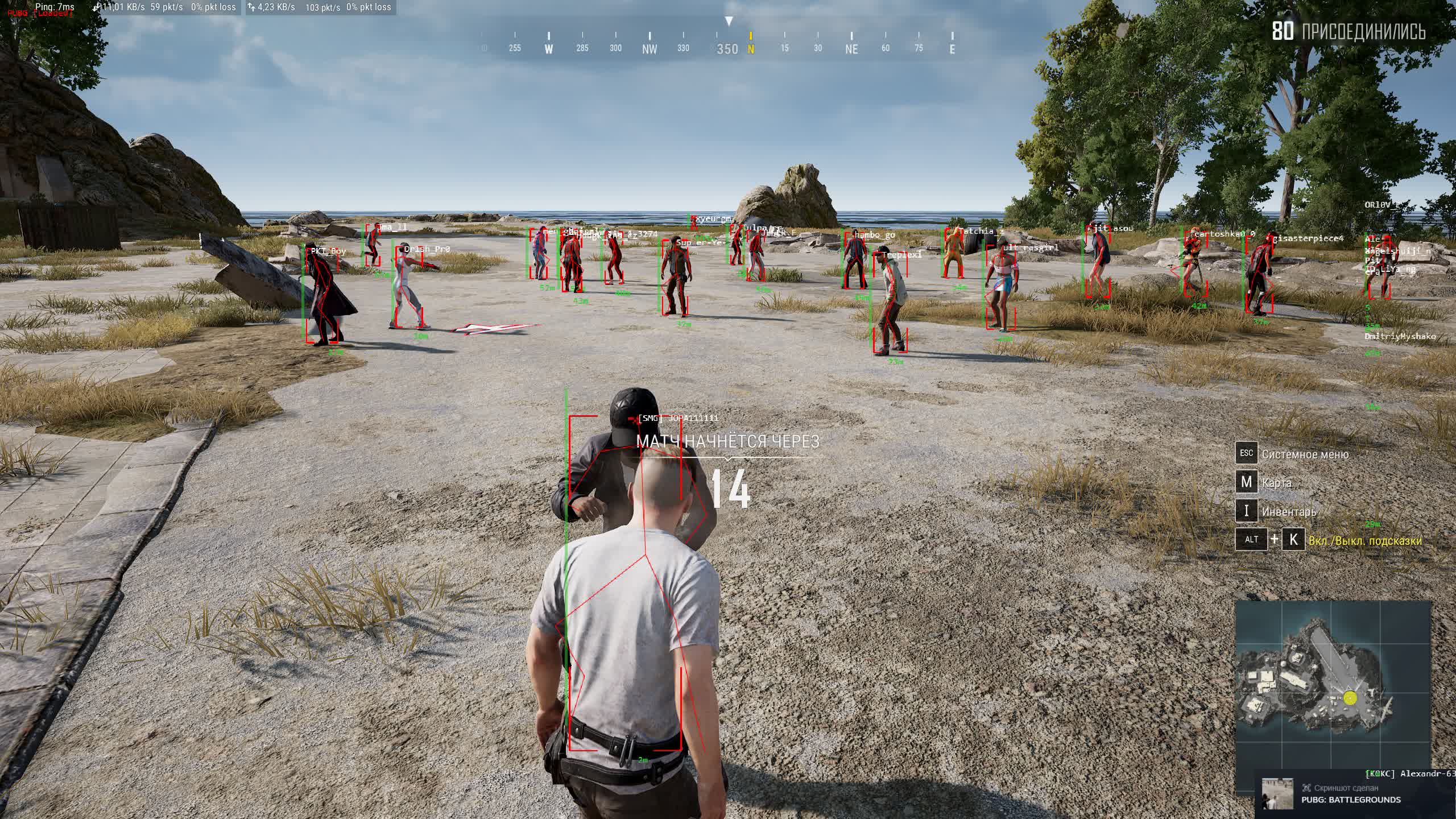
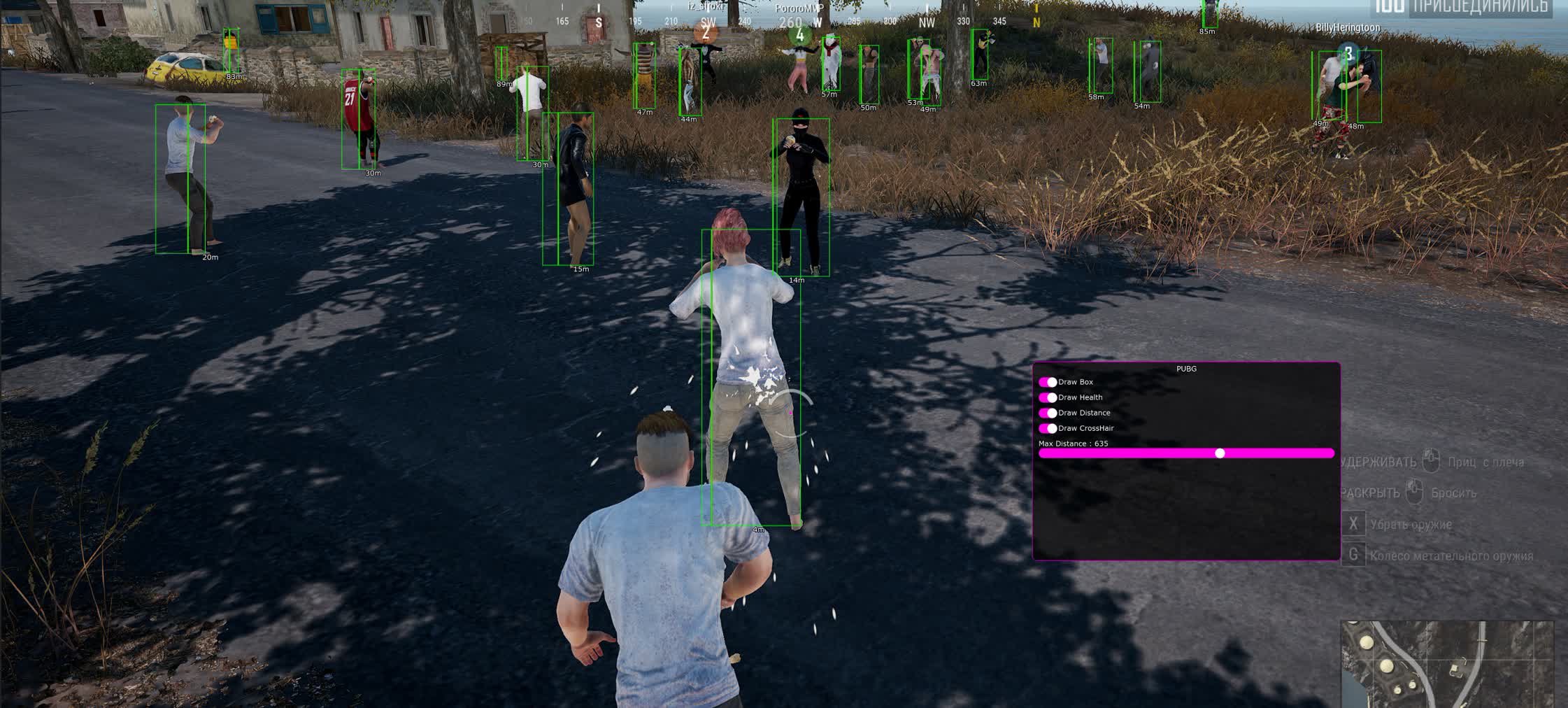
Target data. A clean, no-clutter readout of the key info: Nickname (Name) and Distance in meters. Nothing extra, just the facts.
Health Status
Enemy condition. A visual health bar (HealthBar). Lets you decide instantly: push a wounded player or pull back.
Visual Mode
Display mode. Switch between classic 2D boxes for a general overview and skeletons (Skeleton) to read an enemy's pose behind cover.
ESP Type
Render style. Pick the visual style that distracts you least from your crosshair and gameplay.
System Protocols (System)
Menu Control
Menu hiding. A hotkey (Hide) instantly folds away the cheat interface so you can take a clean screenshot or stream.
Panic Key
Emergency unload. The Unload Hack function fully wipes the cheat from RAM and the game's processes. Hit it when an admin checks your PC or you suspect a ban.
Known issues & fixes
Real questions from our support, with the fixes that worked. Based on user requests for this product.
The loader can't connect to the server and shows a connection error on launch
This is usually caused by your internet provider blocking the connection, not by the program itself.
Connect through a VPN and try a few different server locations — sometimes one specific server is also blocked.
If the error persists, download the loader again, as the version you have may be outdated.
Check that your computer's date and time are set correctly.
If nothing helps, contact support with details of the error.
Loader shows anticheat error on launch or crashes when starting the game
Anticheat errors and loader crashes when starting the game are typically resolved by enabling a VPN. Connect to a VPN, then relaunch the loader and the game.
Also ensure Windows Defender is disabled (e.g. via Defender Control), no third-party antivirus is running, and no unnecessary background software is active.
Loader window appears but cheat menu does not open after injection
If after injection only the loader window appears and the cheat menu never shows, follow these steps:
Download the Sordum utility (available from technical support; archive password: sordum).
Run it, click Search, and wait for it to finish.
Take a screenshot of the result, then repeat the loader launch procedure.
This clears conflicting processes that prevent the menu from appearing.
The checker tool still detects active antivirus protection even though I disabled it
If the checker keeps flagging active protection, the antivirus was likely only turned off in settings rather than fully removed — some of its services and drivers can stay behind.
Uninstall the antivirus completely using the official uninstaller from its vendor, not just by disabling it in settings.
Restart your computer and run the checker again.
If it still detects protection, contact support so they can help identify what's left.
After injecting I get an error like "failed to load module" or "module not found"
This kind of error usually points to corrupted or outdated loader files, or leftover antivirus components still in the system.
If any antivirus is still installed, remove it completely with its official uninstaller.
Download the latest version of the loader again instead of reusing old files.
Run the loader as administrator and try again.
If the error keeps appearing, contact support with a screenshot of the message.
Can't pay from Ukraine , what payment options are available?
Multiple payment methods are available on the site. If one doesn't work, try another option from the payment page , one of the available methods should work for Ukraine.
The cheat stopped working after a game update — what should I do?
After a major game update, the cheat's developer needs time to adapt the program to the new version — during this period the cheat may be temporarily unavailable or behave incorrectly.
Wait for an official update notice from support.
Do not try to run the old build against the new patch — this increases the risk of a ban.
An external cheat only launches from a USB drive — can it be switched to run directly from the PC?
No, the launch method cannot be changed: if the cheat is an external type, loading it from a separate storage device is part of its anti-detection architecture, not an optional setting.
If this launch method does not suit you, check with support whether the product has a separate internal version.
I got banned by anti-cheat — how do I get back into the game with the cheat?
If an account gets banned by anti-cheat, the hardware ID (HWID) tied to it is also considered burned, so simply activating a new license key will not fix the issue.
Before using the cheat again, it is recommended to get a separate HWID-spoofing tool — it makes the system see the hardware as new.
Most satisfied buyers never leave a review — people write mainly when something went wrong, so text reviews skew negative. The score is smoothed over every sale, not just the written reviews.
rating = (G + S + 10·0.9) / (N + S + 10) × 5
G — sum of review positivity (5★ = 1, 1★ = 0)
N — number of text reviews = 32
S = (sales − N) × 0.15 — silent satisfied buyers
Customer
Not recommended
Verified purchase · Digiseller11.03.2026
no work
Customer
Not recommended
Verified purchase · Digiseller21.01.2026
слишком дохуя делать ради ебучиего чита +винда жалуется на файл
Customer
Not recommended
Verified purchase · Digiseller02.01.2026
Не рабочий продукт. не покупайте деньги на ветер тех поддержка не отвечает, купил для двух пк, все сделал по инструкции головняк ужасный. вобщем деньги на ветер!!!!!
Customer
Not recommended
Verified purchase · Digiseller12.10.2025
Не работает!
Customer
Not recommended
Verified purchase · Digiseller01.10.2025
не работает
Customer
Not recommended
Verified purchase · Digiseller20.09.2025
una basura de cheto
Customer
Recommends
Verified purchase · Digiseller24.08.2025
+
Customer
Not recommended
Verified purchase · Digiseller16.08.2025
Купил на мобильную версию а оказалось что это пк
ProCheat reply
А я причем тут, если ты слепой что ты мне отзыв отрицательный пишешь? Сходи к окулисту , а не отзывы пиши. Отправляешь в черный список
Customer
Not recommended
Verified purchase · Digiseller17.02.2025
The software is not working,The staff cannot read back and will not handle the issue
Customer
Not recommended
Verified purchase · Digiseller08.02.2025
Мега не понятно. Очень много лишних действий, когда есть намного дешевле и проще читы. Не советую покупать
Customer
Recommends
Verified purchase · Digiseller15.01.2025
Топ
Customer
Not recommended
Verified purchase · Digiseller31.12.2024
Ужасный товар,банит практически сразу.
Customer
Not recommended
Verified purchase · Digiseller30.12.2024
сукккккааааа,, не работает чит пидоры,, не советую этого муждака
Customer
Not recommended
Verified purchase · Digiseller12.12.2024
3 аккаунта за час в бан
фпс ложит в 10-15
вх в 50% случаев просто пропадает и не показывает никого
кайф
Customer
Not recommended
Verified purchase · Digiseller05.12.2024
бан за пол катки
Customer
Not recommended
Verified purchase · Digiseller26.11.2024
лаунчер запускается но я не могу ввести свой ключи верните деньги
Customer
Not recommended
Verified purchase · Digiseller09.09.2024
прилетел бан во 2ой игре не успел даже самолет вылететь
Customer
Not recommended
Verified purchase · Digiseller12.07.2024
Можно вернуть деньги, оплатил вообще не тот товар и не того продавца
Customer
Not recommended
Verified purchase · Digiseller29.06.2024
где скачать и как установить
Customer
Not recommended
Verified purchase · Digiseller19.06.2024
ничего не работает, хочу возврат средств!!!!!!!
Customer
Not recommended
Verified purchase · Digiseller09.06.2024
не чего не понятно
Customer
Not recommended
Verified purchase · Digiseller26.05.2024
Got banned from PUBG after 2/3 matches. Have a SS of it. it says " You've been permanently banned in PUBG by game's developers. What to do now??
Customer
Not recommended
Verified purchase · Digiseller24.04.2024
Failed to connect to server
Купил для теста на день - вставляю ключ - в ответ ошибку получаю
жесть
Customer
Not recommended
Verified purchase · Digiseller29.03.2024
где чить я его купил где мой чить
Customer
Not recommended
Verified purchase · Digiseller25.03.2024
Чит ковчег работает но система игры спалила его получил бан в игре.
Customer
Not recommended
Verified purchase · Digiseller25.02.2024
хз
Customer
Not recommended
Verified purchase · Digiseller23.02.2024
Wallhack Covcheg не корректно работает + бан дают
Customer
Not recommended
Verified purchase · Digiseller19.02.2024
Оплатил на сутки, сделал все по инструкции, не работает. Продавец не отвечает сутки, за которые срок пользования чита уже истек
Customer
Not recommended
Verified purchase · Digiseller31.01.2024
В общем решил ждать 24 часа пока поддержка заблаговолит ответить, но им как то по*бать, так что -реп, подсказка для реселлера, добавь ссылку на лоадер, м*дила
Customer
Not recommended
Verified purchase · Digiseller29.01.2024
Получил бан спустя пол дня:) Использовал только box, не думаю что уд
Customer
Recommends
Verified purchase · Digiseller25.01.2024
все прекрасно
Customer
Recommends
Verified purchase · Digiseller12.01.2024
Чит работает рекомендую!
Join our gaming community chat
Discuss current cheats from developers and how to use them effectively in popular online games. Share tactics, exchange useful info and find like-minded players in our community.
Run into a technical issue? Our team of experts will help. We handle all requests in a live queue, so please be understanding if it sometimes takes a little wait. We guarantee that no request goes unanswered.
The anti-cheat in PUBG keeps improving, and using risky cheats is a sure path to a ban. Covcheg ESP is built with a focus on safety. It has no aimbot or other "rage" functions that are easy to flag. The developers focused on building a stable, undetected wallhack that gives you an information advantage without touching the shooting mechanics. Regular code updates keep the ban bypass reliable, so you can play calm and confident without worrying about your account.
Tactical Advantage with Covcheg ESP
In PUBG, knowledge is power. Covcheg ESP hands you that knowledge. You see an opponent moving through the building next door and can set up an ambush. You spot a sniper on the hill before he ever takes his first shot. Reading the enemy's health on the HealthBar tells you whether to commit to a fight or back off. This cheat doesn't turn you into an unbeatable shooter, it turns you into a smart strategist. You start making decisions based on the full picture of the fight, which is what ultimately leads to that coveted "Winner Winner Chicken Dinner".
Minimalism for Pros: Why Covcheg ESP Has Nothing Extra
Plenty of cheats are loaded with dozens of functions that only distract you and raise the ban risk. Covcheg ESP takes a different path. It packs only the most essential, proven ESP functions: boxes, skeletons, health and distance. No loot ESP cluttering your screen, no vehicle ESP. That's intentional. This minimalist approach makes the cheat safer, and it also lets you focus on the main threat, other players. It's a tool for people who already know how to play and just need extra information, not crutches.
What happens after payment?
After successful payment you receive access details on the order page at oplata.info. The product key and usage instructions are shown inside the purchased item page.
Contact technical support first. Support requests can be escalated to the developer, so you get the most accurate answer for the selected product.
Status changes are published in the Telegram news channel, on the update history page, and directly on the product page.
The product can be temporarily frozen while the developer updates it. Subscription time is frozen as well, so you do not lose paid time.
Contact support with the order link, product name, Windows build, and a video of the issue. If the problem cannot be solved, we help with the refund process.
Use the public Telegram community for general discussion. Technical support questions should still go through support channels.
If the payment fee looks too high, contact support. We can suggest an alternative payment option when available.
Support replies in queue order. A complete request with screenshots or video is usually processed faster.
Send clear details, stay constructive, and keep the order link available. This helps support solve the issue faster.

 Covcheg



 Join all games chat