Escape from Tarkov: Arena Cheat by Soft Hub

Frozen
Top seller
SOFT HUB SOFT HUB
Last update 30.07.2026 This date shows when the software was last updated. An old date doesn't mean the software stopped working! Most likely the developer just had nothing new to add. If you have any doubts, you can always check the current status with our support team.
Add another cheat from this game too — to compare them.
Soft Hub EFT ARENA FULL
BSG Launcher
Epic Games
Windows support: 10: all builds; 11: all builds
Menu language: Russian, English, Spanish
Spoofer:No
USB drive:Yes
BIOS:No

User information

Keep the main thing in mind: the assist helps you finish the aim, it doesn't shoot for you. You tune the bone, priority and tracking speed to your own hand, so the first couple of matches go into dialing it in. It doesn't behave like a hard aimbot, and for an assist that's normal.

Hardware-wise it's simple: Windows 10 and 11, all builds supported, no USB stick and no BIOS edits, the loader installs like a regular app. You open the game through the BSG Launcher or Steam. Switch the menu language right in the cheat — Russian, English or Spanish. The key and loader arrive by email after payment, with no account to set up on the site. If it won't come up the first time, message support.

VIDEO
SCREENSHOTS
Description

Soft Hub EFT ARENA FULL is an external Tarkov: Arena cheat built from two blocks: an aim assist that helps drag your crosshair onto the target, and visuals that show opponents through walls. Straight up: this isn't a full aimbot, it's an assist for tracking, so it plays differently from the hard aim-locks in other builds.

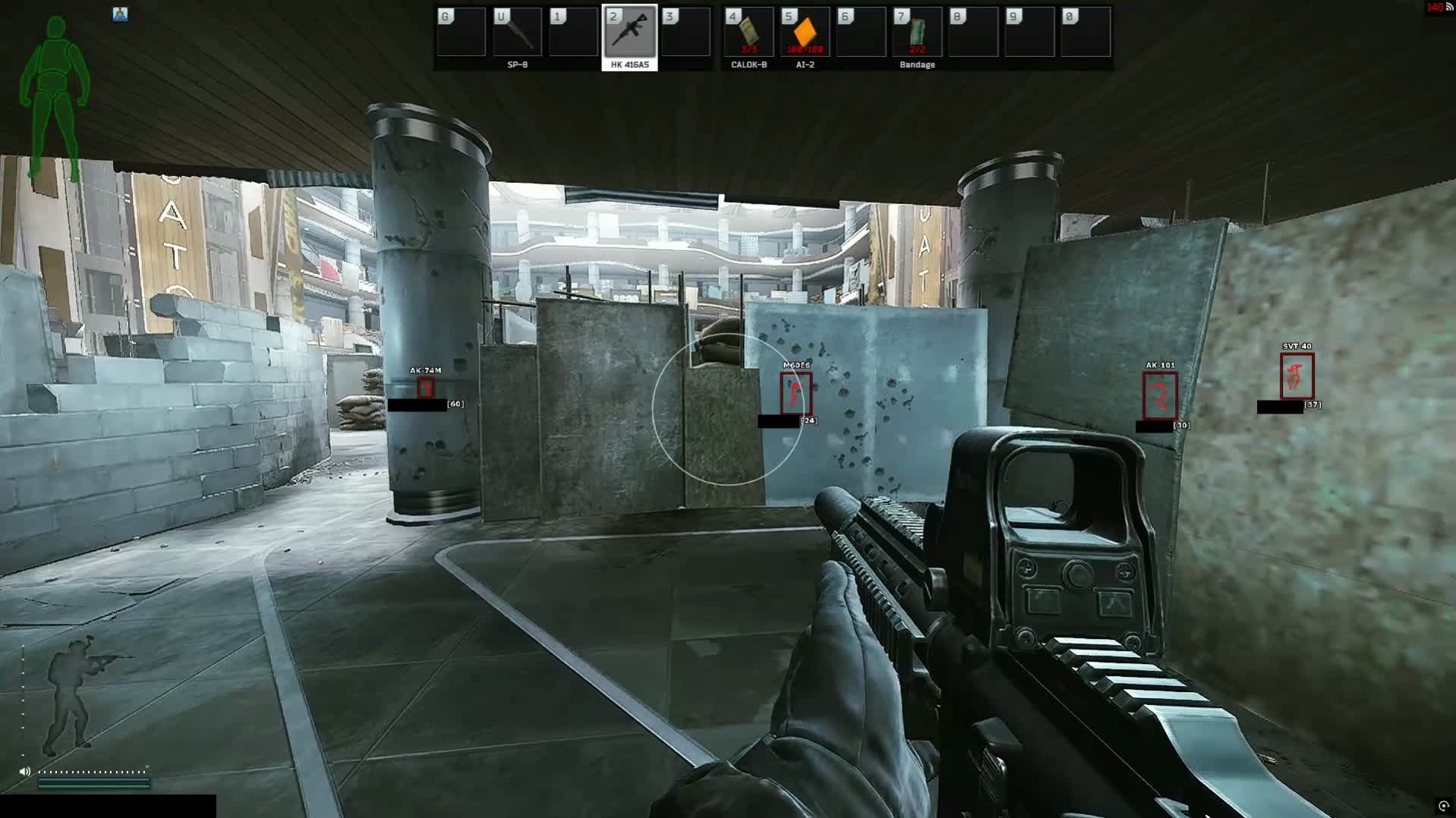
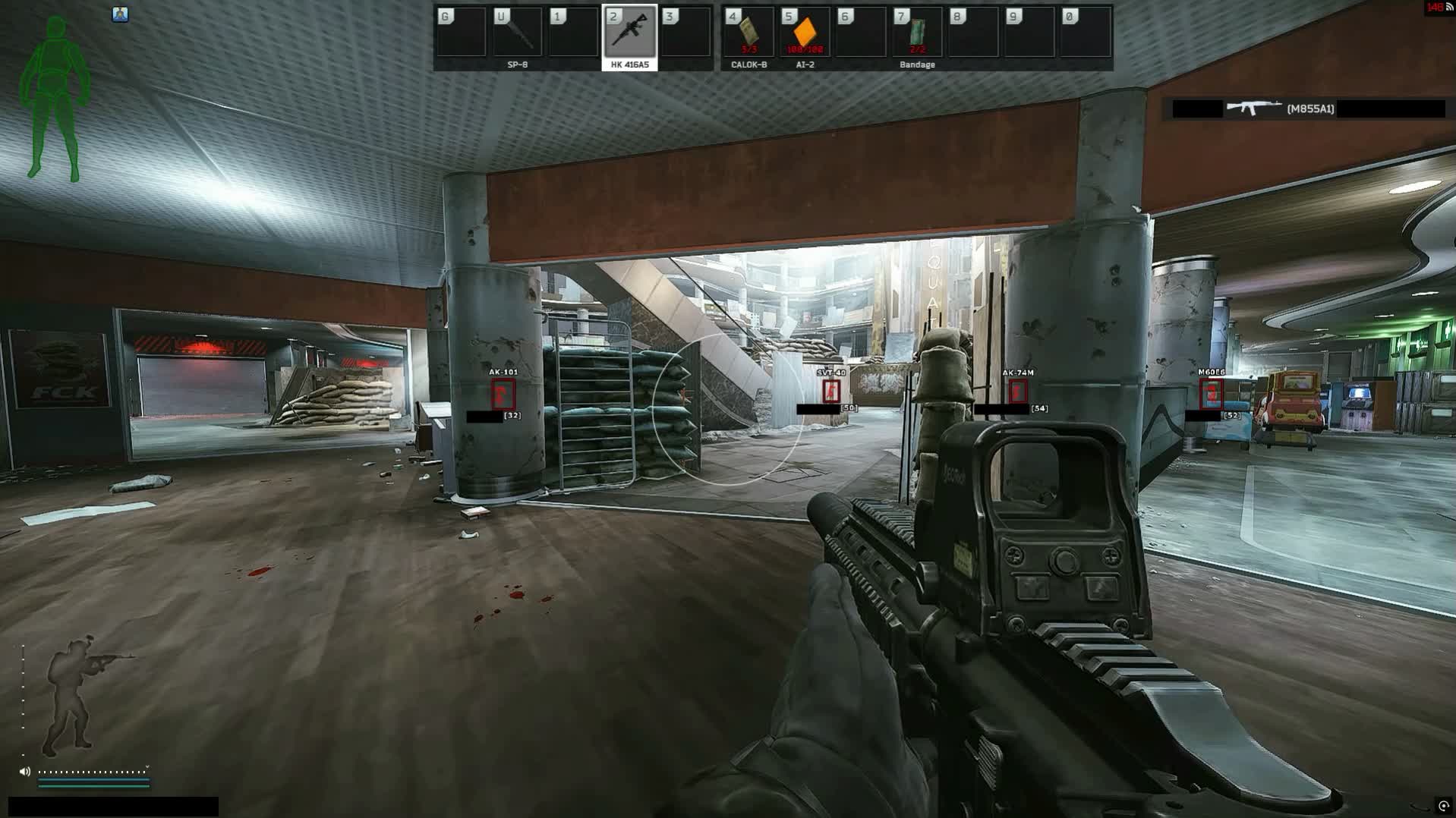
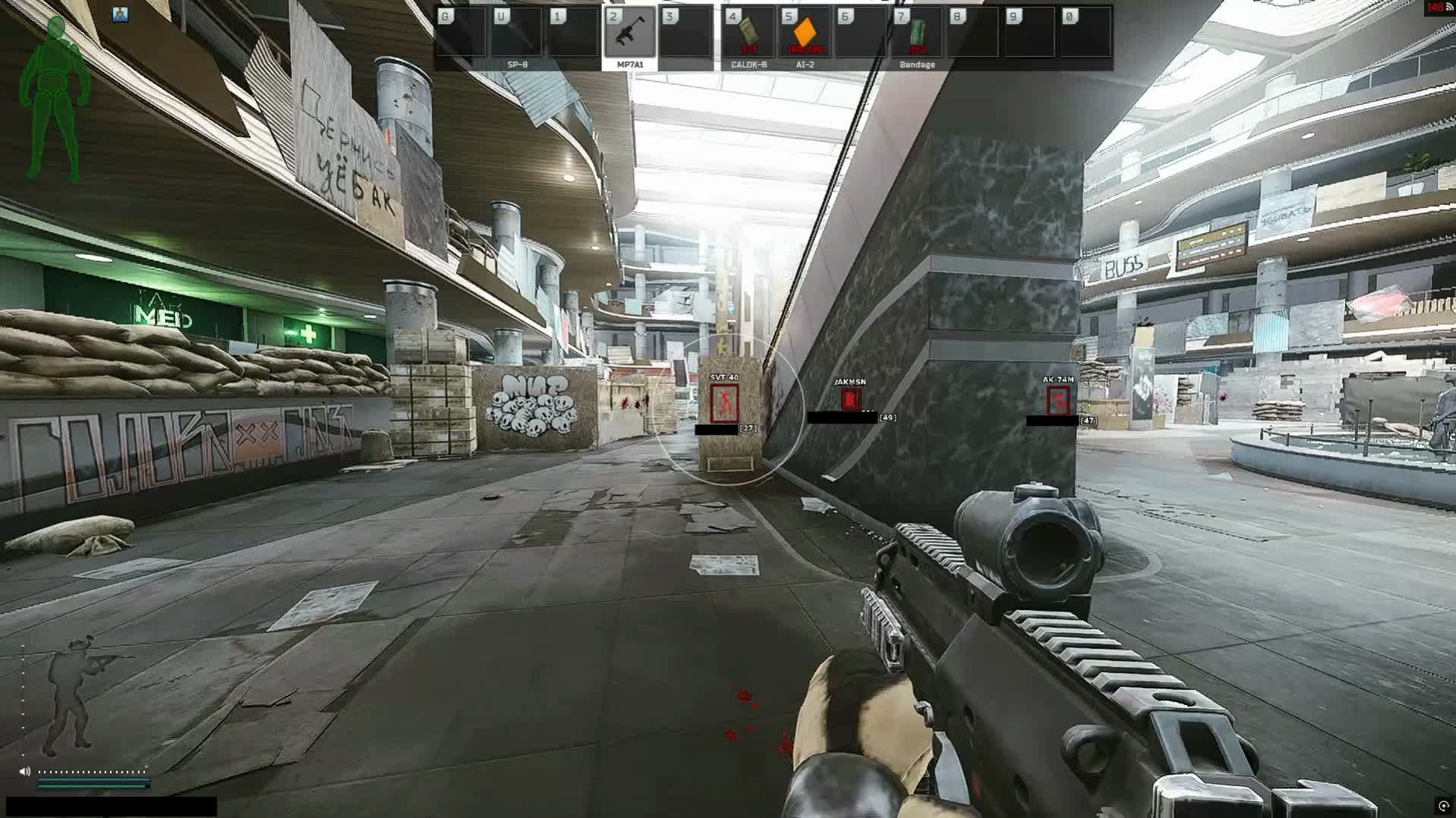
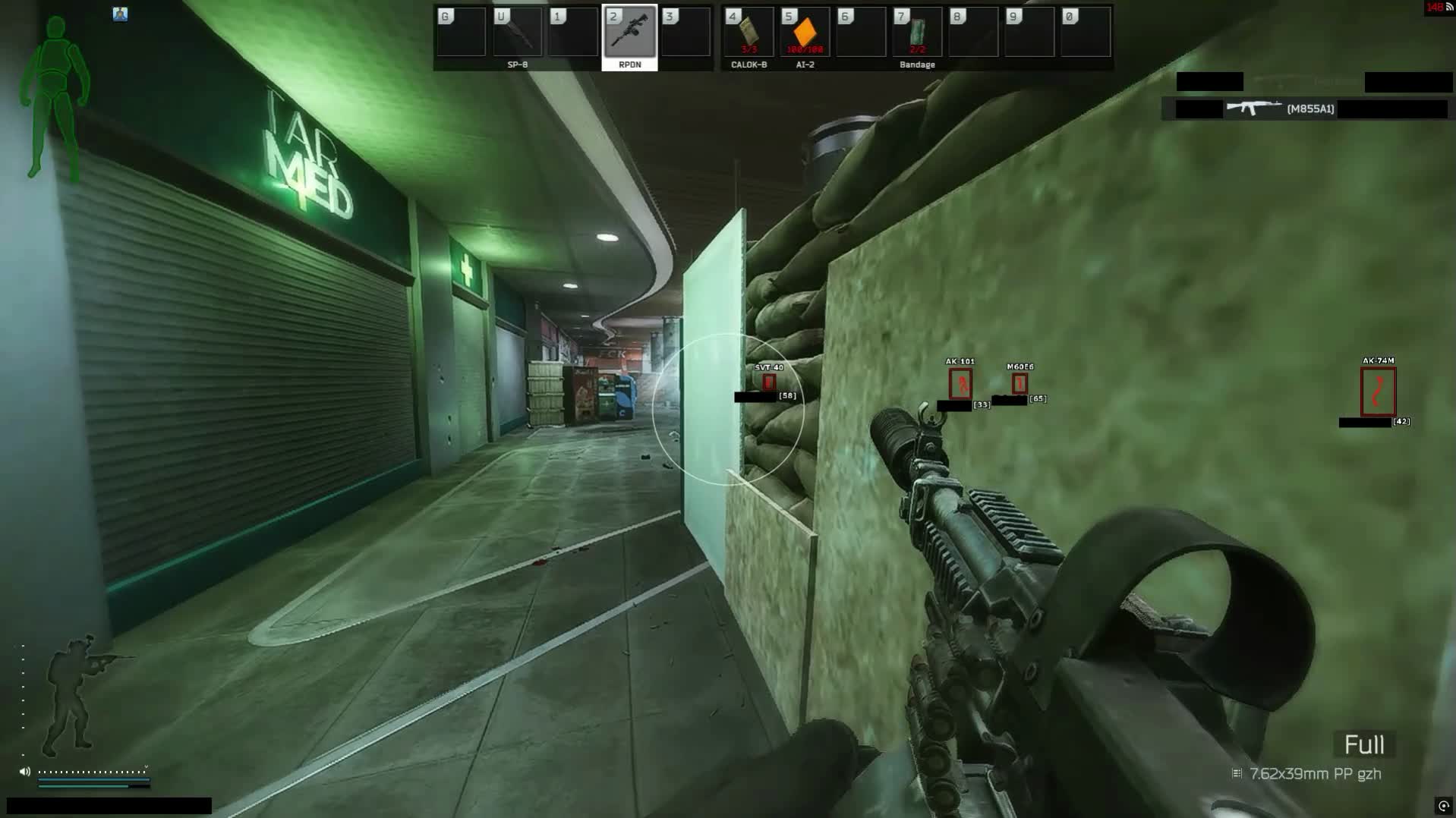
The assist takes your chosen bone and target priority, eases the crosshair toward the enemy at the speed you set and draws the capture radius right in the fight. ESP fills enemies with a box and skeleton, labels the name and distance and pulls lines to them, so on tight Arena maps like Chop Shop and Skybridge you read a position before the enemy even peeks the corner. The menu runs in Russian, English and Spanish, and you save your setup to a config.

Product features

Aim Assist

Activation & keys

Turn the assist on and bind it to your main key, with a spare key for a second grip. In the short Arena rounds the assist stays under your finger and only fires on the peek.

Bone & priority

Pick the aim bone and the priority for which target the assist follows first. In deathmatch you hit chest on the closest, in a duel you switch to the head.

Speed & distance

Dial the tracking speed from lazy to sticky, and the max distance sets how far out the assist even grabs a target. The crosshair movement stays close to a real hand.

Radius, target & color

Draw the capture radius and a marker on the active target, and recolor the marker to your palette. You instantly see who the assist holds and at what range.

Player Visuals

2D box

Opponents get a 2D box, and you choose the frame type: full rectangle or corners. Against the tight walls of Chop Shop the enemy silhouette never melts into the background.

Skeleton

The skeleton shows the player's pose, and you set the line width to taste. You can tell whether the enemy is aiming from behind a crate or already sprinting at you.

Weapon in hands

ESP labels what the opponent is holding, so a shotgun up close or a sniper down the lane is something you read early and pick your fighting distance around.

Name & distance

A name and range in meters hang over the enemy. On Skybridge you instantly know who's point-blank around the corner and who's shooting down through a floor.

Lines

Lines run to opponents and show which side they're coming from. In the side-swap fight that keeps your flanks under control.

Visual colors

Recolor the box, skeleton and lines to fit your picture, so enemies read in smoke and in a dark corridor alike.

Config

Save settings

Save your aim-and-visuals setup to a config and load it in one click. No need to re-drag the sliders every time you jump into Arena.

Known issues & fixes

Real questions from our support, with the fixes that worked. Based on user requests for this product.

Why did the software stop working right after a game update?

After every game update the software goes into a temporary "frozen" state until the developer adapts it to the new game version — this is normal and there is nothing you need to do.

While the status is "frozen", your remaining subscription time is paused, and the downtime is usually compensated. An update typically takes from a few hours up to a day.

When I enter my activation key it says the subscription is frozen — what does that mean?

It means the program is temporarily paused after a recent game update — it is not a problem with your key. Wait until the update is finished, then activate the key again.

Do not enter the key many times in a row: repeated attempts can trigger an automatic lock on the key that only support can remove. You can check the current status on the product page or with support.

How do I check whether my Windows version is supported, and what if my build isn't?

Press Win+R, type winver, and compare your version and build number with the supported list on the product page. If your build is newer than the listed maximum, the program will not run — support for new builds is added only after their official release, and Insider (beta) builds are usually not supported.

In that case, roll back or reinstall a supported official build. Use full editions of Windows 10/11 from an official source — stripped-down or modified builds often cause launch errors.

Do I have to run the loader from a USB drive, and what kind of drive do I need?

Yes, running the loader from a USB drive is a required part of the protection setup — it lowers the chance of the program being flagged by anti-cheat. A regular flash drive works fine, nothing special is needed.

Once the game has launched successfully, you can remove the drive — the program will keep working. If you don't have a physical drive, it can be emulated with a virtual one: contact support and they will walk you through it.

Can I move my key to another computer, and how do I reset the hardware (HWID) lock?

The key is bound to a single computer by its hardware, so it won't activate on a new machine on its own, and it can't be used on several computers at once.

To switch computers, contact support with your software login — the hardware lock will be reset manually, and you can then activate the key on the new machine.

My computer freezes or blue-screens while the software is running — what should I do?

First, update Windows to the latest supported build via Windows Update and restart your computer. Disabling the page file (virtual memory) in the system performance settings also helps.

Wait 10–15 minutes after turning the computer on before launching, so the system finishes its background initialization. If the problem persists, contact support and attach a video of the freeze — it speeds up diagnosis.

The loader shows an error about the page file at startup — what should I do?

The error means an active page file (virtual memory) is blocking the loader. Disable it in the Windows performance settings: in the virtual memory options, uncheck automatic size management and set "No paging file" for every drive.

Save the changes, restart your computer, and launch the loader again.

I paid but it still says there is no payment — what should I do?

Sometimes the payment system needs a little time to confirm the transfer. Wait a few minutes — once the bank or payment provider sends confirmation, the payment status will update automatically.

If it is still not confirmed after 15–20 minutes, contact support and attach your payment receipt.

The game crashes, freezes, or the screen goes black while the software is running — what should I check?

A common cause is a conflict with third-party overlays — Steam, Discord, screen-recording tools, audio overlays, and similar utilities.

Disable all such overlays and unnecessary background programs before launching and try again.

At startup I get an error saying the anti-cheat driver is already loaded in the system — what should I do?

This happens when the game was launched before the loader. Fully close the game (use Task Manager if needed), start the loader, wait until it finishes loading completely, and only then open the game.

The cheat menu shakes or jitters on top of the game — how do I fix it?

This is usually caused by the game running in exclusive fullscreen mode. Switch the game to windowed or borderless windowed mode in its graphics settings — this normally stops the overlay from jittering.

If the issue persists after switching modes, take a screenshot and contact support.

I forgot my account password for the software — how do I recover access?

You can't reset the password yourself through the website. Contact support and provide your purchase details so the operator can confirm the account is yours.

After verification, the operator will manually reset the password and send you a new one.

All issues & general troubleshooting
TARIFFS
$4.93

Subscribe to learn when this product is updated.

Got a question? Ask before you pay

We'll help you choose and sort out any launch issue. Ask us anything before buying, we're always on your side.

Support 10:00–22:00, sometimes we reply at night too
Ask a question
Update history
  • 30.07.2026 Frozen
    Sent for update, time frozen
  • 22.07.2026 Working
    Received an update
  • 22.07.2026 Working
    Received an update

Available tariffs

1 day
$4.93
SUBSCRIBE
7 days
$18.49
SUBSCRIBE
30 days
$36.98
SUBSCRIBE
Reviews about Soft Hub EFT ARENA FULL

No reviews yet. Be the first to leave one.

Your review

Reviews are published after moderation.

Join our gaming community chat

Discuss current cheats from developers and how to use them effectively in popular online games. Share tactics, exchange useful info and find like-minded players in our community.

1 900+Members
24/7Online
Join our gaming community chat

Technical support

Run into a technical issue? Our team of experts will help. We handle all requests in a live queue, so please be understanding if it sometimes takes a little wait. We guarantee that no request goes unanswered.

Availabilityfrom 10:00 to 23:00
Fast responseIn queue order
Get help
Technical support
PROCHEAT

PROCHEAT news channel

Follow product status changes, update history and important announcements.

Subscribe

What's inside Soft Hub EFT ARENA FULL

The build is made of two working blocks plus a config: the assist helps you finish the aim, while the visuals give you the full read of a fight. The software is external and doesn't inject into the game — the overlay and the assist logic run as a separate layer. Here's what's inside and where to look.

Capability What it gives you in a fight
Aim assist helps drag the crosshair onto your chosen bone, but doesn't shoot for you
Player visuals box, skeleton, weapon, name and distance of enemies through walls
Lines show which side the enemy is coming from
Color settings box, skeleton and target marker read on any background
Config save your setup and load it back in one click

How the aim assist works in Arena

The assist doesn't replace your shooting, it pulls the crosshair toward the target once you're already aiming its way. You set the bone, priority and tracking speed, and within the capture radius it helps bring the aim onto the opponent. The hit is still on you: positioning, peek timing and recoil control are all still your job.

That's why Soft Hub plays differently from aimbots with an instant lock. Tuning to your hand is what matters: too high a speed gives itself away, too low barely helps. In the short Arena rounds this helper saves a fraction of a second on tracking, and that's often enough to win the first contact.

Visuals: what you see on the map

The visual block keeps opponents in view. The box and skeleton show the pose and size, the weapon label tells you what you'll be met with, and the name and distance in meters cut the guesswork about range. Lines fill in which side the approach comes from.

On the Arena maps this is decisive. Chop Shop with its blind angles, the Skybridge floors, open Equator and the Bowl each play differently, and an early read of positions changes the whole trade. You tune the visual colors so the enemy reads in grenade smoke and in a dark passage alike.

BattlEye and keeping your account

Arena is covered by BattlEye, the same anti-cheat as in base Tarkov: it starts before the game and watches the software on your PC. Soft Hub is external and doesn't inject into the game, so it's calmer than internal builds, though it doesn't remove the risk entirely. After Arena patches the dev ships a fix and puts a freeze on the downtime so your paid days don't burn.

The rest is on your behavior. Don't crank the assist speed to the max in public and don't post clips where the crosshair obviously sticks to heads. There's no built-in spoofer in the build, so you keep the account clean with your head, not with hardware.

Payment, languages and launch

The plans are simple: a day to try it, a week for an active stretch and a month for the Arena season. You pay, and the key and loader arrive by email, no account needed on the site. You run the loader, enter the key and jump into the game through the BSG Launcher or Steam.

The menu comes in three languages: Russian, English and Spanish, switched right in the cheat. Which game build is supported right now, support will confirm before you pay, and they'll help there too if the software won't come up the first time.

FAQ

Is this a full aimbot?

No. It's an aim assist, a helper for finishing the aim. It pulls the crosshair toward your chosen bone, but you shoot and position yourself, so it works differently from hard aimbots.

How is Soft Hub different from other Arena cheats?

By leaning on honest tracking instead of an instant lock, and by a three-language menu. The aim tunes finely to your hand, and the visuals give the full read of a fight without radar or loot ESP.

What language is the menu in?

Russian, English and Spanish. The language switches right in the cheat.

Does it work on Windows 11?

Yes, all current Windows 10 and 11 builds are supported. No USB stick and no BIOS edits.

Do I need a spoofer?

There's no built-in spoofer in the build. Under BattlEye you keep the account clean through behavior, and a spoofer is taken separately if you want one.

Where does the key arrive after payment?

At the email you gave at checkout. There's no account on the site, so mail is the only channel — double-check the address.

What happens after an Arena patch?

The product goes on freeze, your subscription time is frozen, and the post-fix unfreeze returns the spent days.

Latest updates

30.07.2026 04:40
Frozen
Sent for update, time frozen
22.07.2026 23:15
Working
Received an update
22.07.2026 17:44
Working
Received an update
20.07.2026 10:58
Working
Received an update
16.07.2026 16:44
Frozen
Sent for update, time frozen
Open full history
Ask a question


