AUTHORITY Cheat for Escape from Tarkov: Arena

Working
SMG SMG
Last update 09.07.2026 This date shows when the software was last updated. An old date doesn't mean the software stopped working! Most likely the developer just had nothing new to add. If you have any doubts, you can always check the current status with our support team.
Add another cheat from this game too — to compare them.
AUTHORITY
BSG Launcher
Riot Games
Windows support: 10: 21h1, 22h2, 23h2, 24h4; 11: 21h2, 22h2, 23h2
Menu language: English, Russian
Spoofer:Yes
USB drive:No
BIOS:No

User information

AUTHORITY ships with a built-in spoofer, so there's no separate BattlEye bypass to buy; a USB stick and BIOS edits aren't needed either, and the loader installs like any normal app. The menu and overlay switch between Russian and English.

To be precise rather than just saying "10 and 11": it supports Windows 10 builds 21h1 and 22h2 and Windows 11 builds 21h2, 22h2 and 23h2. Check other builds with support before buying. You launch the game through the BSG Launcher or Steam, and after payment the key and loader arrive at the email you gave, with no account to set up on the site.

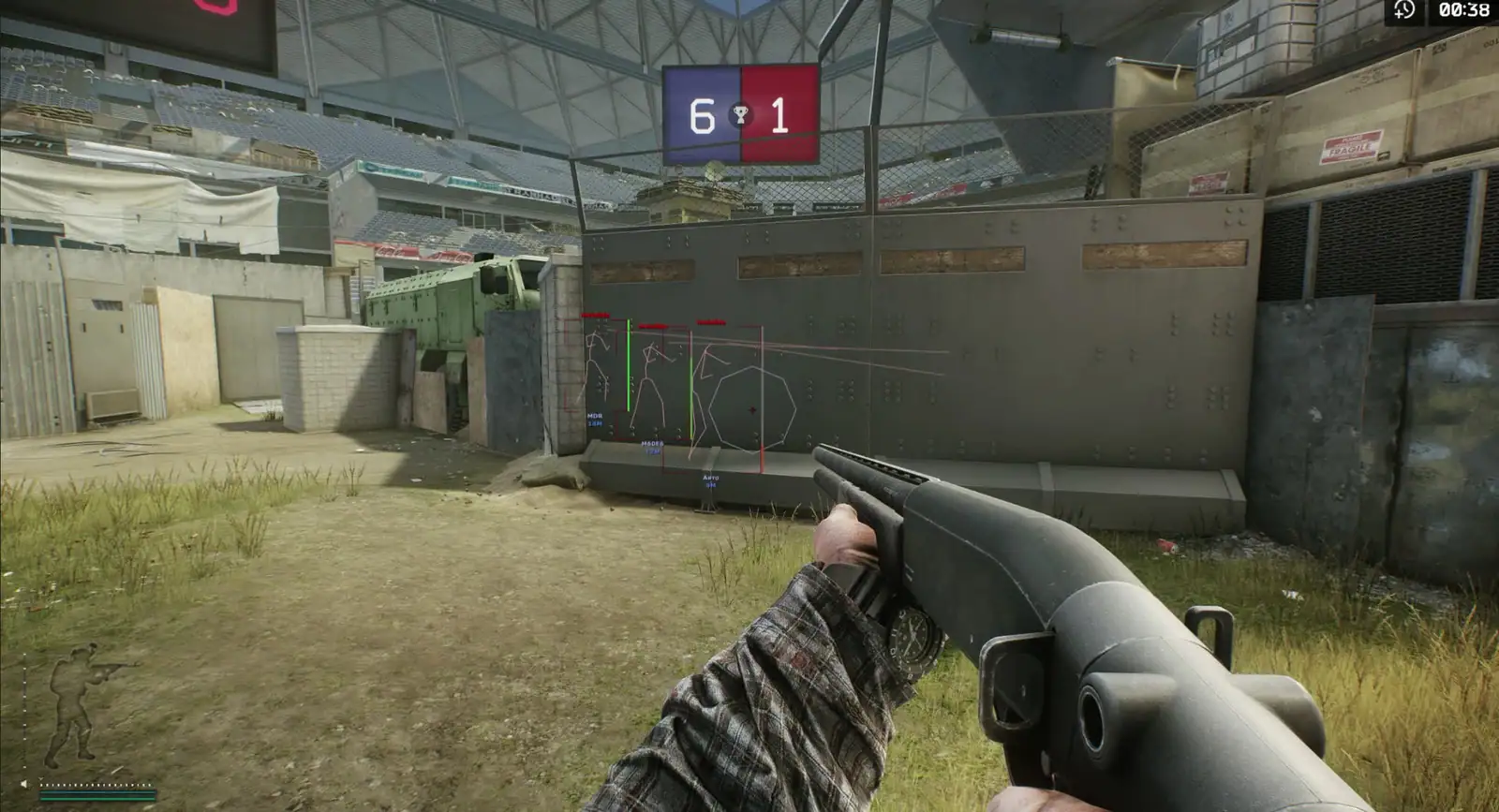
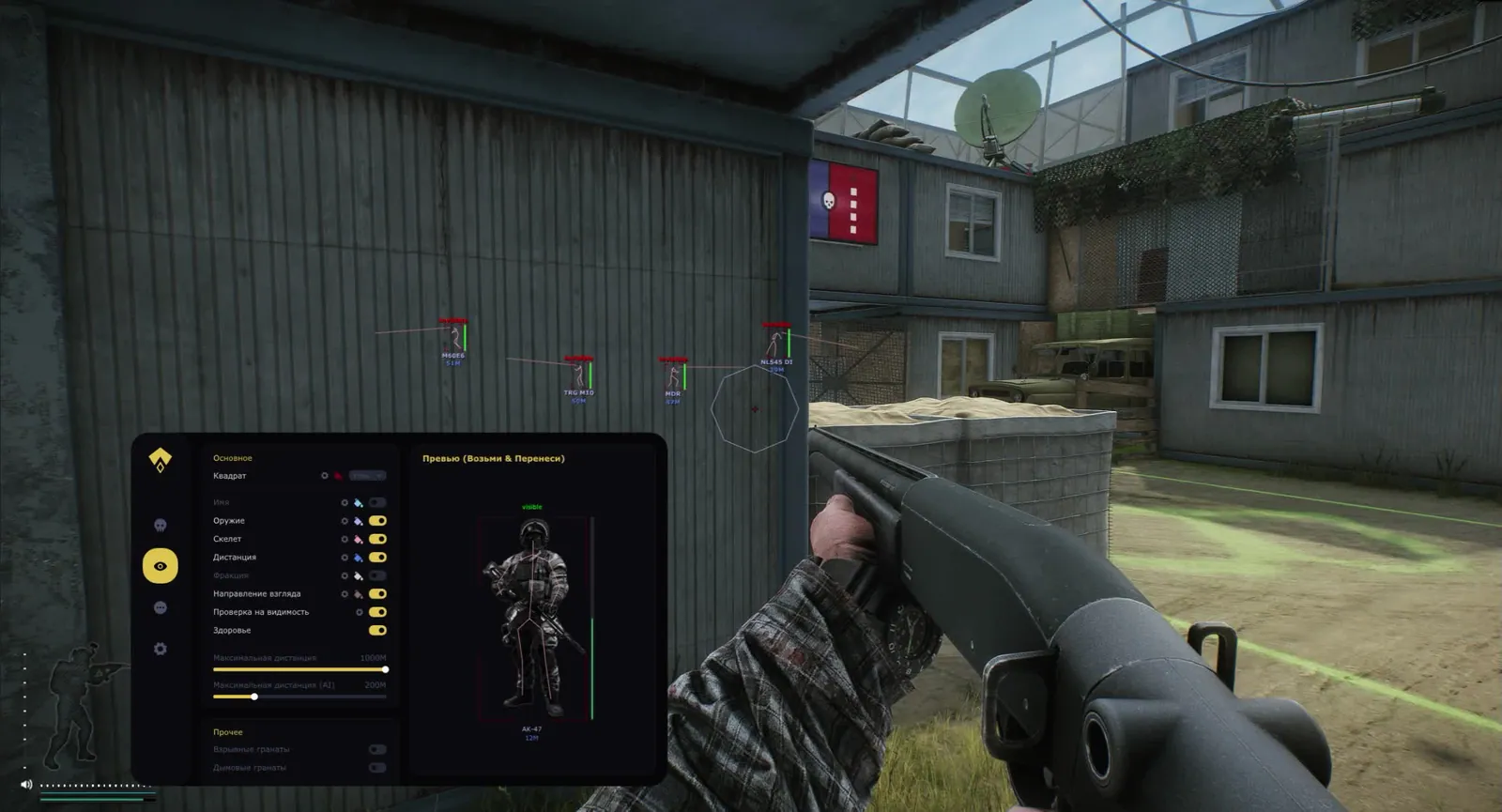
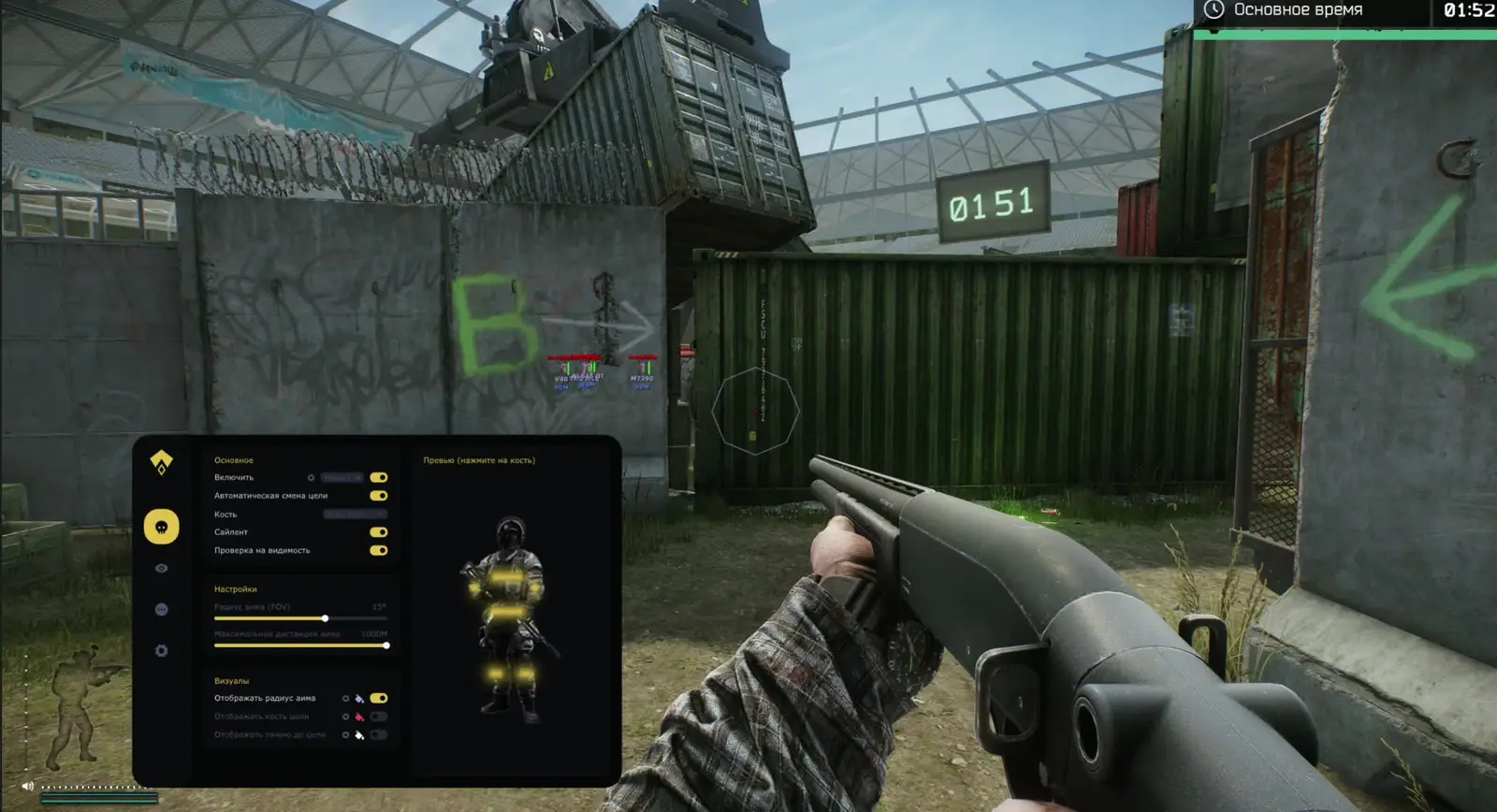
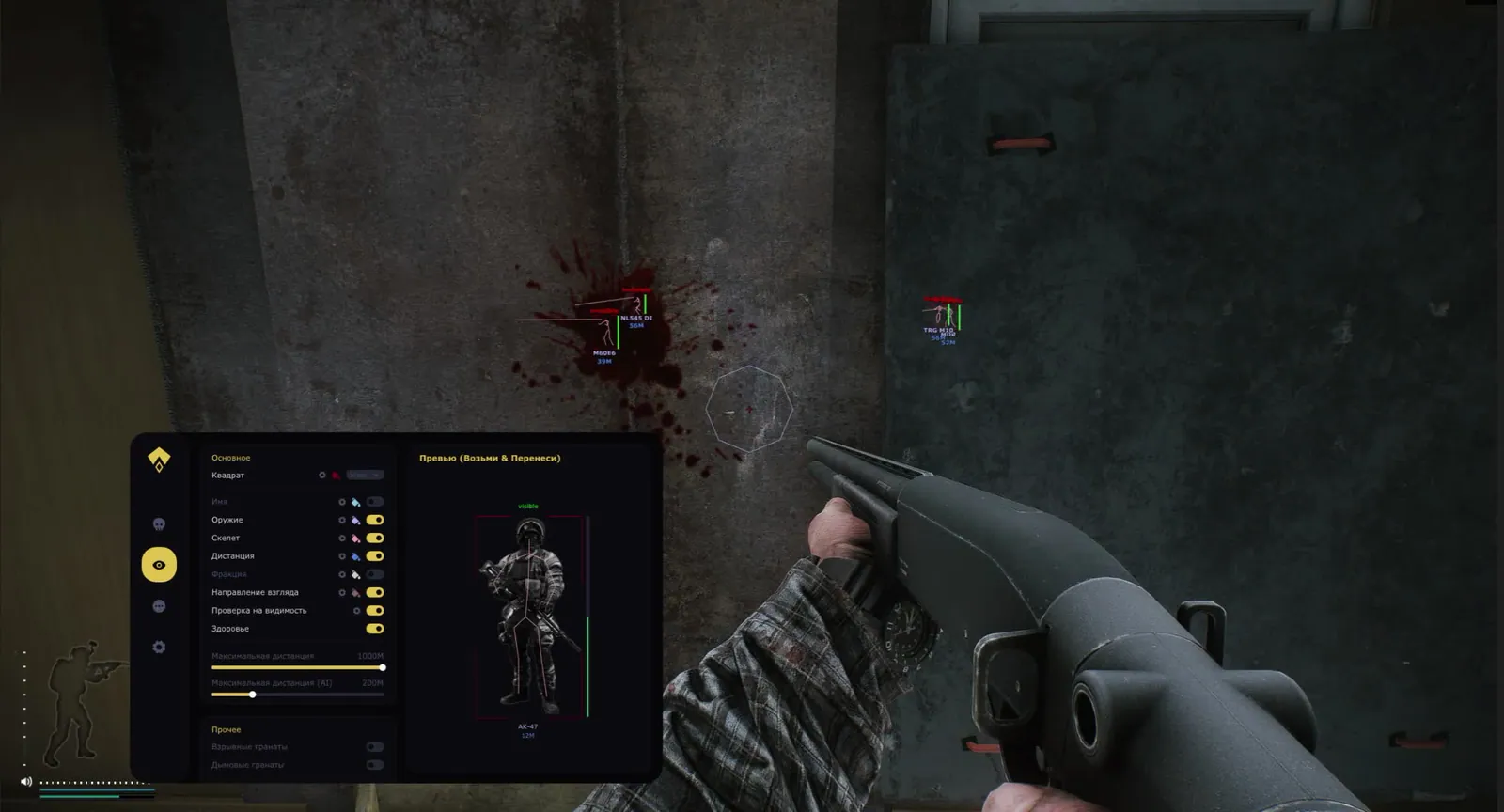
SCREENSHOTS
Description

AUTHORITY is a private Tarkov: Arena cheat by SMG built for fast close-range fights: a vector aimbot snaps your crosshair on, ESP keeps opponents in view through walls, and the misc set kills recoil and weapon sway. On top of that sits a built-in spoofer, so you don't buy a separate bypass for BattlEye.

This is external software for Escape from Tarkov: Arena, tuned for Arena with its short rounds and tight maps like Chop Shop and Skybridge, not for base Tarkov raids. Below we break down the aim, the visuals and the misc one by one and show what actually wins rounds in each match.

Product features

Aimbot

Vector and silent aim

Vector aim pulls the crosshair onto the target on the shortest path, silent aim guides the bullet in without an obvious camera turn, quieter on someone else's recording. They work together for Arena's close range.

FOV, smooth and crosshair

The capture radius (FOV) and aim smoothness tune to your style, and an FOV circle plus a custom crosshair show on screen so you see the aim's working zone.

Visibility check

The aim only locks onto genuinely visible targets and won't drag the crosshair through walls blindly, which looks far more natural from the outside.

Target info

Shows the target's bone and a line to it, plus the enemy's ammo counter so you can catch their reload.

Visuals

Boxes

A 3D box and a corner box around the enemy model, readable at any range and on the busy backgrounds of the arena maps.

Skeleton and state

The skeleton shows pose and movement direction, and a visible-state marker tells you whether the enemy can see you right now.

Target labels

Player name, distance to target, weapon and ammo in their hands — the full read on an opponent before contact.

ESP customization

Colors are set through a color picker with an ESP preview, and a maximum draw distance keeps far targets from cluttering the screen.

Misc

Weapon control

No recoil, no sway, no inertia and no weapon malfunctions, so the gun behaves predictably on any burst.

Handling speed

Instant ADS and fast magazine load/unload, you shoulder the weapon and reload with no delay.

Body

Infinite stamina and oxygen plus a high jump, you keep the pace and reach spots you usually can't.

Vision

Visor off, thermal vision, ZoomHack and an FOV changer, you tune the picture and zoom to the task at hand.

Known issues & fixes

Real questions from our support, with the fixes that worked. Based on user requests for this product.

The cheat won't launch or shows an error — is my Windows version supported?

The software doesn't support every Windows version and build — the newest system updates in particular may not be supported yet, in which case the launch fails or the system blocks the driver as "unsafe".

  • Check your exact version and build number in Windows Settings (System → About) and compare it with the list of supported versions on the product page.
  • If your build is newer than the ones listed, or it's a non-standard/stripped-down Windows edition, stable operation isn't guaranteed — installing one of the supported official versions usually resolves it.
  • Before purchasing, ask support which Windows version is required for the specific product — they can also tell you whether an update for your build is planned.
The program launches but nothing happens, or it gets blocked even though the antivirus was removed long ago

The most common cause is leftovers from previously installed antivirus or security tools: their drivers and background files keep interfering with the program even after the antivirus itself has been removed.

Contact support — they can point you to a dedicated utility that checks your computer for such leftovers and help you remove them properly. After cleaning up, restart your computer and launch the program again.

The cheat stopped working or shows an error after a game update — what should I do?

This is expected: after a major game update the developer needs time to adapt the program, usually anywhere from a few hours up to a day. Until the update is ready, the loader may fail to start or some features may work incorrectly.

  • You don't need to update anything manually — the current version is pulled through the loader automatically.
  • Check the product status on the website to see when the update is finished.
  • If the program is temporarily unavailable due to an update, your subscription time is extended to cover the downtime.
  • If it still won't launch a day after the game patch, contact support to check the update status.
Loader flashes briefly and disappears on startup — Windows security driver conflict

This is a common issue caused by Windows driver security components. Follow these steps:

  • Download the Sordum utility (available from technical support; archive password: sordum), run it, click Search, and wait for it to finish.
  • Apply the win_driver_OFF.reg file provided by support — it disables Windows driver signature enforcement. Reboot your PC afterwards.
  • Make sure User Account Control (UAC) is disabled — the loader handles this automatically, but verify it manually if needed.
  • If the issue persists, run sc query vgk, sc query faceit, sc query wdfilter in CMD and send a screenshot to support.
The program stopped working after a Windows update — what should I do?

Most software is built for specific Windows builds, and an automatic system update can make your system incompatible with the program's protection.

  • After any major system update, compare your build with the supported Windows versions listed on the product page.
  • If your build isn't supported, you'll need to roll back the update or reinstall Windows on a supported build.
  • Ask support for the exact list of supported builds and advice for your specific case.
Loader connection error or infinite loading on startup — VPN or Network Manager required

Loader connection errors are usually caused by ISP-level blocking. Try the following steps:

  • Enable a VPN (any country), launch the loader and click Inject. Once injected successfully, disable the VPN before starting the game.
  • If VPN does not help: download the networkmanager.zip utility, run it, select «Find Best IP» and click Apply. Then try launching the loader again.
System freezes and mouse barely moves when entering the key in the loader

System freeze when entering the key is usually caused by HDR or antivirus conflicts. Do the following in order:

  • Disable HDR in Windows display settings.
  • Disable Windows Defender and make sure any third-party antivirus (e.g. Kaspersky) is fully uninstalled.
  • Run the Sordum utility (available from technical support) to disable system security drivers, then reboot your PC.
Loader crashes or throws errors on startup — antivirus or Vanguard interfering

The most common cause is third-party antivirus or security software blocking the loader. Completely uninstall 360 Total Security, Vanguard (Valorant anti-cheat — must be uninstalled, not just disabled), and any other third-party antivirus.

After removal: download the Sordum utility (available from technical support; archive password — sordum), run it, click Search, and wait for it to finish. Then reboot your PC and try launching the loader again.

If errors persist, send a screenshot of your installed programs list to support. As a last resort, a clean Windows reinstall resolves the issue.

The menu doesn't open with the hotkey after launching the game

Switching the game to windowed mode is usually what fixes this — in fullscreen mode the menu hotkey may not respond.

  • Finish all loader steps exactly as instructed, then start the game in windowed mode.
  • Press the menu hotkey specified in the instructions only after the game has fully loaded.
  • If the menu still doesn't appear, reinstall the program and try again from scratch; if the issue persists, contact support and attach a screenshot of what happens when you press the key.
Loader keeps asking to reboot the PC — stuck in a reboot loop

Run a system file repair: open Command Prompt as Administrator and execute two commands — first DISM /Online /Cleanup-Image /RestoreHealth, then sfc /scannow. After that, make sure Fast Boot is disabled in BIOS/UEFI, then reboot.

If the issue persists, a clean Windows reinstall is required. Use the Pro edition only — Home versions may lack required components for the loader to function correctly.

The loader won't open and says it can't find d3dx9_43.dll

This error means the computer is missing DirectX components the program needs to run. Download and install the official DirectX Redistributable package from Microsoft, then restart your computer.

If the error persists, update your graphics drivers and try launching again.

Can I use one key on several computers or after switching PCs?

An activation key is bound to the hardware of one specific device (HWID) the first time you run it, and it only works on that device — you can't use the same key on several computers at once, and launching it on another PC will just return an error.

If you switch computers or reinstall Windows, the hardware binding resets along with the system. After installing a supported Windows version on the new device, contact support — once your situation is confirmed, they may extend your key's validity to cover the time spent setting things up.

After running the spoofer some hardware serial numbers didn't change

Sometimes the spoofer doesn't change every component in a single run — for example the motherboard serial number can stay the same while the SSD and RAM are spoofed correctly. That's normal behavior for some setups.

Reboot your computer and run the program again. To confirm the result, compare your system info before and after running it — a hardware-checking tool works well for this. If nothing changes after several attempts, contact support.

Do I need to enable Discord screen-share bypass separately?

Discord screen-share bypass is built in and works automatically — there is no separate toggle for it. The key requirement is to choose "Game Capture" instead of "Screen Capture" when streaming; that way viewers will not see the program's window.

All issues & general troubleshooting
TARIFFS
$4.62
BUY What happens after payment?
Got a question? Ask before you pay

We'll help you choose and sort out any launch issue. Ask us anything before buying, we're always on your side.

Support 10:00–22:00, sometimes we reply at night too
Ask a question

Available tariffs

1 day
$4.62
START PURCHASE
7 days
$18.48
START PURCHASE
30 days
$34.65
START PURCHASE
Reviews about AUTHORITY

No reviews yet. Be the first to leave one.

Your review

Reviews are published after moderation.

Join our gaming community chat

Discuss current cheats from developers and how to use them effectively in popular online games. Share tactics, exchange useful info and find like-minded players in our community.

1 900+Members
24/7Online
Join our gaming community chat

Technical support

Run into a technical issue? Our team of experts will help. We handle all requests in a live queue, so please be understanding if it sometimes takes a little wait. We guarantee that no request goes unanswered.

Availabilityfrom 10:00 to 23:00
Fast responseIn queue order
Get help
Technical support
PROCHEAT

PROCHEAT news channel

Follow product status changes, update history and important announcements.

Subscribe

What's Inside AUTHORITY for Tarkov: Arena

AUTHORITY isn't a narrow visual but a full kit for Arena: the aim takes the duels, the visuals give you the picture before contact, misc clears recoil and sway, and the built-in spoofer settles the hardware-lock question. Here is the group summary, then each one gets its own block.

Group What it gives you in a fight
Aimbot vector and silent aim, FOV and smooth tuning, visibility check
Visuals (ESP) 3D and corner boxes, skeleton, name, distance, enemy weapon and ammo
Misc no recoil, sway or inertia, instant ADS, thermal, zoom and FOV
Spoofer built-in hardware-lock bypass under BattlEye, no separate purchase

Aimbot in Escape from Tarkov: Arena

The core of the build is a two-mode aim. Vector runs the crosshair to the target on the shortest line, while silent guides the bullet in without a sharp camera turn, so the game looks calmer from the outside. FOV and smooth bend to you: a narrow radius for precise work or wider for a spawn brawl, and the FOV circle plus a custom crosshair show right on screen.

The visibility check keeps the aim honest within the frame: it only locks onto what you can actually see, not blindly through walls. Backing the duel is the target info, the bone and a line to it plus the enemy's ammo counter, which lets you catch their reload and push first.

Visuals and ESP

The visuals give you the full read on an opponent before you even meet. The model gets a 3D box or a corner box, the skeleton shows the pose and where the player is moving, and a visible-state marker tells you whether they're looking at you. Next to the target sit the name, the distance and what weapon and ammo count they're running.

All of it tunes to your taste: colors through a color picker with a live ESP preview, and a maximum draw distance drops far markers so the tight arena maps don't turn the screen into mush. The result is that you enter a fight with the picture already set instead of building it on the fly.

Misc: Weapon, Body and Vision

The misc set cleans up how the gun and the character behave. Recoil, sway, inertia and weapon malfunctions go away, so the burst lands where you aim with no surprises. Instant ADS and fast magazine load and unload speed up your handling: you shoulder up and reload with no delay, which is what decides a short Arena match.

For the body it's infinite stamina and oxygen plus a high jump, the pace never sags and you reach spots you usually can't. Vision is under control too: visor off, thermal, ZoomHack and an FOV changer fit the picture and the zoom to the specific map and fighting distance.

Built-In Spoofer and BattlEye

Arena is guarded by BattlEye: it starts before the game and watches what software runs on the PC. AUTHORITY already has the spoofer built in, with no separate bypass to buy; it changes your hardware fingerprint and works as a safety net if a ban lands on your parts. The cheat itself is external and never injects into the game process, which is calmer under BattlEye than internal builds.

Nobody gives guarantees, and the main tell is behavior. An aim that tracks heads through smoke and walls, or misc with a jump to the ceiling, reads without any footage, so it's worth playing within reason. The dev ships fixes right after Arena patches and puts a freeze on the downtime so your paid days don't burn.

How to Buy AUTHORITY for Tarkov: Arena

You pick a duration on the card: a day to try it, a week for an active stretch or a month for the season. After payment the key and loader arrive at the email you used, with no account to set up on the site. Run the loader, enter the key, jump into Arena — the spoofer is already inside the build.

The current product status is shown right on the card, and support will tell you which Arena build is supported before you pay. If something won't come up at the start, they'll get you into the game there too.

FAQ About AUTHORITY

Is this a cheat for Arena or for base Tarkov?

For Escape from Tarkov: Arena. AUTHORITY is tuned for Arena with its short rounds, not for the raids and loot of base Tarkov, so it's worth grabbing purely for Arena.

Does the spoofer come included?

Yes, the spoofer is built in, with no separate BattlEye bypass to buy. It changes your hardware fingerprint and works as a safety net against a hardware ban.

What aim is inside?

Two modes, vector and silent, with FOV and smooth tuning and a visibility check. It shows the FOV circle, a crosshair, the target's bone and the enemy's ammo counter.

What does the ESP show?

3D and corner boxes, skeleton, visible state, name, distance, and the target's weapon and ammo. Colors are set with a color picker and an ESP preview, and you set a maximum draw distance.

Will I get banned for the cheat?

There's always a risk, BattlEye is active in Arena. External software and the built-in spoofer lower the odds but give no guarantees. What gets you caught most is playing too obviously.

Which Windows does it run on?

Windows 10 builds 21h1 and 22h2 and Windows 11 builds 21h2, 22h2 and 23h2. No USB stick or BIOS edits needed; check other builds with support.

Where does the key arrive after payment?

In the email you gave at checkout. There's no account on the site, so mail is the only channel, double-check the address.

from $4.62 Choose a plan
Ask a question


