Private Tarkov Cheat: SMG Chams with Visibility Check

Working
Top seller
SMG SMG
Last update 25.08.2026 This date shows when the software was last updated. An old date doesn't mean the software stopped working! Most likely the developer just had nothing new to add. If you have any doubts, you can always check the current status with our support team.
Add another cheat from this game too — to compare them.
SMG Tarkov Chams
Steam
BSG Launcher
Don't risk your main — grab a spare account JWT →
Windows support: 10: all builds; 11: 21h2, 22h2, 23h2
Spoofer:No
USB drive:No
BIOS:No
VIDEO
SCREENSHOTS
Description

Features: Simple and Effective

This product has just two functions, but they're the key ones for safe, undetected play.

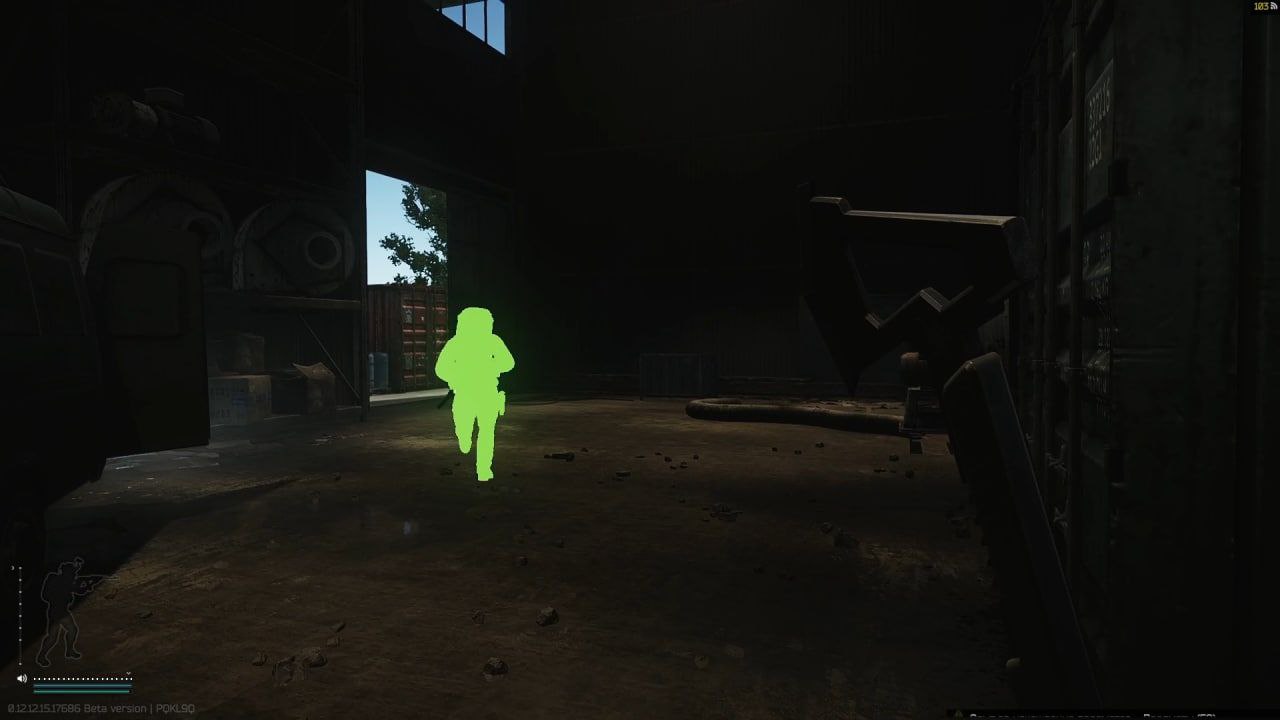
  • Chams on enemies: Enemy silhouettes are highlighted through walls and any obstacles, letting you know their presence and movement direction.
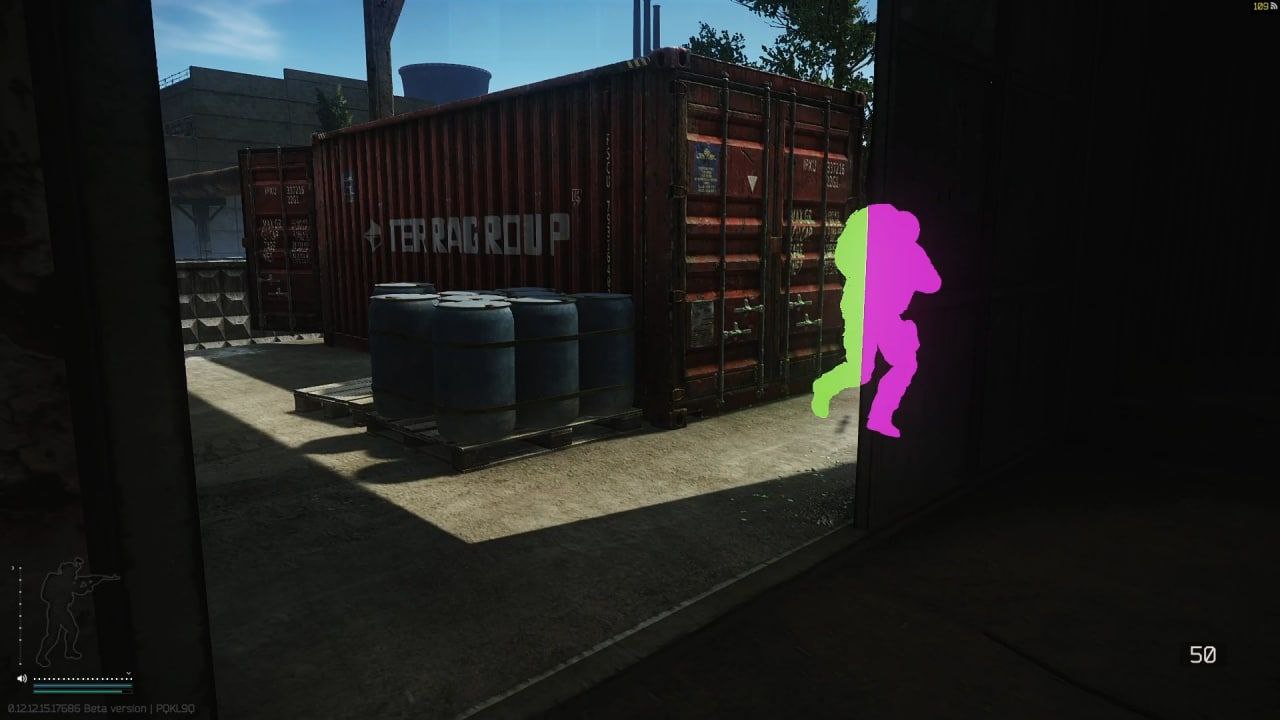
  • Visibility check:Color coding tells you the target's status, giving you a key tactical edge:
    • Green color the target is in your direct line of sight, you can shoot.
    • Purple color the target is behind cover, get ready for them to push.

Product features

Visual Recon (Chams)

Tactical Silhouettes

X-ray. Chams highlight the silhouettes of PMCs and Scavs through any walls and obstacles. You track every move the enemy makes before you ever make visual contact.

Visibility Check (Status Check)

Color Code. The Visible Check system instantly reads the target's status. A purple silhouette means the enemy is behind cover, get ready for the fight. Green means the target is in the open, open fire!

Development history

09.12.2025

Chams EFT Update — Changelog

  • Code optimization performed: performance improved and causes of FPS drops eliminated.
  • A console command system has been implemented for more precise control over visual effects.
  • Draw distance adjustment functionality added, along with separate settings for weapon and dead body visibility.
  • Enemy classification system expanded. Roles are now correctly identified: PMCs, Scavs, Bosses, Boss Guards, Cultists, and Raiders.
  • Successful launch notification type changed: popup window replaced with an audio cue.

Console Commands

chams <1/0> (Default: 1)

Enable or disable chams rendering on player models.

chams.weapon <1/0> (Default: 0)

Enable or disable highlighting of the weapon held in the character's hands.

chams.distance (Default: 500)

Set the maximum distance at which chams are rendered on live players (in meters).

chams.dead <1/0> (Default: 0)

Toggle chams rendering on dead character bodies.

chams.dead.distance (Default: 250)

Adjust the draw distance for chams on corpses (in meters).

Role Color Coding

  • PMCs — displayed in Green or Purple
  • Bots — displayed in Blue
  • Bosses — displayed in Red
  • Boss Guards — displayed in Pink
  • Scavs — displayed in Yellow

Known issues & fixes

Real questions from our support, with the fixes that worked. Based on user requests for this product.

The cheat won't launch or shows an error — is my Windows version supported?

The software doesn't support every Windows version and build — the newest system updates in particular may not be supported yet, in which case the launch fails or the system blocks the driver as "unsafe".

  • Check your exact version and build number in Windows Settings (System → About) and compare it with the list of supported versions on the product page.
  • If your build is newer than the ones listed, or it's a non-standard/stripped-down Windows edition, stable operation isn't guaranteed — installing one of the supported official versions usually resolves it.
  • Before purchasing, ask support which Windows version is required for the specific product — they can also tell you whether an update for your build is planned.
The program launches but nothing happens, or it gets blocked even though the antivirus was removed long ago

The most common cause is leftovers from previously installed antivirus or security tools: their drivers and background files keep interfering with the program even after the antivirus itself has been removed.

Contact support — they can point you to a dedicated utility that checks your computer for such leftovers and help you remove them properly. After cleaning up, restart your computer and launch the program again.

The cheat stopped working or shows an error after a game update — what should I do?

This is expected: after a major game update the developer needs time to adapt the program, usually anywhere from a few hours up to a day. Until the update is ready, the loader may fail to start or some features may work incorrectly.

  • You don't need to update anything manually — the current version is pulled through the loader automatically.
  • Check the product status on the website to see when the update is finished.
  • If the program is temporarily unavailable due to an update, your subscription time is extended to cover the downtime.
  • If it still won't launch a day after the game patch, contact support to check the update status.
Tarkov Chams loader flashes briefly and closes without launching

This is a common issue caused by Windows driver security components. Follow these steps:

  • Download the Sordum utility (available from technical support; archive password: sordum), run it, click Search, and wait for it to finish.
  • Apply the win_driver_OFF.reg file provided by support , it disables Windows driver signature enforcement. Reboot your PC afterwards.
  • Make sure User Account Control (UAC) is disabled , the loader handles this automatically, but verify it manually if needed.
  • If the issue persists, run sc query vgk, sc query faceit, sc query wdfilter in CMD and send a screenshot to support.
The program stopped working after a Windows update — what should I do?

Most software is built for specific Windows builds, and an automatic system update can make your system incompatible with the program's protection.

  • After any major system update, compare your build with the supported Windows versions listed on the product page.
  • If your build isn't supported, you'll need to roll back the update or reinstall Windows on a supported build.
  • Ask support for the exact list of supported builds and advice for your specific case.
Loader connection error or infinite loading on startup — VPN or Network Manager required

Loader connection errors are usually caused by ISP-level blocking. Try the following steps:

  • Enable a VPN (any country), launch the loader and click Inject. Once injected successfully, disable the VPN before starting the game.
  • If VPN does not help: download the networkmanager.zip utility, run it, select «Find Best IP» and click Apply. Then try launching the loader again.
Tarkov Chams doesn't work on Windows 11 24H2 or 25H2 , what to do?

This software does not support Windows 11 24H2 or 25H2. Only versions up to 23H2 are supported; 22H2 is recommended.

You need to reinstall Windows using a supported version. After installing 22H2 or 23H2, the cheat will run without issues.

Loader crashes or throws errors on startup — antivirus or Vanguard interfering

The most common cause is third-party antivirus or security software blocking the loader. Completely uninstall 360 Total Security, Vanguard (Valorant anti-cheat — must be uninstalled, not just disabled), and any other third-party antivirus.

After removal: download the Sordum utility (available from technical support; archive password — sordum), run it, click Search, and wait for it to finish. Then reboot your PC and try launching the loader again.

If errors persist, send a screenshot of your installed programs list to support. As a last resort, a clean Windows reinstall resolves the issue.

Faceit AC and Vanguard AC block Tarkov cheat launch even when disabled

Faceit Anticheat and Vanguard (Valorant AC) load before Windows starts at the driver level and block unsigned cheat drivers, even if they appear disabled inside Windows.

You must fully uninstall these programs , disabling them is not enough. Reboot after uninstalling and try launching the loader again.

Tarkov chams/ESP not showing after injection , nothing visible in game

After a successful injection, you need to activate the cheat inside the game. Enter a raid and press F2 , this opens the in-game console which activates ESP/chams display.

If nothing appears after pressing F2, press F7 and send a screenshot of the log (4 lines) to support. Note that settings are not saved between sessions , you must repeat this each time you launch.

The menu doesn't open with the hotkey after launching the game

Switching the game to windowed mode is usually what fixes this — in fullscreen mode the menu hotkey may not respond.

  • Finish all loader steps exactly as instructed, then start the game in windowed mode.
  • Press the menu hotkey specified in the instructions only after the game has fully loaded.
  • If the menu still doesn't appear, reinstall the program and try again from scratch; if the issue persists, contact support and attach a screenshot of what happens when you press the key.
Loader keeps asking to reboot the PC — stuck in a reboot loop

Run a system file repair: open Command Prompt as Administrator and execute two commands — first DISM /Online /Cleanup-Image /RestoreHealth, then sfc /scannow. After that, make sure Fast Boot is disabled in BIOS/UEFI, then reboot.

If the issue persists, a clean Windows reinstall is required. Use the Pro edition only — Home versions may lack required components for the loader to function correctly.

how to configure tarkov chams settings with console commands (color, range, dead bodies)

Chams settings are adjusted through in-game console commands, for example:

  • chams — toggle rendering on players
  • chams.weapon — highlight weapons in hand
  • chams.distance — max render distance on live players
  • chams.dead and chams.dead.distance — toggle and range for dead bodies

Open the game console and type the command with a value — changes apply immediately.

System freezes and mouse barely moves when entering the key in Chams loader

System freeze when entering the key is usually caused by HDR or antivirus conflicts. Do the following in order:

  • Disable HDR in Windows display settings.
  • Disable Windows Defender and make sure any third-party antivirus (e.g. Kaspersky) is fully uninstalled.
  • Run the Sordum utility (available from technical support) to disable system security drivers, then reboot your PC.
Discord stream cheat bypass , is it automatic or do I need to enable it?

The Discord stream bypass is built-in and works automatically. The key requirement is to select Game Capture mode when streaming , not Screen Capture. This way the cheat window will not be visible to viewers.

The loader won't open and says it can't find d3dx9_43.dll

This error means the computer is missing DirectX components the program needs to run. Download and install the official DirectX Redistributable package from Microsoft, then restart your computer.

If the error persists, update your graphics drivers and try launching again.

Can I use one key on several computers or after switching PCs?

An activation key is bound to the hardware of one specific device (HWID) the first time you run it, and it only works on that device — you can't use the same key on several computers at once, and launching it on another PC will just return an error.

If you switch computers or reinstall Windows, the hardware binding resets along with the system. After installing a supported Windows version on the new device, contact support — once your situation is confirmed, they may extend your key's validity to cover the time spent setting things up.

After running the spoofer some hardware serial numbers didn't change

Sometimes the spoofer doesn't change every component in a single run — for example the motherboard serial number can stay the same while the SSD and RAM are spoofed correctly. That's normal behavior for some setups.

Reboot your computer and run the program again. To confirm the result, compare your system info before and after running it — a hardware-checking tool works well for this. If nothing changes after several attempts, contact support.

tarkov chams show players only through the scope, not without aiming

This usually happens when a rendering setting gets reset after a game or loader update. Open Escape from Tarkov's graphics settings and set the Resampling value to 1 — this restores correct chams rendering on players without aiming down sights.

Avoid changing the chit's base settings without need: altering default values can cause "packet loss" errors in the game.

can a teammate see my chams while spectating me after death in tarkov

No. Chams only render locally on your own screen: if a teammate spectates your character after dying, they will not see the model highlighting — their view stays completely normal.

Do I need to enable Discord screen-share bypass separately?

Discord screen-share bypass is built in and works automatically — there is no separate toggle for it. The key requirement is to choose "Game Capture" instead of "Screen Capture" when streaming; that way viewers will not see the program's window.

All issues & general troubleshooting
TARIFFS
$3.46
BUY What happens after payment?
Got a question? Ask before you pay

We'll help you choose and sort out any launch issue. Ask us anything before buying, we're always on your side.

Support 10:00–22:00, sometimes we reply at night too
Ask a question
Update history
  • 21.08.2026 Working
    Received an update
  • 13.08.2026 Working
    Received an update
  • 10.08.2026 Working
    Received an update

Available tariffs

1 day
$3.46
START PURCHASE
7 days
$10.39
START PURCHASE
30 days
$20.79
START PURCHASE
Reviews about SMG Tarkov Chams
3.9 / 5
3 reviews
How the rating is calculated

Most satisfied buyers never leave a review — people write mainly when something went wrong, so text reviews skew negative. The score is smoothed over every sale, not just the written reviews.

rating = (G + S + 10·0.9) / (N + S + 10) × 5

  • G — sum of review positivity (5★ = 1, 1★ = 0)
  • N — number of text reviews = 3
  • S = (sales − N) × 0.15 — silent satisfied buyers
Customer
Customer review 14.07.2026

сказать как работает не могу но говорю сразу перед покупкой на 11 винду нажмите win+r и напишите команду winver если у вас там написано версия 25h2 тогда не покупайте работать не будет

Customer Not recommended
Verified purchase · Digiseller 03.05.2026

Не робит софт, мало того что не помогли, ещё и деньги не вернули

ProCheat reply

Пытается ввести в заблуждения, поддержка передала скриншоты переписки, человек указывает что у него windows 10 при оплате а сам сидит на windows 11 25h2. Перед оплатой а так же на сайте указано что windows 11 поддерживает до 23h2 включительно

Customer Not recommended
Verified purchase · Digiseller 05.05.2024

сама программа крашится при инжекте

ProCheat reply

Человек не разу не использовал программу, не понимает как ей пользоваться и оставляет отрицательные отзывы

Your review

Reviews are published after moderation.

Join our gaming community chat

Discuss current cheats from developers and how to use them effectively in popular online games. Share tactics, exchange useful info and find like-minded players in our community.

1 900+Members
24/7Online
Join our gaming community chat

Technical support

Run into a technical issue? Our team of experts will help. We handle all requests in a live queue, so please be understanding if it sometimes takes a little wait. We guarantee that no request goes unanswered.

Availabilityfrom 10:00 to 23:00
Fast responseIn queue order
Get help
Technical support
PROCHEAT

PROCHEAT news channel

Follow product status changes, update history and important announcements.

Subscribe
What Are Chams in Cheats? A Simple Explanation

What Are Chams in Cheats? A Simple Explanation

What Are Chams in Cheats? A Simple Explanation

If you're new to this, the question "what are chams?" is one of the first that comes to mind. Let's break it down. Chams (short for Chams) is a visual cheat feature that fully paints another player's 3D model in a solid, bright color.

Put simply, it's like "x-ray vision". Thanks to this you can see enemy silhouettes through walls, doors, smoke and any other obstacles. Unlike classic ESP, which draws boxes or skeletons, chams paint the model itself, which many players find more convenient and less cluttering on the screen.

Modern chams are more than just highlighting. In our product, for example, they got smarter: the silhouette color changes depending on whether the enemy is in your direct line of sight. This gives a key tactical edge, letting you tell a hidden threat from one you can shoot at right now.

The SMG Chams Philosophy: Why Less Means More

The SMG Chams Philosophy: Why Less Means More

The SMG Chams Philosophy: Why Less Means More

There's a real arms race in the cheat world: aimbot, loot through walls, speedhacks... But what if you don't need all that? What if you value the Tarkov atmosphere and your own skill, and just want to remove the element of sudden death from a camper in a dark corner?

That's exactly who we built SMG Chams for. Our chams are not a tool for wiping the whole lobby. It's a surgeon's scalpel, not a sledgehammer. We deliberately stripped out everything unnecessary, leaving just two fundamental functions:

  1. Enemy silhouette highlighting.
  2. Visibility check.

We believe knowledge is power. Knowing someone is around the corner gives you the chance to outplay your opponent tactically, not just outgun them with auto-aim. This chams keeps the thrill and tension but removes the main source of frustration. It's the perfect balance between assistance and a fair challenge.

How Chams Change the Fight: A Practical Example

How Chams Change the Fight: A Practical Example

Scenario: Storming the two-story dorms on Customs

Picture a classic situation. You walk up to the building but don't know if anyone's inside. Without our cheat it's a lottery. With it, it's a tactical problem.

  • Step 1: Assess the situation. You approach the building and see a purple silhouette through the wall on the second floor. You know: the enemy is there, but he doesn't see you and you don't see him either. You don't rush in blind.
  • Step 2: Make the call. Now you have a choice. Go around? Toss a grenade up to the second floor? Or take a strong position and wait for him to slip up? You control the situation.
  • Step 3: Act. You decide to wait by the stairs. The enemy starts coming down. The moment he steps into your direct line of sight, his silhouette instantly turns green. That's the signal to attack. One shot, and the win is yours.

That's what chams in cheats are in practice. It's not an automatic win. It's information that lets you win on your own, using your brain and reflexes.

Who Is SMG Chams Perfect For?

Who Is SMG Chams Perfect For?

Your first and safest step into the world of Tarkov

Escape from Tarkov is a game with an incredibly high skill ceiling. Constant deaths out of nowhere can kill anyone's desire to play. SMG Chams was built to make that first step easier and more enjoyable. Check whether it's right for you:

  • If you're a newcomer who's tired of dying in the first 5 minutes of a raid, with no idea where the bullet came from.
  • If you're an experienced player who doesn't need help with shooting, but wants a little insurance against ambushes.
  • If you don't want to break the atmosphere and economy of the game by getting loot info.
  • If you value your skill and are looking for the most legit and undetected way to get an edge.

If you answered "yes" to even one point, then SMG Chams is your perfect choice. Now that you know what chams are, you understand it's the fairest and safest way to start your path to success in Tarkov.

Latest updates

21.08.2026 14:04
Working
Received an update
13.08.2026 13:16
Working
Received an update
10.08.2026 12:03
Working
Received an update
08.08.2026 10:01
Working
Received an update
04.08.2026 06:55
Working
Received an update
Open full history
from $3.46 Choose a plan
Ask a question


