Last update 21.08.2026
This date shows when the software was last updated. An old date doesn't mean the software stopped working! Most likely the developer just had nothing new to add. If you have any doubts, you can always check the current status with our support team.
Add another cheat from this game too — to compare them.
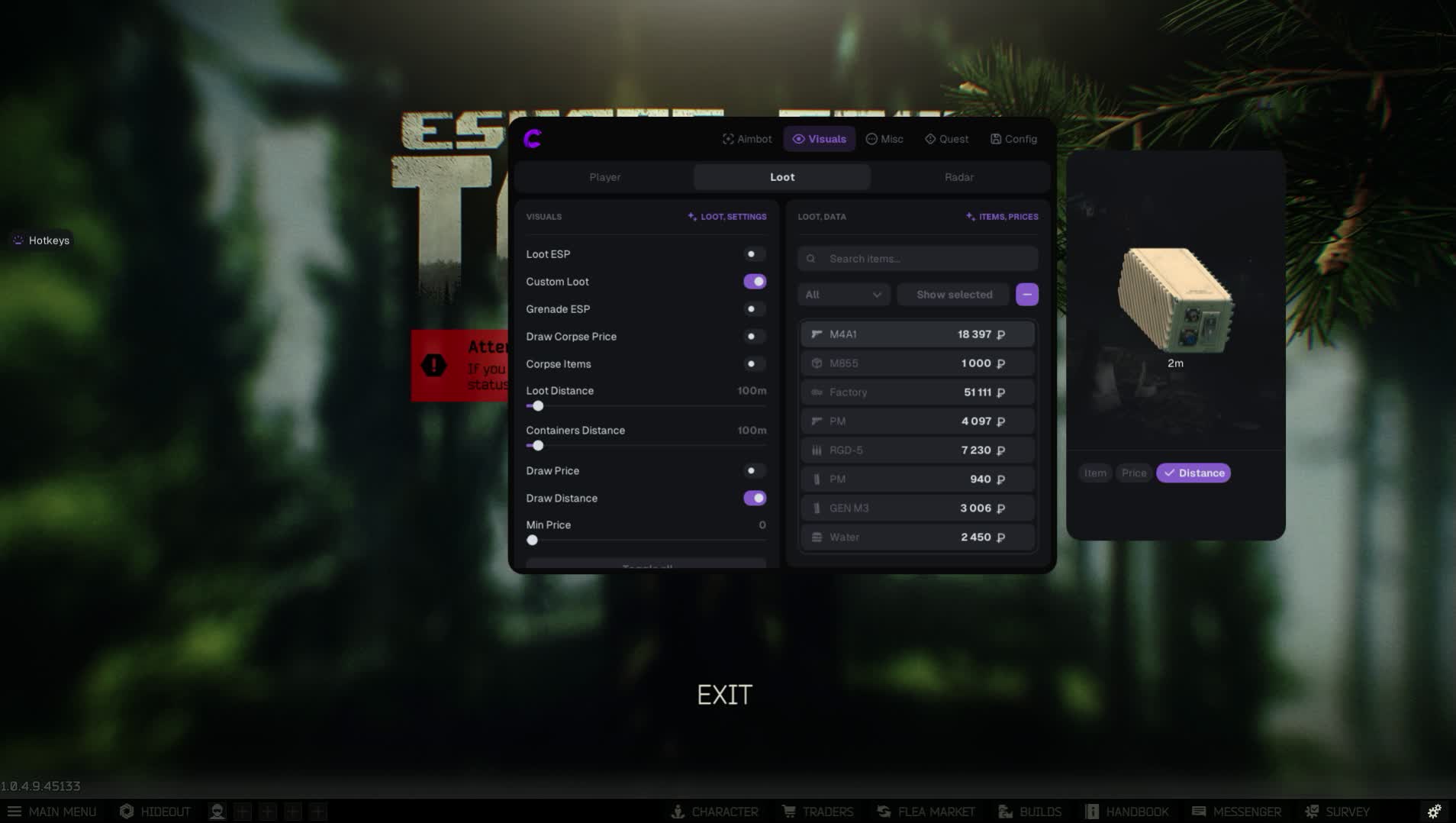
Tarkov doesn't forgive mistakes. Every raid is a one-way ticket. But with the Covcheg cheat for EFT you'll always have a return ticket. This isn't just a cheat, it's a full survival kit built for the most hardcore players out there. The devs at Covcheg poured all their experience into giving you tools not only to win fights, but to take total control of the economy and your surroundings.
From a precise aimbot with recoil compensation to a unique loot-through-walls feature, this product turns you from prey into the owner of the location. Survive. Cash in. Get out of Tarkov.
Product features
Firefight (Aim)
Stabilization and Control
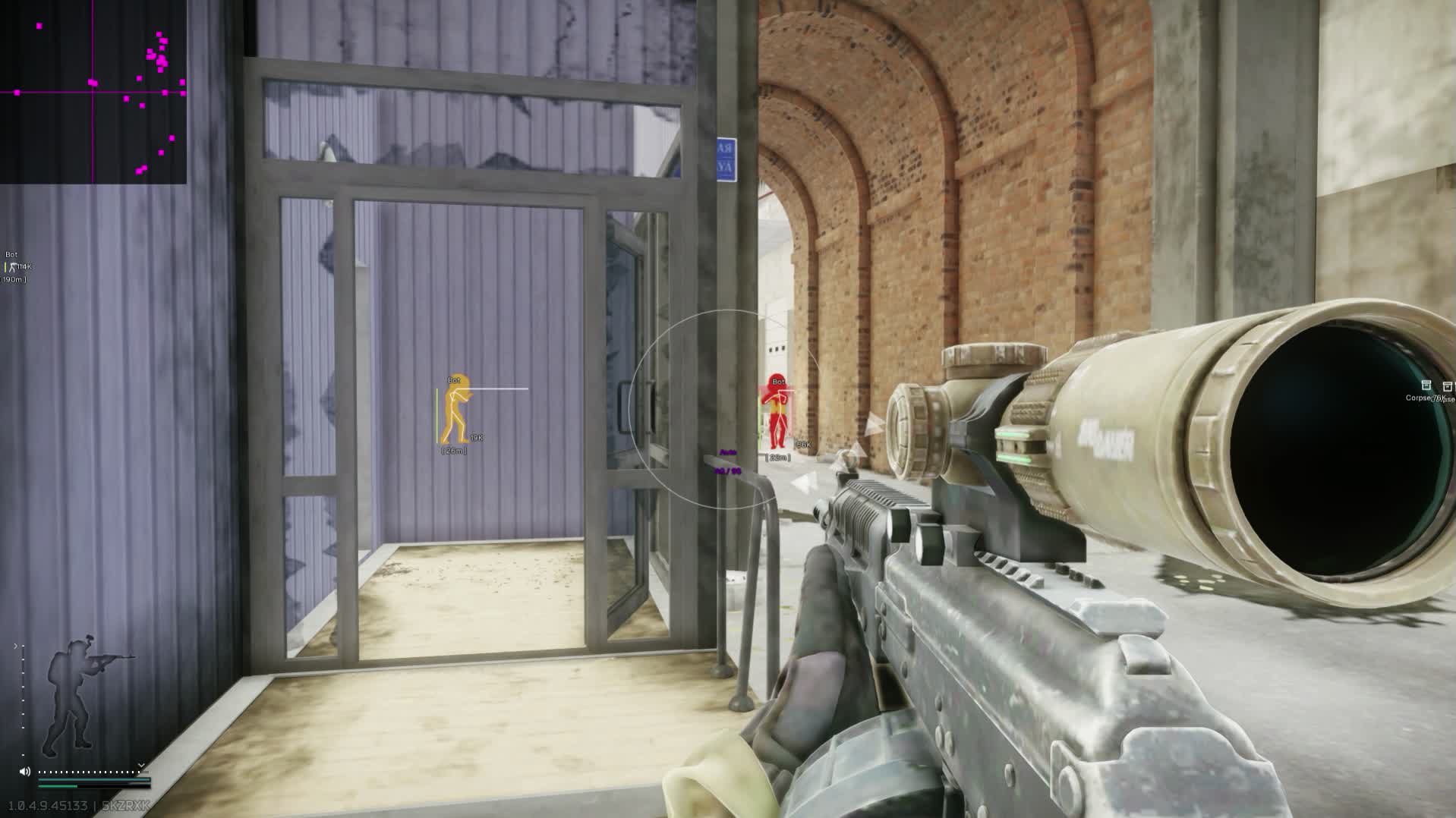
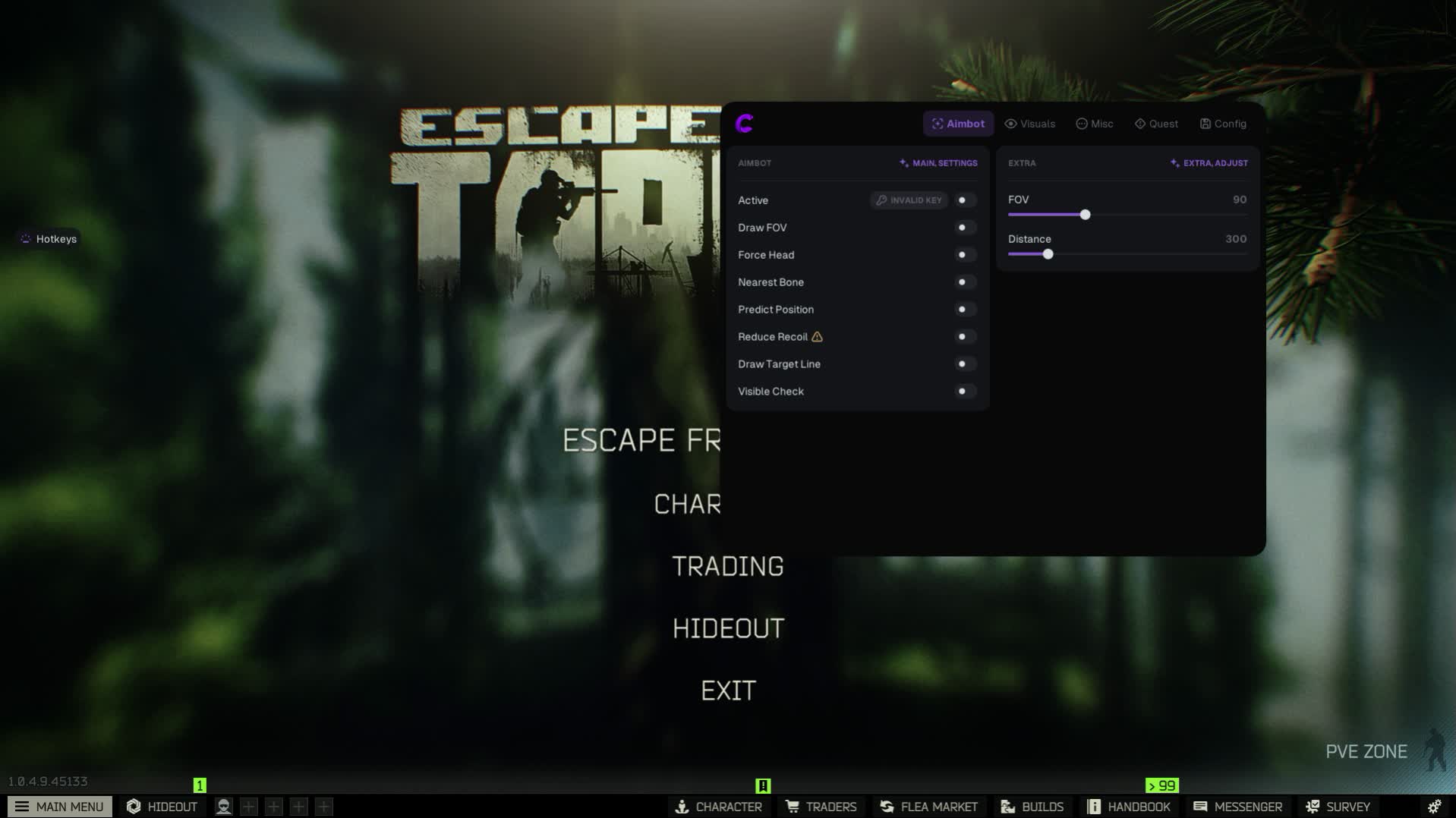
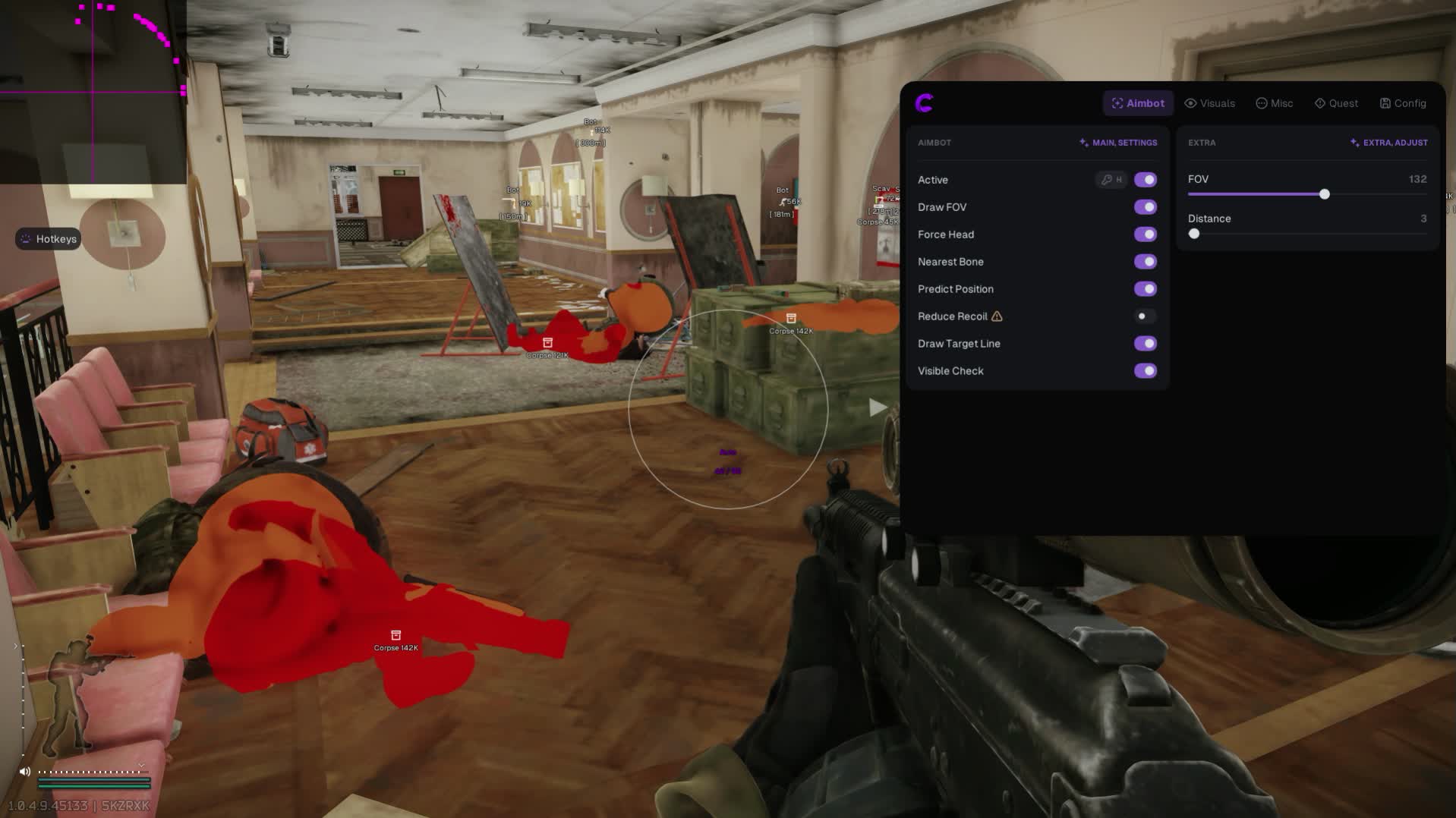
Accuracy. Full recoil and sway compensation with percentage tuning. Pick your priority bone, adjust smoothness (Smooth) and the radius (FOV) for perfect shooting.
Recon and Radar (ESP)
Visuals
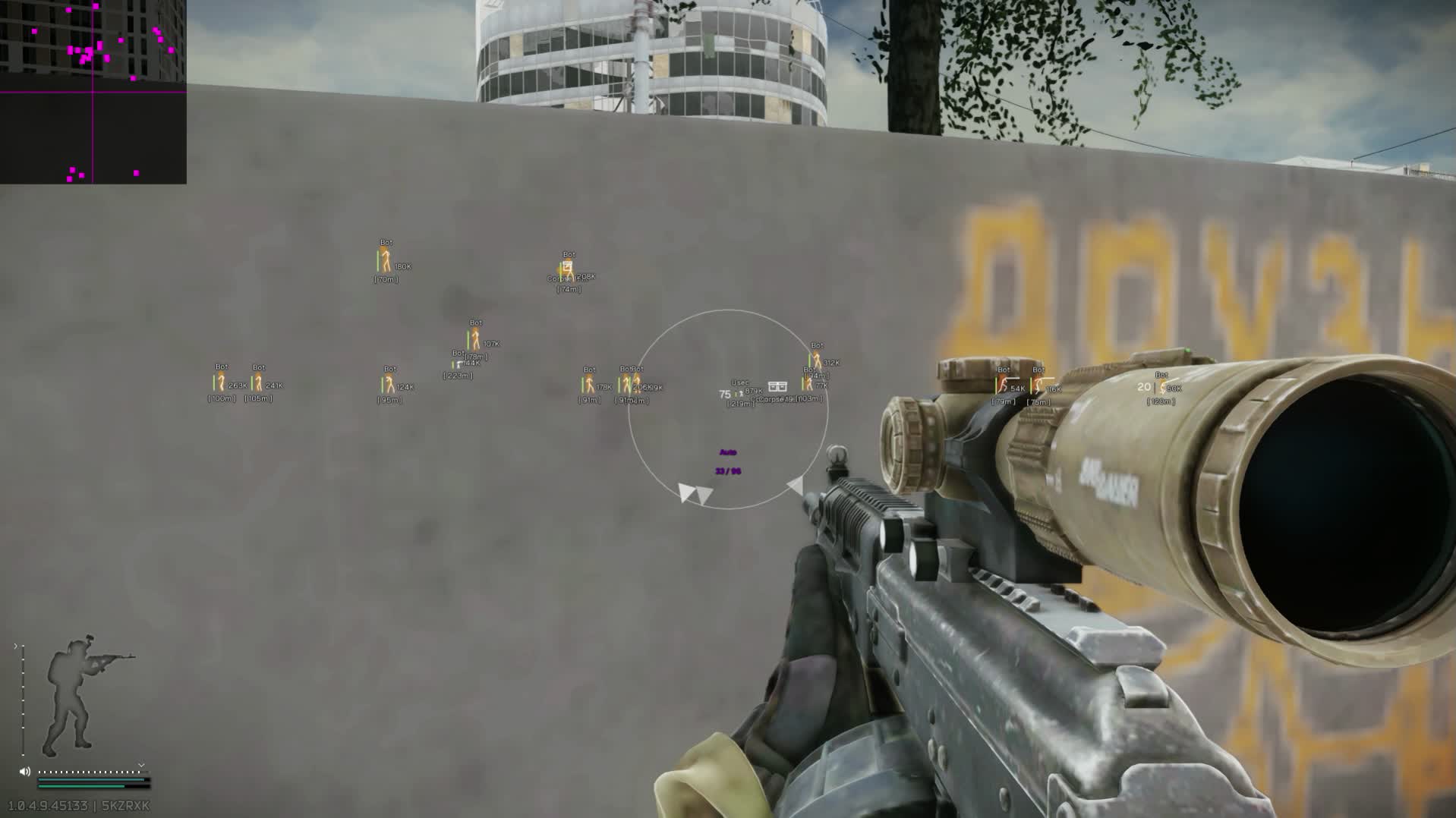
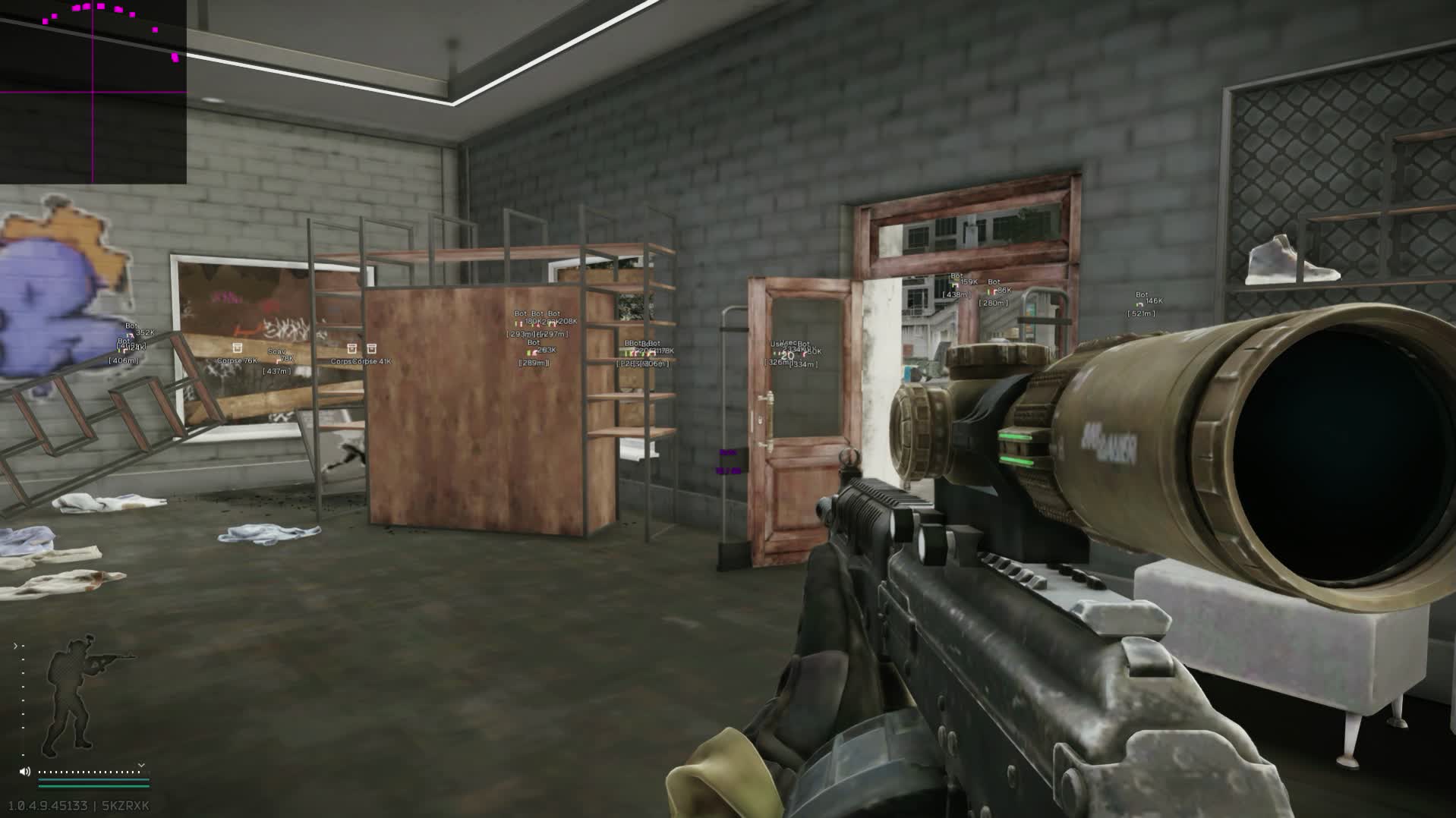
Awareness. Boxes and skeletons for every enemy type: PMCs (BEAR/USEC), Scavs and bots. See nicknames, weapons and health. A fully customizable radar (position, scale) shows the threats around you.
Looting (Loot)
Smart Economy
Price Limiter. A unique filter shows only the items whose flea market price is above the value you set. Build presets and see the real value of loot right on your screen.
Special Features (Misc)
Loot Through Walls
A real breakthrough. This feature lets you search containers and grab items through walls and doors. Forget about keys and long detours.
Mobility and Vision
The upper hand. Built-in thermal vision and night vision, Chams to highlight models. Speedhack, no fall damage and faster item searching.
Known issues & fixes
Real questions from our support, with the fixes that worked. Based on user requests for this product.
The loader can't connect to the server and shows a connection error on launch
This is usually caused by your internet provider blocking the connection, not by the program itself.
Connect through a VPN and try a few different server locations — sometimes one specific server is also blocked.
If the error persists, download the loader again, as the version you have may be outdated.
Check that your computer's date and time are set correctly.
If nothing helps, contact support with details of the error.
Loader shows anticheat error on launch or crashes when starting the game
Anticheat errors and loader crashes when starting the game are typically resolved by enabling a VPN. Connect to a VPN, then relaunch the loader and the game.
Also ensure Windows Defender is disabled (e.g. via Defender Control), no third-party antivirus is running, and no unnecessary background software is active.
Loader window appears but cheat menu does not open after injection
If after injection only the loader window appears and the cheat menu never shows, follow these steps:
Download the Sordum utility (available from technical support; archive password: sordum).
Run it, click Search, and wait for it to finish.
Take a screenshot of the result, then repeat the loader launch procedure.
This clears conflicting processes that prevent the menu from appearing.
Cheat opens but shows a gray console window and does nothing
The cause is an antivirus blocking the cheat. Fully uninstall all third-party antivirus software (Avast, Kaspersky, etc.) , disabling them is not enough.
After uninstalling, reboot your PC, re-download the cheat, and launch it again.
Checker detects Faceit anticheat even though I uninstalled it
Faceit or VGK service remnants may remain active even after uninstalling the app. Open Command Prompt as Administrator and run:
sc query vgk
sc query faceit
sc query wdfilter
If any service is not in a STOPPED / not-found state, remove it manually or use the official Faceit uninstaller. Then reboot your PC.
Cheat window is empty or F2/F5 keys do nothing in game
This usually means your Windows version is not supported or was recently updated to an unsupported build. Check the list of supported Windows versions on the product page.
If the update happened recently, roll back Windows via Settings → Update & Security → Recovery → Go back.
The checker tool still detects active antivirus protection even though I disabled it
If the checker keeps flagging active protection, the antivirus was likely only turned off in settings rather than fully removed — some of its services and drivers can stay behind.
Uninstall the antivirus completely using the official uninstaller from its vendor, not just by disabling it in settings.
Restart your computer and run the checker again.
If it still detects protection, contact support so they can help identify what's left.
After injecting I get an error like "failed to load module" or "module not found"
This kind of error usually points to corrupted or outdated loader files, or leftover antivirus components still in the system.
If any antivirus is still installed, remove it completely with its official uninstaller.
Download the latest version of the loader again instead of reusing old files.
Run the loader as administrator and try again.
If the error keeps appearing, contact support with a screenshot of the message.
Does the Covcheg cheat show bots in Escape From Tarkov PVE mode
Yes, ESP shows bots in Escape From Tarkov's PVE mode as well. If markers do not appear, make sure you are in a PVE location and that the bot-display option is enabled in the cheat menu (default menu key is F2).
The Covcheg cheat is frozen — when will it be updated
If the cheat is temporarily frozen, the developer is preparing an update for the current Escape From Tarkov patch. Exact timing is not announced in advance — the current update status is posted in the game's news section on the website. Once the update is released, the cheat unfreezes automatically and becomes available to launch again.
Game crashes when pressing F5 or when OBS is launched
Download and run the diagnostic utility from the archive (password: sordum), click Search, and send a screenshot of the result to support , this helps identify conflicting services or software.
OBS may conflict with certain cheat components , try launching the game without OBS to isolate the issue.
The cheat stopped working after a game update — what should I do?
After a major game update, the cheat's developer needs time to adapt the program to the new version — during this period the cheat may be temporarily unavailable or behave incorrectly.
Wait for an official update notice from support.
Do not try to run the old build against the new patch — this increases the risk of a ban.
An external cheat only launches from a USB drive — can it be switched to run directly from the PC?
No, the launch method cannot be changed: if the cheat is an external type, loading it from a separate storage device is part of its anti-detection architecture, not an optional setting.
If this launch method does not suit you, check with support whether the product has a separate internal version.
I got banned by anti-cheat — how do I get back into the game with the cheat?
If an account gets banned by anti-cheat, the hardware ID (HWID) tied to it is also considered burned, so simply activating a new license key will not fix the issue.
Before using the cheat again, it is recommended to get a separate HWID-spoofing tool — it makes the system see the hardware as new.
Most satisfied buyers never leave a review — people write mainly when something went wrong, so text reviews skew negative. The score is smoothed over every sale, not just the written reviews.
rating = (G + S + 10·0.9) / (N + S + 10) × 5
G — sum of review positivity (5★ = 1, 1★ = 0)
N — number of text reviews = 63
S = (sales − N) × 0.15 — silent satisfied buyers
Customer
Not recommended
Verified purchase · Digiseller11.05.2026
посмотрел инструкцию, всё сделал в точности как там и получил ошибку, потом пол часа занимался тем, что добавлял в исключения антивируса файлы, обнаружил там троян. А прога так и не заработала. Продавец, тем временем, не отвечает
Customer
Not recommended
Verified purchase · Digiseller23.04.2026
Моментальный бан по железу!
Customer
Not recommended
Verified purchase · Digiseller09.02.2026
ESP не работает на чвк только на диком
Customer
Not recommended
Verified purchase · Digiseller08.02.2026
Так и не поиграл сервис нульцевый ответа нет ждешь днями
Customer
Recommends
Verified purchase · Digiseller24.01.2026
поиграл, аим на 10-20 метрах откидывает в стороны а так норм софт, не детектится но может забанить из за репортов как меня
Customer
Not recommended
Verified purchase · Digiseller03.01.2026
товар не качественный. причина тому часть заявленных функций не работает в полном объеме.
Customer
Not recommended
Verified purchase · Digiseller05.12.2025
не запускается, при обновлении вылетает.
закинул им тикет, они написали про впн, хотя и так из под него запускал, и тут же закрыли тикет, без решения проблемы и фитбека.
Customer
Not recommended
Verified purchase · Digiseller26.11.2025
Возникли проблемы с товаром (при поиске игры и ее нахождении Covcheg вылетает, соблюдал все инструкции, ставил disable on, ничего не помогает ), связь с техподдержкой не помогла, прошу вернуть деньги.
Customer
Not recommended
Verified purchase · Digiseller22.11.2025
не работает
Customer
Not recommended
Verified purchase · Digiseller21.11.2025
Ужасно,чит для таркова От Ковчега,нужно ставить старый obs через впн,потому что так не качает ни чит ни obs, ни кнопок управления,ничего,не рабочая шляпа.
Customer
Not recommended
Verified purchase · Digiseller19.11.2025
С мега не качает лоадер
Customer
Not recommended
Verified purchase · Digiseller24.10.2025
нерабочие ссылки на скачивание
работа тех поддержки отвратительное
два часа после покупки
тех решение проблемы отсутствует
движение тех поддержки 0
не реком
Customer
Recommends
Verified purchase · Digiseller23.03.2025
Отличная программка! Был бы русский язык вообще было бы замечательно! Это реально сделать?
Customer
Not recommended
Verified purchase · Digiseller13.11.2024
Купил, по инструкции запустил. В инструкции нет информации как запускать софт в самой игре, на какую кнопку открывается окно. Написал в поддержку, мне не ответили ДО СИХ ПОР! Прошли почти сутки. Редкостный кал....не рекомендую!
Customer
Recommends
Verified purchase · Digiseller23.08.2024
Всё отлично. Может промокоды появятся как частому клиенту.
Customer
Not recommended
Verified purchase · Digiseller09.06.2024
Вирусы в файле. Требую возврат!!!!
Customer
Not recommended
Verified purchase · Digiseller10.04.2024
В поддержке сидит неадекват, функции нужные не работают. Прошу вернуть средства
Customer
Recommends
Verified purchase · Digiseller29.03.2024
Беру постоянно у Azewolf
Customer
Not recommended
Verified purchase · Digiseller26.03.2024
Дерьмо. Не рекомендую к покупку!!!
Customer
Recommends
Verified purchase · Digiseller24.03.2024
Возникла проблема, помог ее решить, хороший продавец.
Customer
Not recommended
Verified purchase · Digiseller21.03.2024
не работает сертификат
Customer
Recommends
Verified purchase · Digiseller19.03.2024
Товар супер
Customer
Not recommended
Verified purchase · Digiseller18.03.2024
- Rep, Menu not showing up, there's no Support, no one helping on discord,Telegram, everyone ignores
bad - REPPP !!! do not buy
Customer
Not recommended
Verified purchase · Digiseller23.02.2024
Мда, аим работает криво + постоянно вылетает
не стоит того что бы покупать это
Customer
Recommends
Verified purchase · Digiseller09.01.2024
топ
Customer
Not recommended
Verified purchase · Digiseller04.01.2024
Купил, скачал по инструкции файлы. И тут опа! Лоадер содержит вирус Trojan:Win32/Wacatac.H!ml. Ставить такой софт на свой ПК, я конечно же не стану. Он открывает разработчикам чита огромные возможности по использованию ПК. И пока пользователь наслаждается 1 день игрой, его ПК пашет на благо читоделов - там все что угодно от майнинга криптовалюты до участия в поднет сети...
ProCheat reply
Лоадер не содержит вирус
Customer
Not recommended
Verified purchase · Digiseller02.01.2024
Гавно дичайшее, интерфейс за 3 копейки, сделанный на отъebis такое ощущение что дизайнер на холст насрал просто. Не советую никому, параша полнейшая, бан за 1 день купите просто.
Customer
Recommends
Verified purchase · Digiseller26.12.2023
Пользуюсь неоднократно! Топ!
Customer
Recommends
Verified purchase · Digiseller23.12.2023
works great
Customer
Not recommended
Verified purchase · Digiseller16.12.2023
осталось только с бубном вокруг компьютера скакать, чтобы заработало. столько установить\удалить\заменить надо и всё-равно не работает. главная ошибочная покупка уходящего года. мой компьютер столько синих экранов не видел за всё время, сколько при настройке сегодня было
Customer
Recommends
Verified purchase · Digiseller13.12.2023
Чит хороший,но используйте ток на 1 ПК!
Customer
Recommends
Verified purchase · Digiseller15.11.2023
Все супер, беру у Azewolf через сайт не в первый раз, сейчас придет зп и возьму на месяц
Customer
Recommends
Verified purchase · Digiseller06.10.2023
Все супер беру уже 4 месяц со спуфером и аккаунт до сих пор живой, покупаю софт у Azewolf на его сайте
Customer
Recommends
Verified purchase · Digiseller20.09.2023
Отлично
Customer
Recommends
Verified purchase · Digiseller20.09.2023
🥰
Customer
Recommends
Verified purchase · Digiseller17.09.2023
всё классно на тиккет ответили быстро
Customer
Recommends
Verified purchase · Digiseller17.09.2023
Класс чит заработал со второго раза, надо защиту офнуть
Customer
Recommends
Verified purchase · Digiseller15.09.2023
дали ключ сразу после покупки софт работает
Customer
Recommends
Verified purchase · Digiseller13.09.2023
Все супер- беру не первый раз у Azewolf чит на EFT, супер
Customer
Recommends
Verified purchase · Digiseller06.09.2023
Все супер, беру 3 месяц у Azewolf, радует что спуфер идет в комплекте
Customer
Not recommended
Verified purchase · Digiseller01.09.2023
купил в первый раз на месяц, в лучшем случае попользовался дней 5 с постоянными крашами и вылетами( в одной катке 3 раза перезапускал рейд) после такого еще и перестало работать. Переустановил винду, все обновил не помогло. По ошибке купил 2й раз спустя месяц, ситуация точно та же.
Customer
Not recommended
Verified purchase · Digiseller30.08.2023
На инструкции не заблокирована ссылка на лоадер. Скачать не получилось
Customer
Recommends
Verified purchase · Digiseller25.08.2023
Все супер барли у Azewolf на Funpay
Customer
Recommends
Verified purchase · Digiseller17.08.2023
like!
Customer
Not recommended
Verified purchase · Digiseller12.08.2023
Софт максимально отвратительно себя показал!
Постоянные вылеты при настройке функций, отвратительный АИМ, Постоянно крашащий игру радар
5/ 10
Спасибо что работает и не откинуло в первые 10 минут
Customer
Not recommended
Verified purchase · Digiseller26.07.2023
не работает
Customer
Recommends
Verified purchase · Digiseller21.06.2023
Спасибо продавцу за чит. Все объяснил и показал. Рекомендую.
Customer
Not recommended
Verified purchase · Digiseller28.05.2023
не заработал(
ProCheat reply
Нет тикета в техподдержке
Customer
Recommends
Verified purchase · Digiseller25.05.2023
Как всегда мегахарош
Customer
Not recommended
Verified purchase · Digiseller13.04.2023
Плохая инструкция, поддержка не отзывчивая, решите пожалуйста мою проблему, либо дело в ключе всё
Customer
Not recommended
Verified purchase · Digiseller14.03.2023
не работает чит
ProCheat reply
Работает
Customer
Recommends
Verified purchase · Digiseller14.03.2023
Не неплохой софт за такие деньги, если бы был фильтр по цене лута, цены бы ему не было
Customer
Recommends
Verified purchase · Digiseller14.03.2023
Не неплохой софт за такие деньги, если бы был фильтр по цене лута, цены бы ему не было
Customer
Not recommended
Verified purchase · Digiseller08.02.2023
Не работает. Больше смахивает на вирус.
Customer
Recommends
Verified purchase · Digiseller07.02.2023
Отличный продавец. Помог со всеми ньюансами.
Customer
Recommends
Verified purchase · Digiseller31.01.2023
Спасибо up game за качественный товар
Customer
Not recommended
Verified purchase · Digiseller18.01.2023
Чит в детекте. 2 перма.бана без убийств чвк. После использования чита кто-то взломал телеграм. Крайне не советую это дерьмо.
Customer
Not recommended
Verified purchase · Digiseller13.01.2023
Пользовался 7 дней, аккаунт заблокировали. Статус undetected, все кто пользовался софтом также получили бан своих аккаунтов. Сделайте возврат
ProCheat reply
Свяжитесь со мной
Customer
Recommends
Verified purchase · Digiseller06.01.2023
best tarkov tool recommend
Customer
Recommends
Verified purchase · Digiseller06.01.2023
Best eft tool for price recommend 100%
Customer
Not recommended
Verified purchase · Digiseller05.01.2023
Ни о чём, интсрукции нет, не работает. Поддержка не помогает от слова совсем. Не советую к покупке.
UPD: Вместо тех поддержки мне было предложено энидеск, от чего я имею права отказаться по своим соображениям. Текстовая помощь в решении проблемы не была выполнена, следовательно тех поддержки нет.
UPD2: Это инструкция к читу - please open discord and enable discord overlay for game EFT (you will see discord window over the game)
after that, start loader, enter your key and start the software.
Сначало подумайте, нужно оно вам, а потом берите.
ProCheat reply
Наглое вранье - поддержка запросила у тебя AnyDesk, после чего ты оскорбил проект и ливнул с дискорда.
Customer
Recommends
Verified purchase · Digiseller19.11.2022
долго но сделал)
Customer
Recommends
Verified purchase · Digiseller15.11.2022
норм
Join our gaming community chat
Discuss current cheats from developers and how to use them effectively in popular online games. Share tactics, exchange useful info and find like-minded players in our community.
Run into a technical issue? Our team of experts will help. We handle all requests in a live queue, so please be understanding if it sometimes takes a little wait. We guarantee that no request goes unanswered.
After successful payment you receive access details on the order page at oplata.info. The product key and usage instructions are shown inside the purchased item page.
Contact technical support first. Support requests can be escalated to the developer, so you get the most accurate answer for the selected product.
Status changes are published in the Telegram news channel, on the update history page, and directly on the product page.
The product can be temporarily frozen while the developer updates it. Subscription time is frozen as well, so you do not lose paid time.
Contact support with the order link, product name, Windows build, and a video of the issue. If the problem cannot be solved, we help with the refund process.
Use the public Telegram community for general discussion. Technical support questions should still go through support channels.
If the payment fee looks too high, contact support. We can suggest an alternative payment option when available.
Support replies in queue order. A complete request with screenshots or video is usually processed faster.
Send clear details, stay constructive, and keep the order link available. This helps support solve the issue faster.

 Covcheg



 Join all games chat





