Private TikTok Cheat for Arena Breakout

Working
Top seller
SMG SMG
Last update 08.01.2026 This date shows when the software was last updated. An old date doesn't mean the software stopped working! Most likely the developer just had nothing new to add. If you have any doubts, you can always check the current status with our support team.
Add another cheat from this game too — to compare them.
Arena Breakout TikTok
Steam
WeGame
Official
Windows support: 10: all builds; 11: 21h2, 22h2, 23h2
Menu language: Russian, English, Chinese
Spoofer:No
USB drive:No
BIOS:No

User information

Processor: Intel & AMD (AVX2 support required)
When playing Arena Breakout: Infinite it is important to keep the most careful and legit style possible. Use the aimbot at your own discretion, but do it as quietly as you can. Otherwise your account can be flagged by the system and sent for an extra review, which can lead to a ban regardless of which cheat you use.

VIDEO
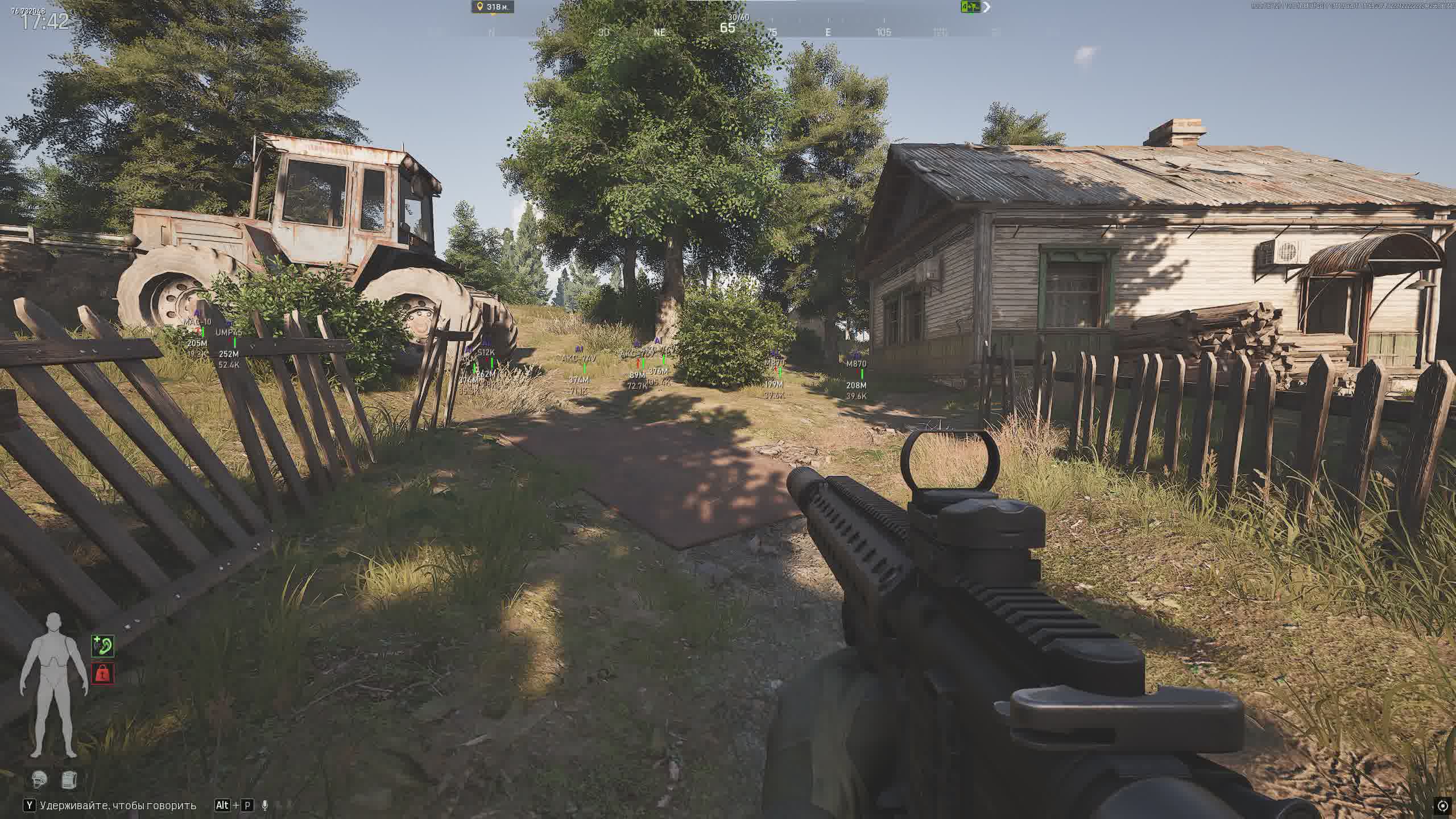
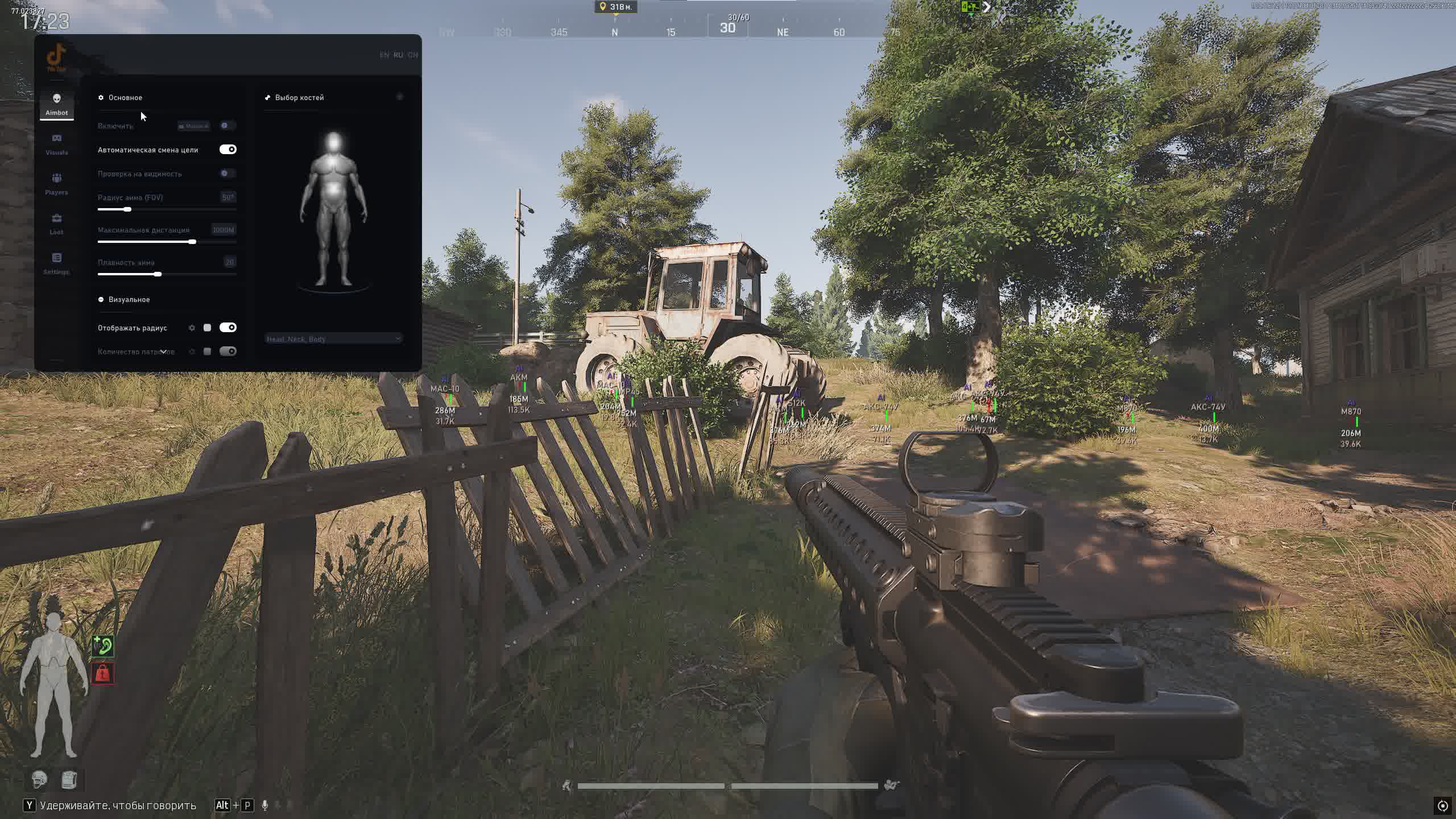
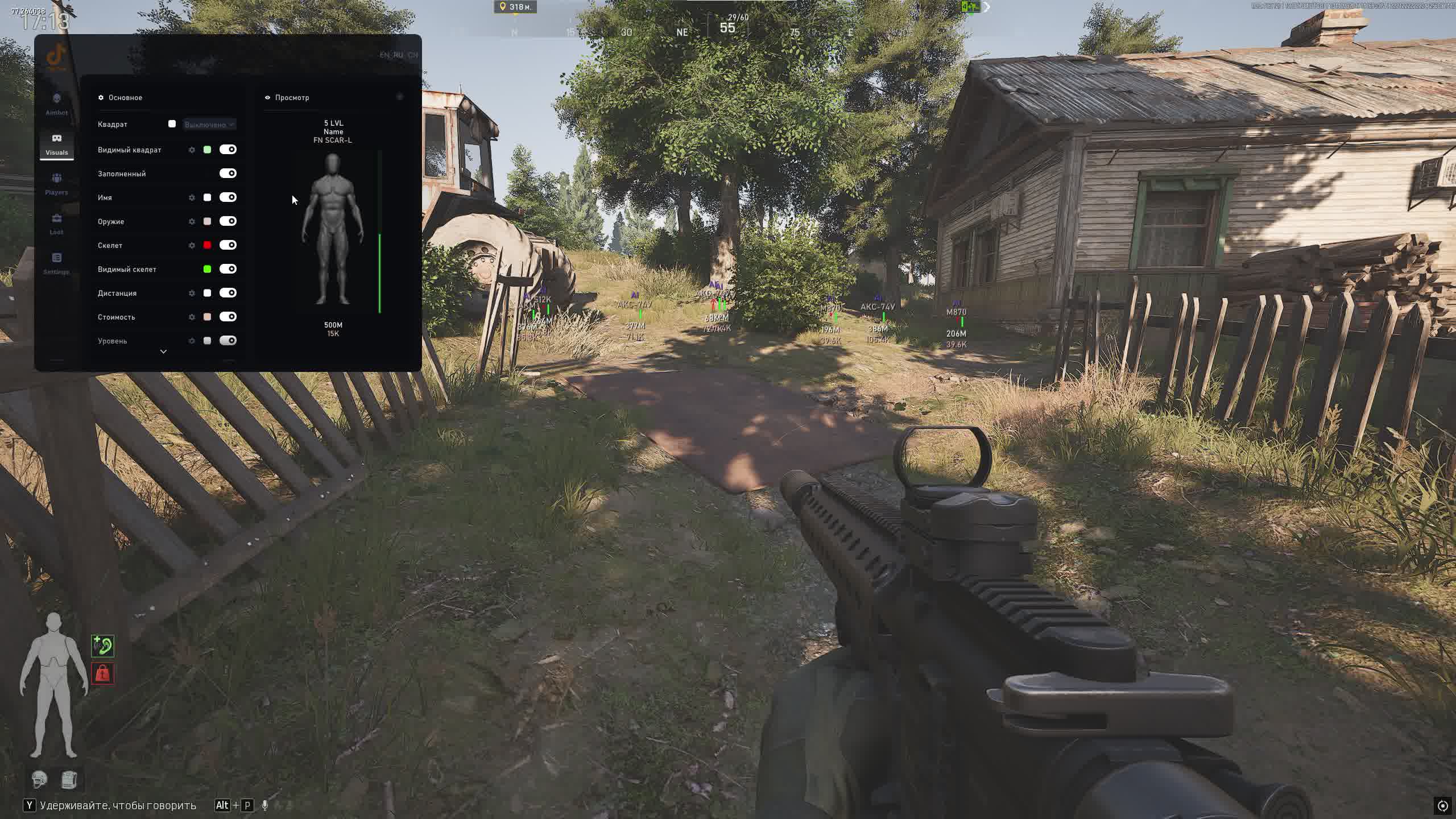
SCREENSHOTS
Description

This cheat is built for raids in Arena Breakout: the aimbot helps you win duels, while the advanced ESP for players, items, containers, and corpses lets you always play off information and loot value. The flexible settings system and battle mode let you switch fast between a farm mode and a clean HUD during tight firefights.

Product features

Aimbot (Shooting)

Main Aimbot

Smart aim assist onto the enemy within the FOV radius. Works only on enemies, with a visibility check so there are no shots through walls or smoke.

Key Binding

Flexible aim activation bind for any playstyle: put it on a separate key for holding angles or pixel prefires in raids.

Zone and Distance Control

Adjust the aim radius (FOV) and the maximum trigger distance. Easy to limit the aimbot to mid and close range only for a more legit look.

Smoothing and Visualization

Tune the aim smoothing, show the FOV circle and the line to the target. You can see who the aim will lock onto and how human the crosshair movement looks.

Bone Selection and Filters

Precise target zone selection (head, neck, body, arms, legs) and ignoring bots/sleeping players so you do not waste time on pointless targets.

Visual (Player ESP)

3D ESP Preview

Built-in ESP preview right in the menu. Every element (boxes, text, icons) can be dragged and set up the way you want before you enter a raid.

Models and Boxes

Square boxes (full or cornered), color fill, and skeletons. Separate colors for visible and hidden targets help you instantly tell who you can actually shoot.

Target Info

Shows nickname, distance, level, target value, and inventory. You can see right away whether a player is worth pushing for his loot.

Weapon and State

Shows the weapon in hand and the target's health. You can size up ahead of time what an enemy is holding in the corner and how much HP he has left after a trade.

Filters and Distance

Hide teammates, separate settings for bots, and a max ESP distance limit. The screen does not get cluttered with extra targets on the far side of the map.

Loot ESP (Items, Containers, Corpses)

Items on the Ground

Highlights gear with its name, icon, price, and distance. You can set a minimum item price so you only see loot that is actually worth grabbing.

Containers

ESP on safes, crates, and other containers: dark background, custom title, icon, distance, and the option to hide contents behind an icon. Handy for marking key farm spots.

Corpses

Highlights bodies with the price under the icon, distance, and an adjustable minimum value threshold. You can tell right away whether it is worth running to loot a specific corpse under fire.

Distances and Filters

Separate max distance settings for items, containers, and corpses. Keeps the picture clean even on crowded maps.

World & Settings

Battle Mode

Battle Mode on a hotkey. One click turns off the extra World/Loot ESP and leaves only what matters for the fight, players and key targets.

Cheat Control

A hotkey to open the menu and a separate button to quickly unload the cheat from the game if you need to instantly clean the system.

Fonts and Interface

Choose the font, text size, and quickly reset the font settings. You can fit the visuals to any resolution and DPI.

Config System

Create, save, load, and delete configs. Easy to keep separate profiles for farming, solo raids, and playing in a party.

Known issues & fixes

Real questions from our support, with the fixes that worked. Based on user requests for this product.

Loader flashes briefly and disappears on startup — Windows security driver conflict

This is a common issue caused by Windows driver security components. Follow these steps:

  • Download the Sordum utility (archive password: sordum), run it, click Search, and wait for it to finish.
  • Apply the win_driver_OFF.reg file provided by support — it disables Windows driver signature enforcement. Reboot your PC afterwards.
  • Make sure User Account Control (UAC) is disabled — the loader handles this automatically, but verify it manually if needed.
  • If the issue persists, run sc query vgk, sc query faceit, sc query wdfilter in CMD and send a screenshot to support.
Loader connection error or infinite loading on startup — VPN or Network Manager required

Loader connection errors are usually caused by ISP-level blocking. Try the following steps:

  • Enable a VPN (any country), launch the loader and click Inject. Once injected successfully, disable the VPN before starting the game.
  • If VPN does not help: download the networkmanager.zip utility, run it, select «Find Best IP» and click Apply. Then try launching the loader again.
System freezes and mouse barely moves when entering the key in the loader

System freeze when entering the key is usually caused by HDR or antivirus conflicts. Do the following in order:

  • Disable HDR in Windows display settings.
  • Disable Windows Defender and make sure any third-party antivirus (e.g. Kaspersky) is fully uninstalled.
  • Run the Sordum utility to disable system security drivers, then reboot your PC.
Loader crashes or throws errors on startup — antivirus or Vanguard interfering

The most common cause is third-party antivirus or security software blocking the loader. Completely uninstall 360 Total Security, Vanguard (Valorant anti-cheat — must be uninstalled, not just disabled), and any other third-party antivirus.

After removal: download the Sordum utility (archive password — sordum), run it, click Search, and wait for it to finish. Then reboot your PC and try launching the loader again.

If errors persist, send a screenshot of your installed programs list to support. As a last resort, a clean Windows reinstall resolves the issue.

Loader keeps asking to reboot the PC — stuck in a reboot loop

Run a system file repair: open Command Prompt as Administrator and execute two commands — first DISM /Online /Cleanup-Image /RestoreHealth, then sfc /scannow. After that, make sure Fast Boot is disabled in BIOS/UEFI, then reboot.

If the issue persists, a clean Windows reinstall is required. Use the Pro edition only — Home versions may lack required components for the loader to function correctly.

All issues & general troubleshooting
TARIFFS
400
BUY What happens after payment?
Got a question? Ask before you pay

We'll help you choose and sort out any launch issue. Ask us anything before buying, we're always on your side.

Support 10:00–22:00, sometimes we reply at night too
Ask a question
Update history
  • 08.01.2026 Working
    Updated, time unfrozen

Available tariffs

1 day
400
START PURCHASE
7 days
2000
START PURCHASE
30 days
4000
START PURCHASE
Reviews about Arena Breakout TikTok
3.8 / 5
2 reviews
How the rating is calculated

Most satisfied buyers never leave a review — people write mainly when something went wrong, so text reviews skew negative. The score is smoothed over every sale, not just the written reviews.

rating = (G + S + 10·0.9) / (N + S + 10) × 5

  • G — sum of review positivity (5★ = 1, 1★ = 0)
  • N — number of text reviews = 2
  • S = (sales − N) × 0.15 — silent satisfied buyers
Customer Not recommended
Verified purchase · Digiseller 28.01.2026

Поддержка молчит, софт не работает

Customer Not recommended
Verified purchase · Digiseller 31.12.2025

Windows 11 [21h2-23h2] Синий экран смерти

Your review

Reviews are published after moderation.

Join our gaming community chat

Discuss current cheats from developers and how to use them effectively in popular online games. Share tactics, exchange useful info and find like-minded players in our community.

1 900+Members
24/7Online
Join our gaming community chat

Technical support

Run into a technical issue? Our team of experts will help. We handle all requests in a live queue, so please be understanding if it sometimes takes a little wait. We guarantee that no request goes unanswered.

Availabilityfrom 10:00 to 23:00
Fast responseIn queue order
Get help
Technical support
PROCHEAT

PROCHEAT news channel

Follow product status changes, update history and important announcements.

Subscribe

Latest updates

08.01.2026 20:50
Working
Updated, time unfrozen
Open full history
Ask a question


