Last update 04.08.2026
This date shows when the software was last updated. An old date doesn't mean the software stopped working! Most likely the developer just had nothing new to add. If you have any doubts, you can always check the current status with our support team.
Add another cheat from this game too — to compare them.
Windows support:
10: all builds; 11: 21h2, 22h2, 23h2
Menu language:Russian, English, Chinese
Spoofer:No
USB drive:No
BIOS:No
VIDEO
SCREENSHOTS
Description
For those who trust their own skill but want to see everything. For those who value accurate intel over auto-aim. Team SMG presents
Chams
, a
private Tarkov cheat
built for total control over the visual side of the game.
This isn't an Aimbot. It's better.
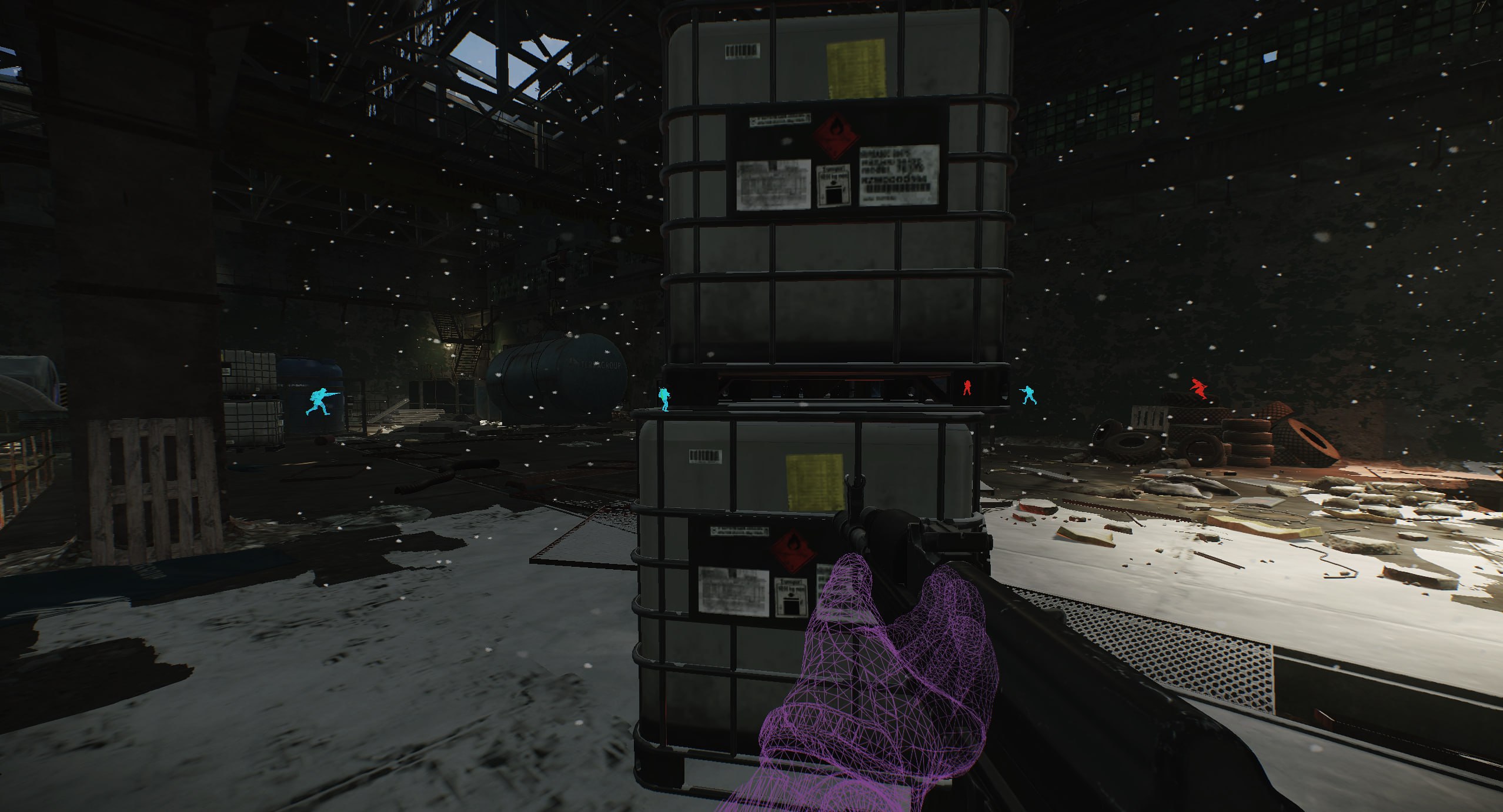
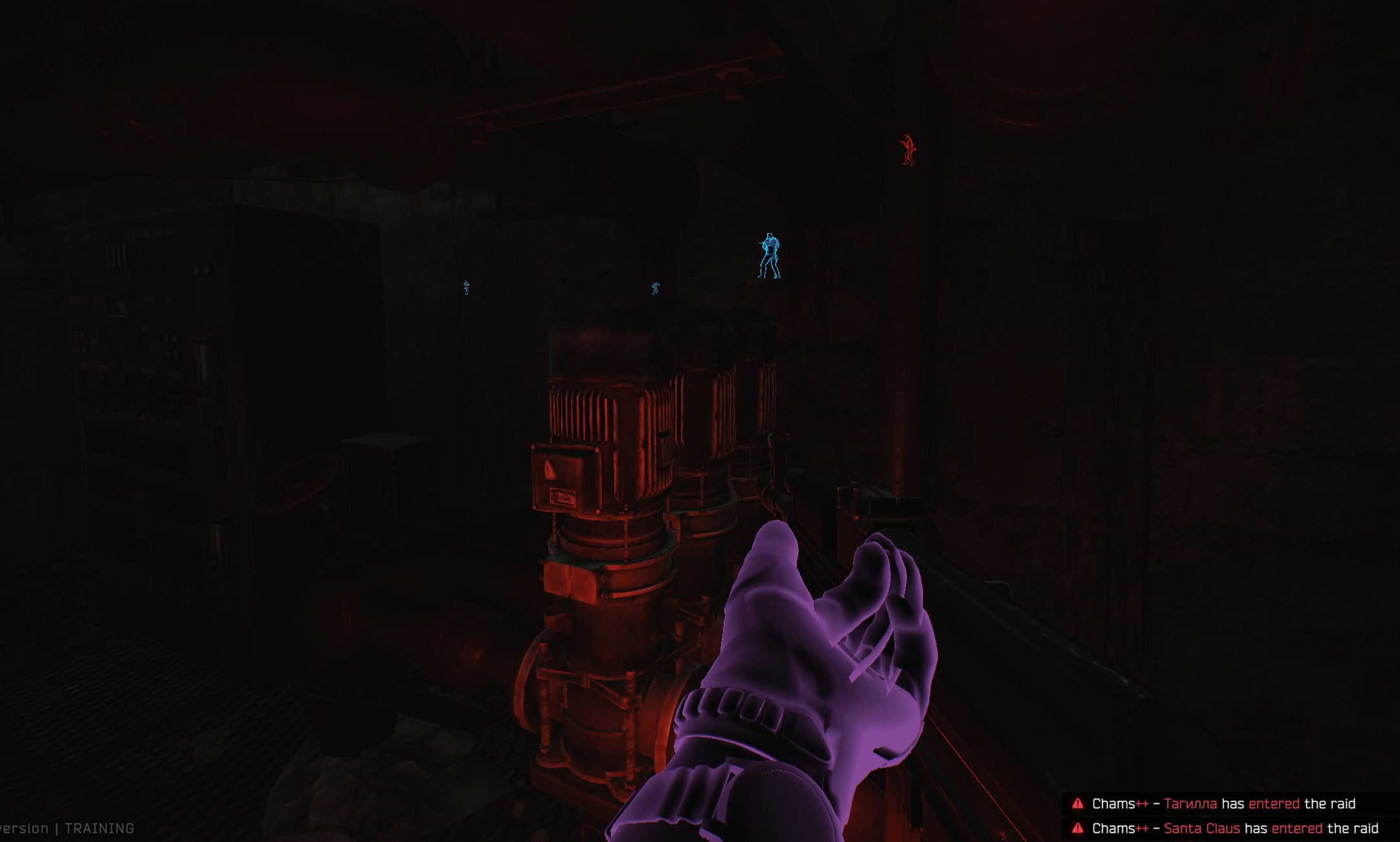
This is your personal X-ray that shows enemies, highlights the most valuable loot and removes every annoying distraction that keeps you from dominating on raw skill alone.
With SMG Chams you'll always be one step ahead. Know where the enemy is, which loot is worth your attention, and grab it through walls without risking a single second. This is the smartest and safest way to win the visual war in Tarkov.
Product features
VISUALS & CHAMS (Perfect ESP Highlight)
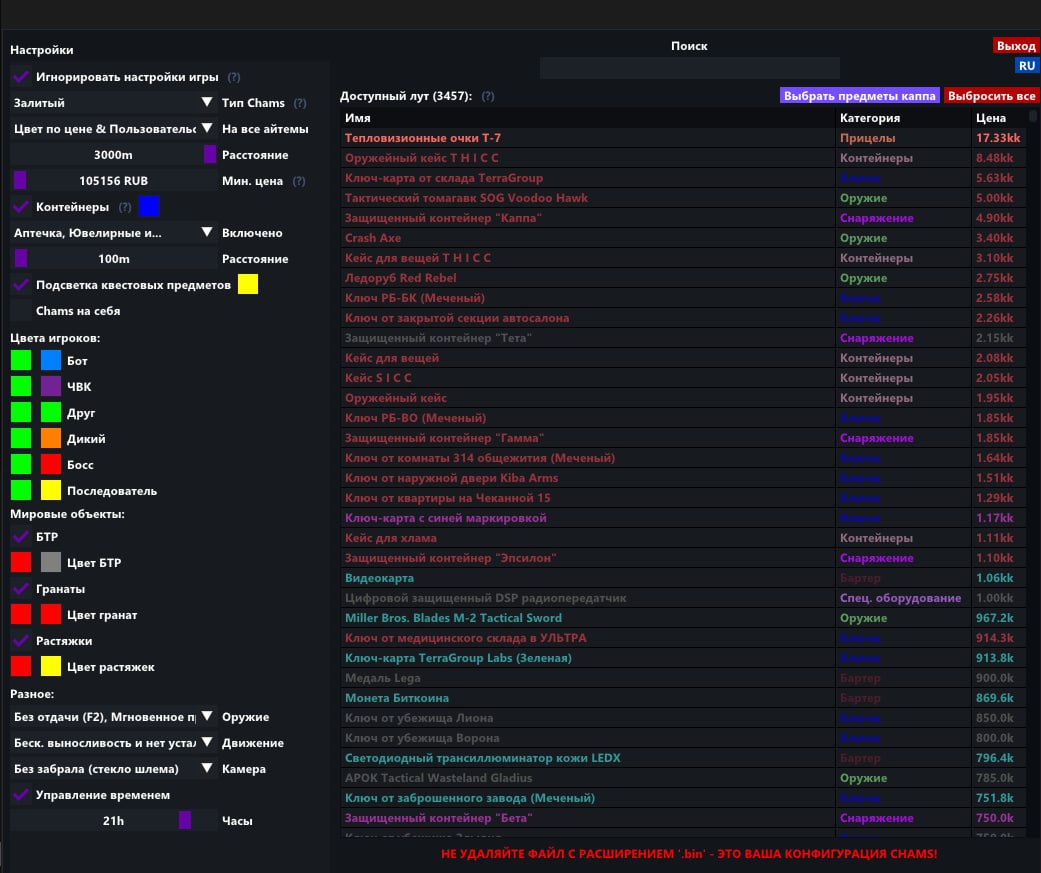
Perfect Chams & Distance
No bugs. The problem of chams painting over your sights is fully solved. Set your render distance (0-3000m) and highlight PMCs, Scavs and Bosses through any walls.
Local Hands Chams
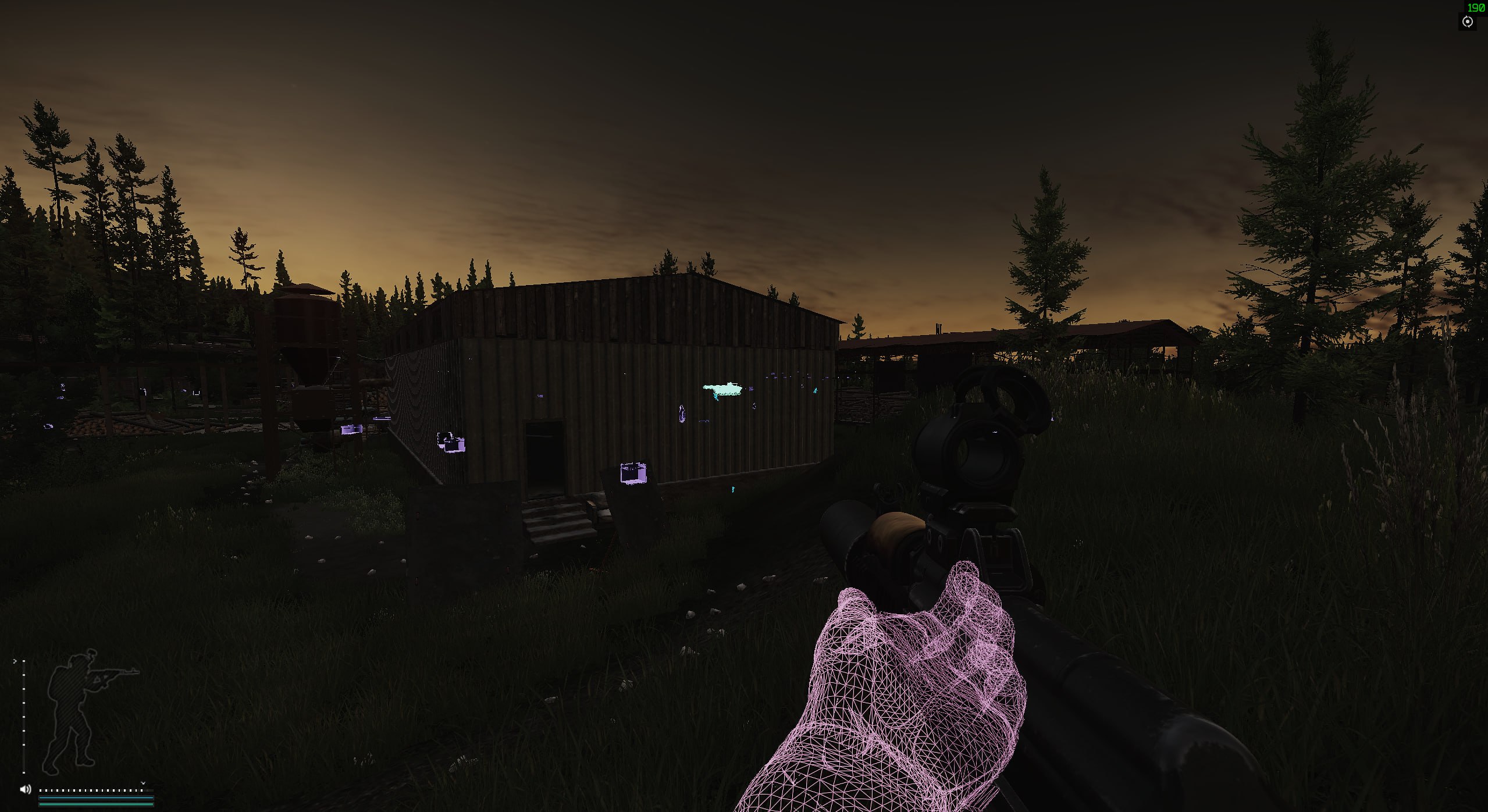
Aesthetics. Customize the color of your own hands. Make them bright for control or transparent for a clean view.
Grenade ESP
Reaction. Highlights thrown grenades. You always know where the RGD or M67 will land and have time to get to cover.
LOOT ESP & QUESTS (Raid Economy)
Smart Color Sort
Price in color. Smart sorting colors items based on their price or category. Red means expensive, gray means trash. Instant loot evaluation.
Advanced Custom Search
See everything. The reworked search shows keys, jackets, computers, bags and containers (20+ types). Not a single item slips by.
Loot Through Walls
Telekinesis. A unique feature lets you grab items through textures. Loot safes and stashes through the wall while staying safe.
Quest ESP (Coming Soon)
Foresight. Pick up quest items even if the task isn't active yet. Get ready for upcoming Prapor and Mechanic quests in advance.
MISC (Absolute Superiority)
Perfect Shooting
Laser. No Recoil removes recoil, No Sway removes scope sway, No Inertia removes movement inertia. Your shooting is flawless in any situation.
No Malfunctions & Instant ADS
Reliability. The No Malfunctions feature prevents weapon jams and misfires. Instant ADS gives instant aiming, so you win every face-to-face.
Always Sprint & No Visor
Mobility. Unlimited sprint and disabling the helmet visor effect (No Visor) for crystal-clear visibility.
Known issues & fixes
Real questions from our support, with the fixes that worked. Based on user requests for this product.
The cheat won't launch or shows an error — is my Windows version supported?
The software doesn't support every Windows version and build — the newest system updates in particular may not be supported yet, in which case the launch fails or the system blocks the driver as "unsafe".
Check your exact version and build number in Windows Settings (System → About) and compare it with the list of supported versions on the product page.
If your build is newer than the ones listed, or it's a non-standard/stripped-down Windows edition, stable operation isn't guaranteed — installing one of the supported official versions usually resolves it.
Before purchasing, ask support which Windows version is required for the specific product — they can also tell you whether an update for your build is planned.
The program launches but nothing happens, or it gets blocked even though the antivirus was removed long ago
The most common cause is leftovers from previously installed antivirus or security tools: their drivers and background files keep interfering with the program even after the antivirus itself has been removed.
Contact support — they can point you to a dedicated utility that checks your computer for such leftovers and help you remove them properly. After cleaning up, restart your computer and launch the program again.
The cheat stopped working or shows an error after a game update — what should I do?
This is expected: after a major game update the developer needs time to adapt the program, usually anywhere from a few hours up to a day. Until the update is ready, the loader may fail to start or some features may work incorrectly.
You don't need to update anything manually — the current version is pulled through the loader automatically.
Check the product status on the website to see when the update is finished.
If the program is temporarily unavailable due to an update, your subscription time is extended to cover the downtime.
If it still won't launch a day after the game patch, contact support to check the update status.
Loader flashes briefly and disappears on startup — Windows security driver conflict
This is a common issue caused by Windows driver security components. Follow these steps:
Download the Sordum utility (available from technical support; archive password: sordum), run it, click Search, and wait for it to finish.
Apply the win_driver_OFF.reg file provided by support — it disables Windows driver signature enforcement. Reboot your PC afterwards.
Make sure User Account Control (UAC) is disabled — the loader handles this automatically, but verify it manually if needed.
If the issue persists, run sc query vgk, sc query faceit, sc query wdfilter in CMD and send a screenshot to support.
The program stopped working after a Windows update — what should I do?
Most software is built for specific Windows builds, and an automatic system update can make your system incompatible with the program's protection.
After any major system update, compare your build with the supported Windows versions listed on the product page.
If your build isn't supported, you'll need to roll back the update or reinstall Windows on a supported build.
Ask support for the exact list of supported builds and advice for your specific case.
Loader connection error or infinite loading on startup — VPN or Network Manager required
Loader connection errors are usually caused by ISP-level blocking. Try the following steps:
Enable a VPN (any country), launch the loader and click Inject. Once injected successfully, disable the VPN before starting the game.
If VPN does not help: download the networkmanager.zip utility, run it, select «Find Best IP» and click Apply. Then try launching the loader again.
System freezes and mouse barely moves when entering the key in the loader
System freeze when entering the key is usually caused by HDR or antivirus conflicts. Do the following in order:
Disable HDR in Windows display settings.
Disable Windows Defender and make sure any third-party antivirus (e.g. Kaspersky) is fully uninstalled.
Run the Sordum utility (available from technical support) to disable system security drivers, then reboot your PC.
Loader crashes or throws errors on startup — antivirus or Vanguard interfering
The most common cause is third-party antivirus or security software blocking the loader. Completely uninstall 360 Total Security, Vanguard (Valorant anti-cheat — must be uninstalled, not just disabled), and any other third-party antivirus.
After removal: download the Sordum utility (available from technical support; archive password — sordum), run it, click Search, and wait for it to finish. Then reboot your PC and try launching the loader again.
If errors persist, send a screenshot of your installed programs list to support. As a last resort, a clean Windows reinstall resolves the issue.
The menu doesn't open with the hotkey after launching the game
Switching the game to windowed mode is usually what fixes this — in fullscreen mode the menu hotkey may not respond.
Finish all loader steps exactly as instructed, then start the game in windowed mode.
Press the menu hotkey specified in the instructions only after the game has fully loaded.
If the menu still doesn't appear, reinstall the program and try again from scratch; if the issue persists, contact support and attach a screenshot of what happens when you press the key.
Loader keeps asking to reboot the PC — stuck in a reboot loop
Run a system file repair: open Command Prompt as Administrator and execute two commands — first DISM /Online /Cleanup-Image /RestoreHealth, then sfc /scannow. After that, make sure Fast Boot is disabled in BIOS/UEFI, then reboot.
If the issue persists, a clean Windows reinstall is required. Use the Pro edition only — Home versions may lack required components for the loader to function correctly.
The loader won't open and says it can't find d3dx9_43.dll
This error means the computer is missing DirectX components the program needs to run. Download and install the official DirectX Redistributable package from Microsoft, then restart your computer.
If the error persists, update your graphics drivers and try launching again.
Can I use one key on several computers or after switching PCs?
An activation key is bound to the hardware of one specific device (HWID) the first time you run it, and it only works on that device — you can't use the same key on several computers at once, and launching it on another PC will just return an error.
If you switch computers or reinstall Windows, the hardware binding resets along with the system. After installing a supported Windows version on the new device, contact support — once your situation is confirmed, they may extend your key's validity to cover the time spent setting things up.
After running the spoofer some hardware serial numbers didn't change
Sometimes the spoofer doesn't change every component in a single run — for example the motherboard serial number can stay the same while the SSD and RAM are spoofed correctly. That's normal behavior for some setups.
Reboot your computer and run the program again. To confirm the result, compare your system info before and after running it — a hardware-checking tool works well for this. If nothing changes after several attempts, contact support.
Do I need to enable Discord screen-share bypass separately?
Discord screen-share bypass is built in and works automatically — there is no separate toggle for it. The key requirement is to choose "Game Capture" instead of "Screen Capture" when streaming; that way viewers will not see the program's window.
Most satisfied buyers never leave a review — people write mainly when something went wrong, so text reviews skew negative. The score is smoothed over every sale, not just the written reviews.
rating = (G + S + 10·0.9) / (N + S + 10) × 5
G — sum of review positivity (5★ = 1, 1★ = 0)
N — number of text reviews = 69
S = (sales − N) × 0.15 — silent satisfied buyers
Customer
Recommends
Verified purchase · Digiseller22.10.2025
топ
Customer
Recommends
Verified purchase · Digiseller10.08.2025
товар пушка!
Customer
Recommends
Verified purchase · Digiseller16.07.2025
С таким удовольствием я ещё никогда не играл, в тарков, огромное спасибо за эту "гуманитарную помощь" :)
Customer
Recommends
Verified purchase · Digiseller16.06.2025
просто класс
Customer
Recommends
Verified purchase · Digiseller01.05.2025
Купил вечером, сказали на 24 часа, в итоге поиграл пару часов всего. Пришлось делать откат винды, чтобы заработало. Благо помог чел на сайте, поддержка со страницы оплаты так и не ответила.
Customer
Recommends
Verified purchase · Digiseller28.02.2025
chams'ы one love :>
Customer
Recommends
Verified purchase · Digiseller16.01.2025
Хороший товар, оперативная поддержка!
Customer
Recommends
Verified purchase · Digiseller10.11.2024
+
Customer
Recommends
Verified purchase · Digiseller12.10.2024
збс
Customer
Not recommended
Verified purchase · Digiseller24.09.2024
Забанели нахуй
Customer
Not recommended
Verified purchase · Digiseller16.09.2024
трояны в папках
Customer
Recommends
Verified purchase · Digiseller09.09.2024
Отличный софт!
Настраивается под требуемый лут, есть дополнительные функции, то что надо для выполнения квестов!
Customer
Recommends
Verified purchase · Digiseller03.09.2024
Работает
Customer
Recommends
Verified purchase · Digiseller12.08.2024
все ок
Customer
Recommends
Verified purchase · Digiseller03.08.2024
никаких сожалений
Customer
Recommends
Verified purchase · Digiseller03.08.2024
отработал как часики
Customer
Not recommended
Verified purchase · Digiseller22.07.2024
Выдаёт ошибку, всю защиту отключил, но не работает ничего, ТП молчит(
Customer
Recommends
Verified purchase · Digiseller03.06.2024
Не первый раз беру у продавца. Рекомендую!
Customer
Recommends
Verified purchase · Digiseller22.05.2024
имба
Customer
Recommends
Verified purchase · Digiseller16.05.2024
Всё честно.
Customer
Recommends
Verified purchase · Digiseller15.05.2024
Сплошное удовольствие
Customer
Not recommended
Verified purchase · Digiseller11.05.2024
Ничего не работало, с поддержкой пытались решить, не помогло. В моменте подписка была заблокирована(причины я не знаю).
Customer
Not recommended
Verified purchase · Digiseller09.05.2024
забанили не успел зайти в рейд
Customer
Recommends
Verified purchase · Digiseller24.04.2024
Чит прикольный, мне понравился. Но немного уже успел в бан отлететь, походу на лаборатории не стоит много себе позволять и сразу идти выносить всех игроков:D
Customer
Not recommended
Verified purchase · Digiseller18.04.2024
Продавец намеренно указывает определенные условия пользованием после покупки( удалить антивирус ), товар приобрел но после прочтения что именно нужно делать пользоваться не стал , на просьбу о возврате был получен отказ …
Продавцу - указывайте условия до покупки и тогда не будет таких отзывов
Customer
Recommends
Verified purchase · Digiseller16.03.2024
Софт работает исправно , рекомендую!
Customer
Recommends
Verified purchase · Digiseller14.03.2024
Work ++
Customer
Recommends
Verified purchase · Digiseller14.03.2024
Софт рабочий , проблем не возникло.
Customer
Recommends
Verified purchase · Digiseller06.03.2024
Мечта
Customer
Recommends
Verified purchase · Digiseller01.03.2024
Все быстро, понятно и работает
Customer
Not recommended
Verified purchase · Digiseller28.02.2024
бан через час:)
Customer
Recommends
Verified purchase · Digiseller25.02.2024
Покупка прошла успешно, инструкция пришла на мыло, все деликатно) +rep
Customer
Not recommended
Verified purchase · Digiseller24.02.2024
не смог поставить чит потому что прога не установила дрова
+ забанили почти сразу не советую
Продавец говорит что забанили из-за репортов хотя я чвк и чело-ботов не убивал
Продавец сказал что он в андетекте по итогу он детект
ProCheat reply
Не нужно тут врать. Софт в андетекте и за него не банят. Банят за использование других читов ранее (по старым логам), по хвид бану или же по репортам. Программа никакие драйвера сама не предлагает установить. Если вы не в состоянии обратиться в поддержку сайта, где вам помогут профессиональные саппорты (которые за это деньги получают), то мы тут уж точно ничем не поможем. Продукт полностью рабочий. Возврата средств не будет.
Customer
Recommends
Verified purchase · Digiseller23.02.2024
Пушка! ещё бы купончик на скидку
Customer
Recommends
Verified purchase · Digiseller20.02.2024
Спасибо.
Customer
Recommends
Verified purchase · Digiseller19.02.2024
Very Good!
Customer
Recommends
Verified purchase · Digiseller18.02.2024
все четко
Customer
Recommends
Verified purchase · Digiseller04.02.2024
Все отлично работает , много функций за такую цену можно настроить под себя
, если короче говорить то имба советую
Customer
Recommends
Verified purchase · Digiseller03.02.2024
Имба
Customer
Recommends
Verified purchase · Digiseller02.02.2024
Гуд
Customer
Not recommended
Verified purchase · Digiseller29.01.2024
Этот тоже не работает
Customer
Recommends
Verified purchase · Digiseller27.01.2024
Прикольно, но не пригодился во второй раз. Получил бан после первого, удалил игру, получается сбежал с таркова, миссия выполнена
Customer
Not recommended
Verified purchase · Digiseller26.01.2024
Не работает
Customer
Recommends
Verified purchase · Digiseller22.01.2024
Товар харош! Оправдал полностью ожидания
Customer
Recommends
Verified purchase · Digiseller07.01.2024
Были проблемы с запуском, но продавец оперативно помог всё решить
Customer
Not recommended
Verified purchase · Digiseller29.12.2023
Чит в детекте получил бан буквально пару часов назад
Customer
Recommends
Verified purchase · Digiseller28.12.2023
всё автоматически и быстро
Customer
Recommends
Verified purchase · Digiseller20.11.2023
Играю уже второй вайп с этим софтом, полет отличный
Customer
Recommends
Verified purchase · Digiseller20.11.2023
Все на уровне!
Customer
Recommends
Verified purchase · Digiseller20.11.2023
все просто класс!
Customer
Recommends
Verified purchase · Digiseller07.10.2023
Спасибо за вашу работу.
Customer
Recommends
Verified purchase · Digiseller01.10.2023
Идеально работает, настроить под себя, на собственном опыте понял, что не палится
Спасибо тебе разраб!
Customer
Recommends
Verified purchase · Digiseller21.09.2023
Покупаю уже не первый раз.Все отлично!
Customer
Recommends
Verified purchase · Digiseller16.09.2023
Нормас, но можно чуть упростить выбора цвета. Так то норм!
Customer
Recommends
Verified purchase · Digiseller27.08.2023
Всё отлично
Customer
Recommends
Verified purchase · Digiseller17.08.2023
Пушка
Customer
Recommends
Verified purchase · Digiseller25.07.2023
Все работает, все отлично
Customer
Recommends
Verified purchase · Digiseller10.05.2023
Топ. Объяснил помог. Техподдержка есть.
Customer
Recommends
Verified purchase · Digiseller08.05.2023
хороший чит советую
Customer
Recommends
Verified purchase · Digiseller10.04.2023
Spasibo, kaif
Customer
Recommends
Verified purchase · Digiseller08.04.2023
Nice stuff
Customer
Recommends
Verified purchase · Digiseller07.04.2023
Zaebis
Customer
Recommends
Verified purchase · Digiseller04.04.2023
ВСЕ РЕКОМЕНДУЮ ДАННЫЙ МАГАЗИН ВСЕ НА ВЫСОТЕ
Customer
Recommends
Verified purchase · Digiseller28.03.2023
как всегда топ
Customer
Recommends
Verified purchase · Digiseller23.03.2023
ГУДДД
Customer
Not recommended
Verified purchase · Digiseller15.03.2023
Товар не соответствует описанию. Не работает.!
Customer
Recommends
Verified purchase · Digiseller26.02.2023
все хорошо и топов
Customer
Recommends
Verified purchase · Digiseller18.02.2023
Спасибо пробую если результат удачный то куплю еще
Customer
Recommends
Verified purchase · Digiseller13.02.2023
Хороший товар! Сидорович одобрил
Join our gaming community chat
Discuss current cheats from developers and how to use them effectively in popular online games. Share tactics, exchange useful info and find like-minded players in our community.
Run into a technical issue? Our team of experts will help. We handle all requests in a live queue, so please be understanding if it sometimes takes a little wait. We guarantee that no request goes unanswered.
After successful payment you receive access details on the order page at oplata.info. The product key and usage instructions are shown inside the purchased item page.
Contact technical support first. Support requests can be escalated to the developer, so you get the most accurate answer for the selected product.
Status changes are published in the Telegram news channel, on the update history page, and directly on the product page.
The product can be temporarily frozen while the developer updates it. Subscription time is frozen as well, so you do not lose paid time.
Contact support with the order link, product name, Windows build, and a video of the issue. If the problem cannot be solved, we help with the refund process.
Use the public Telegram community for general discussion. Technical support questions should still go through support channels.
If the payment fee looks too high, contact support. We can suggest an alternative payment option when available.
Support replies in queue order. A complete request with screenshots or video is usually processed faster.
Send clear details, stay constructive, and keep the order link available. This helps support solve the issue faster.

 SMG
SMG



 Join all games chat





