NeiroDrop, KD dropping in Tarkov for clean stats

Working
Top seller
SMG SMG
Last update 11.04.2026 This date shows when the software was last updated. An old date doesn't mean the software stopped working! Most likely the developer just had nothing new to add. If you have any doubts, you can always check the current status with our support team.
Add another cheat from this game too — to compare them.
KD Droper Neural Net EFT
Steam
BSG Launcher
Windows support: 10: all builds; 11: all builds
Menu language: Russian, English, Chinese
Spoofer:No
USB drive:No
BIOS:No
VIDEO
SCREENSHOTS
Description

You run cheats and your stats climb. A KD of 8, 10, 15 is a red flag for the anti-cheat and for manual review. Abnormal numbers draw attention, and the account lands on the suspect list. One report, then a second, then a third, and you catch a ban for the sum of it. NeiroDrop fixes the problem at the root: it drops your stats back down to natural numbers. A KD of 2-3 raises no questions and looks like an ordinary player. Masking through the numbers is basic hygiene for anyone running cheats.

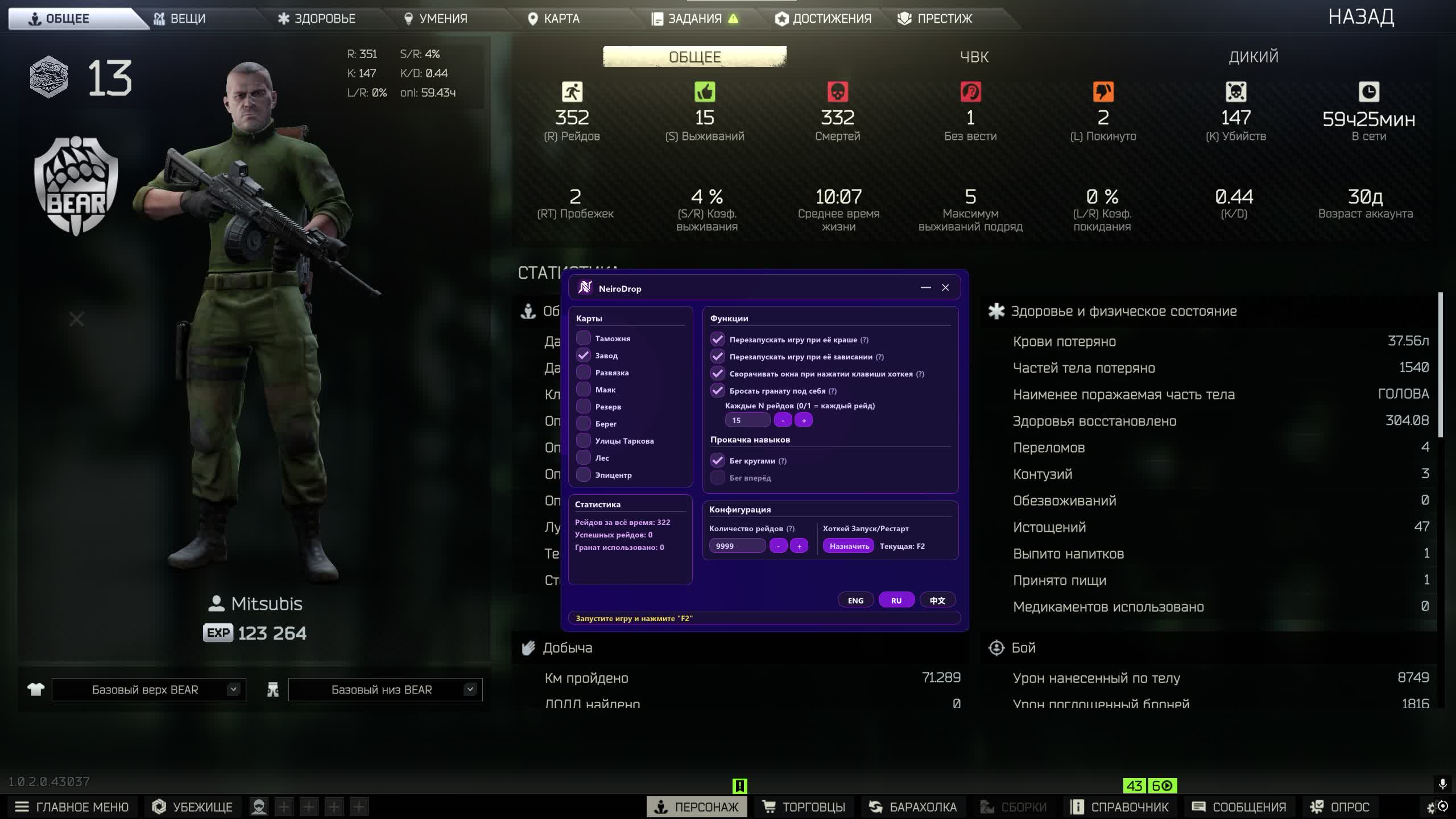
Dropping KD by hand is a pain. You load into a raid, die, leave. Over and over, for hours. It's boring, slow, and steals time from actually playing. NeiroDrop automates the grind. The bot grabs a grenade, loads into the map, and blows itself up. Hundreds of deaths a night while you sleep. In the morning your stats are back to normal and the account looks clean. The neural net reads the interface without being tied to pixels, so patches and resolution changes don't break it. Try to hold the line around a KD of 3, it will keep your account safe.

Product features

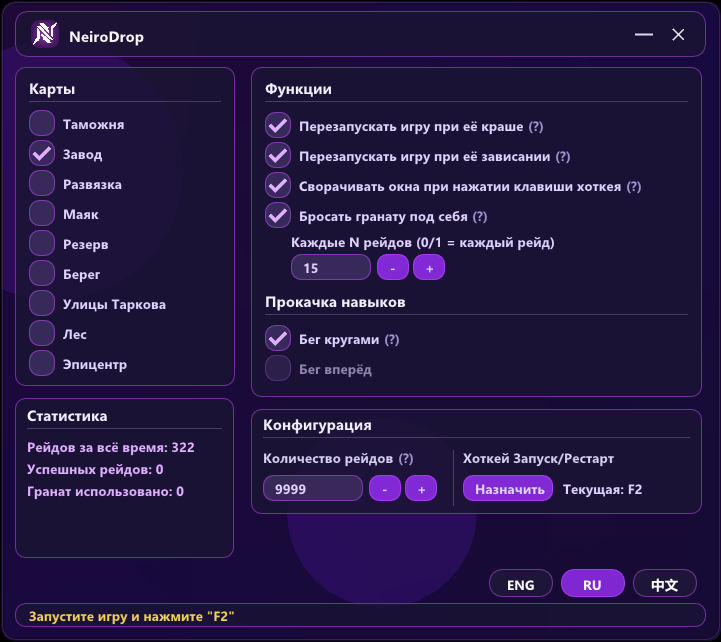
Automatic stat dropping

Auto-launch raids

The bot starts the search itself, loads into a raid and dies, the cycle repeats

Auto-grenade

Pulls a grenade from the stash and blows up the character for a quick death

Map selection

Specific locations or random, the bot rotates them to look natural

Death interval

How often it dumps stats: every raid or after a set number

Leveling mode

Running between deaths, so endurance levels up at the same time

Neural network recognition

Image analysis

Sees the screen like a human, finds buttons by shape, not by pixels

Any resolution

Works on any screen, you can change the settings right in the game

Patch resistance

Graphics updates don't break recognition, the model adapts

Hands-off operation

Smart restart

Crash or freeze, the bot restarts the game itself and keeps going

Launch in 2 clicks

Key, button, start, the rest runs without you

Runs unattended

Set it overnight, in the morning your stats are dumped

Control and stats

Raid counter

How many deaths per session

Grenade counter

Grenade usage for planning your supplies

Activity log

Detailed info on every action the bot takes

Known issues & fixes

Real questions from our support, with the fixes that worked. Based on user requests for this product.

Loader flashes briefly and disappears on startup — Windows security driver conflict

This is a common issue caused by Windows driver security components. Follow these steps:

  • Download the Sordum utility (archive password: sordum), run it, click Search, and wait for it to finish.
  • Apply the win_driver_OFF.reg file provided by support — it disables Windows driver signature enforcement. Reboot your PC afterwards.
  • Make sure User Account Control (UAC) is disabled — the loader handles this automatically, but verify it manually if needed.
  • If the issue persists, run sc query vgk, sc query faceit, sc query wdfilter in CMD and send a screenshot to support.
Loader connection error or infinite loading on startup — VPN or Network Manager required

Loader connection errors are usually caused by ISP-level blocking. Try the following steps:

  • Enable a VPN (any country), launch the loader and click Inject. Once injected successfully, disable the VPN before starting the game.
  • If VPN does not help: download the networkmanager.zip utility, run it, select «Find Best IP» and click Apply. Then try launching the loader again.
System freezes and mouse barely moves when entering the key in the loader

System freeze when entering the key is usually caused by HDR or antivirus conflicts. Do the following in order:

  • Disable HDR in Windows display settings.
  • Disable Windows Defender and make sure any third-party antivirus (e.g. Kaspersky) is fully uninstalled.
  • Run the Sordum utility to disable system security drivers, then reboot your PC.
Loader crashes or throws errors on startup — antivirus or Vanguard interfering

The most common cause is third-party antivirus or security software blocking the loader. Completely uninstall 360 Total Security, Vanguard (Valorant anti-cheat — must be uninstalled, not just disabled), and any other third-party antivirus.

After removal: download the Sordum utility (archive password — sordum), run it, click Search, and wait for it to finish. Then reboot your PC and try launching the loader again.

If errors persist, send a screenshot of your installed programs list to support. As a last resort, a clean Windows reinstall resolves the issue.

Loader keeps asking to reboot the PC — stuck in a reboot loop

Run a system file repair: open Command Prompt as Administrator and execute two commands — first DISM /Online /Cleanup-Image /RestoreHealth, then sfc /scannow. After that, make sure Fast Boot is disabled in BIOS/UEFI, then reboot.

If the issue persists, a clean Windows reinstall is required. Use the Pro edition only — Home versions may lack required components for the loader to function correctly.

All issues & general troubleshooting
TARIFFS
300
BUY What happens after payment?
Got a question? Ask before you pay

We'll help you choose and sort out any launch issue. Ask us anything before buying, we're always on your side.

Support 10:00–22:00, sometimes we reply at night too
Ask a question
Update history
  • 11.04.2026 Working
    Received an update
  • 24.03.2026 Working
    Received an update
  • 09.03.2026 Working
    Updated, time unfrozen

Available tariffs

7 days
300
START PURCHASE
7 days
600
START PURCHASE
30 days
1200
START PURCHASE
Reviews about KD Droper Neural Net EFT
16 sales on Digiseller No text reviews yet — be the first to leave one.

Your review

Reviews are published after moderation.

Join our gaming community chat

Discuss current cheats from developers and how to use them effectively in popular online games. Share tactics, exchange useful info and find like-minded players in our community.

1 900+Members
24/7Online
Join our gaming community chat

Technical support

Run into a technical issue? Our team of experts will help. We handle all requests in a live queue, so please be understanding if it sometimes takes a little wait. We guarantee that no request goes unanswered.

Availabilityfrom 10:00 to 23:00
Fast responseIn queue order
Get help
Technical support
PROCHEAT

PROCHEAT news channel

Follow product status changes, update history and important announcements.

Subscribe

Why drop your KD after running cheats

The Tarkov anti-cheat doesn't just look at memory. Your stats are the second line of defense. A KD of 12 on an account with 200 hours? Suspicious. An 80% headshot rate? Another flag. Reports from the players you killed pile up, and the account gets pulled for manual review. Dropping your KD down to 2-3 clears the anomalies out of your stats. The numbers look natural and there's no reason to check you. From what PROCHEAT customers have seen, regular dropping between cheat sessions makes accounts last far longer.

Automation instead of manual grinding

Dropping KD by hand is torture. Load in, die, leave. Repeat three hundred times. A whole evening gone to dull busywork. NeiroDrop does it for you while you sleep or handle other things. Start it before bed and your KD is back to normal by morning. The neural net never gets tired, never slips up, never forgets to grab a grenade. Hundreds of raids a night without a single click. Your time is freed up for actually playing while your stats get sorted in the background.

Neural net versus pixel scripts

Free droppers are tied to coordinates. Change the resolution and the script loses the buttons. A patch ships with a new interface and you're rewriting the code. NeiroDrop works differently. The neural net analyzes the whole image and looks for elements by shape and context. The "Ready" button gets recognized no matter where it sits or what color it is. Set it up once and it runs for months with no touching. The software also doesn't break on game updates, so while other tools are stuck updating, you can keep dropping KD.

Natural-looking stats

The dropping has to look organic. A hundred deaths in a row on the same map is suspicious too. NeiroDrop randomizes the behavior: different maps, different intervals between deaths. Leveling mode adds "live" raids, where the character runs around, builds endurance, then dies. The stats end up looking like a bad but active player. Not a bot, not a cheater, just an ordinary newbie with clumsy hands.

Running unattended all night

The main value is autonomy. Game crashed? The bot restarts it. Server dropped the connection? It logs back in. Map stuck loading? It restarts. NeiroDrop watches the state and reacts to any problem. Eight hours of sleep, eight hours of dropping KD. In the morning you open your stats and see the result. No babysitting, no waking up at three in the morning to check on it.

Latest updates

11.04.2026 15:28
Working
Received an update
24.03.2026 18:31
Working
Received an update
09.03.2026 14:17
Working
Updated, time unfrozen
Open full history
Ask a question


